None of these messages were typed by a human sitting at a keyboard, waiting for you to act. They were sent by an autoresponder.
An autoresponder is software that automatically sends a pre-written email — or a series of emails — when a specific trigger event occurs. The trigger can be a subscription, a purchase, a form submission, a date on the calendar, or any action a user takes. Once configured, the system replies instantly and runs without manual intervention, delivering the right message at the moment it matters most.
What Is an Autoresponder?
The Core Definition
An autoresponder is a program or cloud-based service that sends pre-written email messages automatically in response to a defined trigger. The trigger is an action taken by a user — signing up for a list, completing a purchase, clicking a link, or reaching a specific date relative to when they joined. The message can be a single reply or the first step in a multi-message sequence that unfolds over hours, days, or weeks.
The term “autoresponder” originally described simple out-of-office email replies — a single message sent once when someone emailed an address. That use case still exists, but modern autoresponders are far more capable. They now power welcome sequences, abandoned cart reminders, post-purchase follow-ups, re-engagement campaigns, and entire educational email courses, all running on conditional logic that adapts to subscriber behavior.
How It Differs from Broadcast Emails
The distinction between an autoresponder and a broadcast email is fundamental to planning any email strategy.
| Feature | Autoresponder | Broadcast Email |
|---|
| Trigger | Individual user action (sign-up, purchase, click) | Manual send by the marketer |
| Timing | Sent relative to each subscriber’s own timeline | Sent to everyone at the same moment |
| Setup | Configured once, runs continuously | Created and scheduled per send |
| Personalization | Can reference the specific trigger event | Typically one-size-fits-all |
| Examples | Welcome sequence, cart recovery, onboarding drip | Newsletter, product launch announcement, flash sale |
A broadcast goes to your entire list at once — you write it, schedule it, and everyone receives it simultaneously. An autoresponder is tied to each subscriber’s individual journey: someone who signs up today starts receiving your welcome sequence today; someone who signs up next month starts the same sequence then. This makes autoresponders a “set once, benefit continuously” tool, while broadcasts demand ongoing content creation.
The Core Definition
An autoresponder is a program or cloud-based service that sends pre-written email messages automatically in response to a defined trigger. The trigger is an action taken by a user — signing up for a list, completing a purchase, clicking a link, or reaching a specific date relative to when they joined. The message can be a single reply or the first step in a multi-message sequence that unfolds over hours, days, or weeks.
The term “autoresponder” originally described simple out-of-office email replies — a single message sent once when someone emailed an address. That use case still exists, but modern autoresponders are far more capable. They now power welcome sequences, abandoned cart reminders, post-purchase follow-ups, re-engagement campaigns, and entire educational email courses, all running on conditional logic that adapts to subscriber behavior.
How It Differs from Broadcast Emails
The distinction between an autoresponder and a broadcast email is fundamental to planning any email strategy.
| Feature | Autoresponder | Broadcast Email |
|---|
| Trigger | Individual user action (sign-up, purchase, click) | Manual send by the marketer |
| Timing | Sent relative to each subscriber’s own timeline | Sent to everyone at the same moment |
| Setup | Configured once, runs continuously | Created and scheduled per send |
| Personalization | Can reference the specific trigger event | Typically one-size-fits-all |
| Examples | Welcome sequence, cart recovery, onboarding drip | Newsletter, product launch announcement, flash sale |
A broadcast goes to your entire list at once — you write it, schedule it, and everyone receives it simultaneously. An autoresponder is tied to each subscriber’s individual journey: someone who signs up today starts receiving your welcome sequence today; someone who signs up next month starts the same sequence then. This makes autoresponders a “set once, benefit continuously” tool, while broadcasts demand ongoing content creation.
Launch your affiliate program today
Set up advanced tracking in minutes. No credit card required.
How Does an Autoresponder Work?
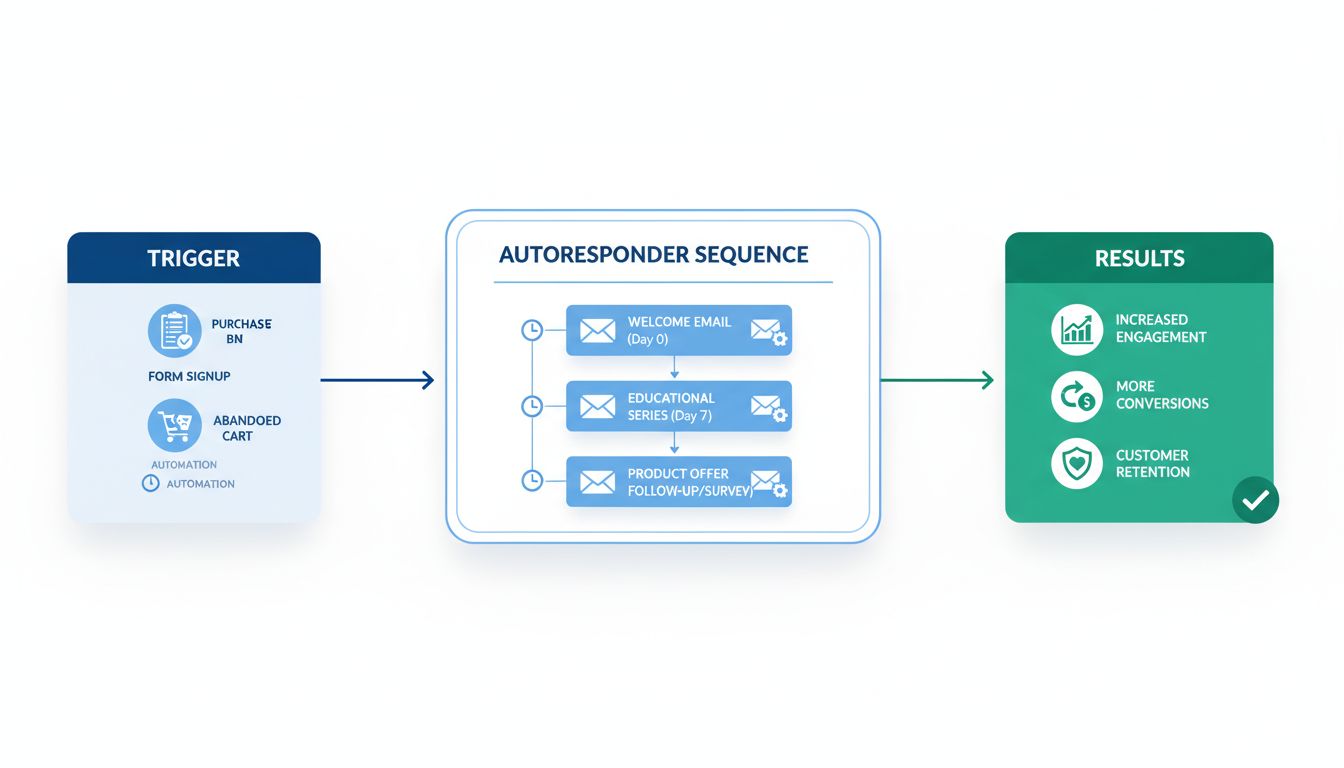
Every autoresponder relies on two components: a trigger and a message (or message sequence). The trigger defines when the system acts; the message defines what it sends.
Triggers — The Events That Start the Sequence
A trigger is any action or condition the software monitors. Common triggers include:
- Subscription events — a user joins an email list or opts into a specific communication.
- Transactional events — a purchase is completed, a payment is processed, or a subscription renews.
- Behavioral events — a user visits a specific page, clicks a link, abandons a cart, or downloads a file.
- Date-based events — a birthday, an anniversary, or a set number of days since the last interaction.
- Inactivity thresholds — a subscriber hasn’t opened or clicked any email in a defined period.
Modern email marketing platforms let you layer conditions on top of triggers. For example: “Send this email only if the subscriber clicked Link A in the previous message, but not if they already purchased Product B.” This branching logic means different subscribers receive different messages based on what they actually do — not just what you predicted they would do.
Messages and Sequences
The simplest autoresponder sends a single message in reply to a single trigger. An out-of-office reply is the classic example: one trigger (an incoming email), one message (“I’m away until Monday”).
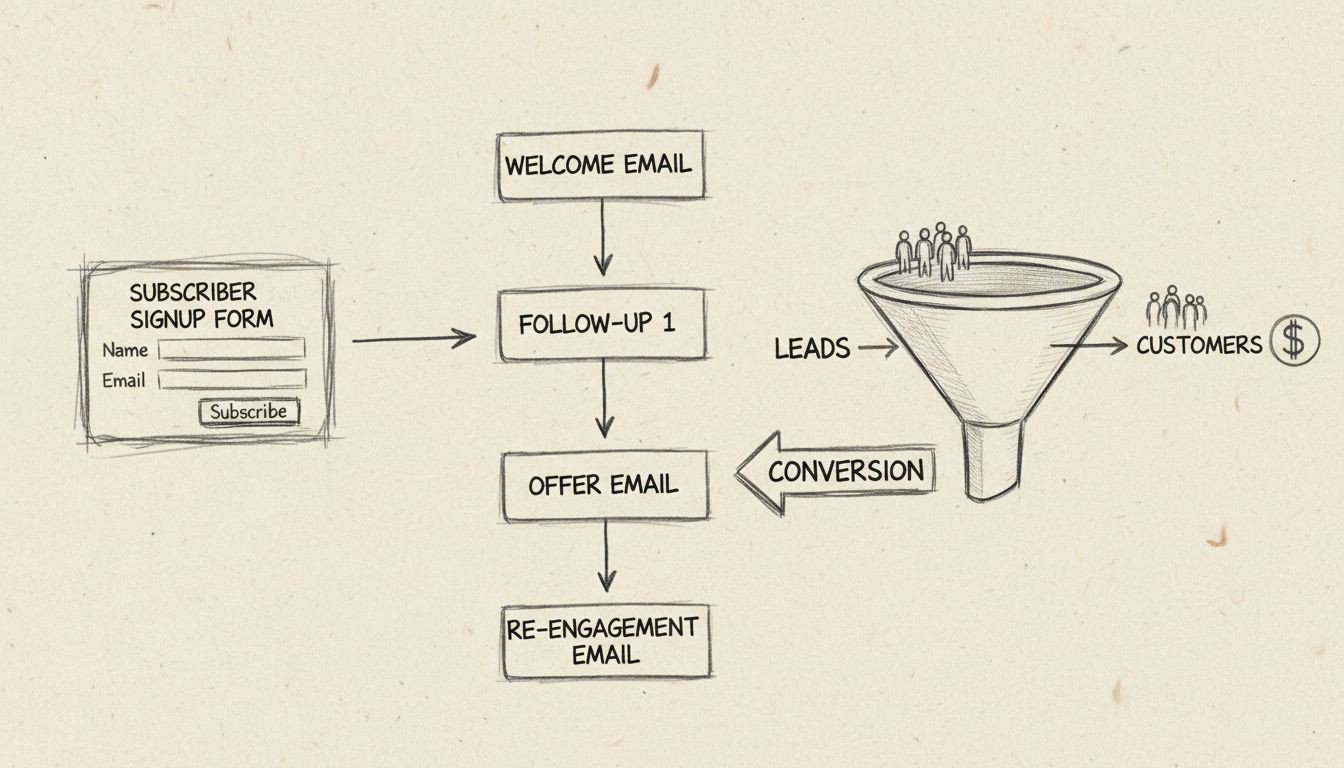
A more advanced setup uses an autoresponder sequence — a chain of messages sent at predetermined intervals. A typical welcome sequence might look like this:
- Day 0 (immediately): Welcome message with the promised lead magnet or discount code.
- Day 2: Introduction to the brand story or best-performing content.
- Day 5: Social proof — a case study, testimonial, or review.
- Day 8: Soft sales pitch or product recommendation.
- Day 14: Check-in — ask what they think, invite a reply.
Each message in the sequence can include conditional splits. If a subscriber clicks through and buys on Day 5, the sequence can branch them into a post-purchase track instead of continuing with the pre-sale content.
Timing and Delivery
Autoresponder messages can be sent instantly when the trigger fires, or after a delay measured in minutes, hours, or days. Most platforms also let you restrict delivery to specific days of the week and time windows — for instance, sending only on weekdays between 9 a.m. and 5 p.m. in the recipient’s time zone.
The timing you choose affects engagement. A re-engagement email sent after 90 days of inactivity strikes a balance between giving subscribers space and catching them before they forget you entirely. There is no universal best time — it depends on your audience, your offer, and the trigger itself.
Common Autoresponder Examples
Autoresponders power a wide range of email workflows.
Welcome Emails
A welcome email is the message a new subscriber receives the moment they join your list.
A strong welcome email does three things: it delivers whatever was promised (a download link, a discount code), it sets expectations for future communication (how often, what about), and it starts the relationship with a human tone. The welcome email is often the first step in a longer welcome sequence that introduces the brand over several days.
Out-of-Office and Confirmation Replies
The simplest form of autoresponder is the out-of-office reply — a single message sent automatically when someone emails an address, letting them know the recipient is unavailable and when they will return. Gmail, Outlook, and virtually every email provider include this feature, usually labeled “vacation responder” or “automatic reply.”
Confirmation emails are another single-message use case: an order confirmation, a form-submission acknowledgment, or a support-ticket receipt. These messages confirm that the user’s action was received and set expectations for what happens next.
Abandoned Cart and Post-Purchase Follow-Ups
Abandoned cart autoresponders recover revenue by reminding shoppers about items they left behind. A typical cart recovery sequence sends the first reminder within an hour, a second after 24 hours (perhaps with a small incentive), and a third after 48–72 hours.
Post-purchase autoresponders continue the relationship after the sale: a thank-you message, a shipping confirmation, a product-use tip delivered a few days later, and a review request after enough time has passed for the customer to form an opinion. These messages turn one-time buyers into repeat customers by staying useful after the transaction.
Lead Nurturing and Educational Sequences
An educational autoresponder delivers value over time without asking for anything in return — at least not immediately. A five-part email course, a series of weekly tips, or an onboarding guide for new users all fit this pattern. The goal is to build trust and demonstrate expertise so that when a sales message does arrive, the recipient is primed to act.
Lead nurturing sequences in a B2B context might span weeks or months, gradually moving a prospect from awareness to consideration to decision. Each message addresses a specific objection or question that prospects typically have at that stage.
Join our newsletter
Be the first to know about new features and product updates.
Autoresponders in Affiliate Marketing
Affiliate marketing depends on timely, relevant communication between advertisers, publishers, and the program managers who connect them. Autoresponders handle much of that communication automatically, at scale.
For Advertisers
Advertisers — the businesses that run affiliate programs — use autoresponders to manage their relationships with affiliates. Common workflows include:
- Affiliate onboarding sequences. When a new affiliate joins a program, an autoresponder delivers their login credentials, explains commission structures, shares brand guidelines, and points them toward approved creative assets. A well-designed onboarding sequence reduces the support burden and gets affiliates promoting faster.
- Promotional material distribution. When a new product launches or a seasonal promotion goes live, an autoresponder can push updated banners, email copy, and social media assets to the entire affiliate base automatically.
- Commission and performance notifications. Transactional autoresponders confirm when a commission is earned, when a payout is processed, or when an affiliate reaches a new performance tier. These messages build trust and keep affiliates engaged.
For Publishers
Publishers — the affiliates who promote products — use autoresponders to build and monetize their audiences:
- Welcome sequences for new subscribers. A publisher’s email list is their most valuable asset. An autoresponder welcome sequence introduces the publisher’s voice, delivers a lead magnet, and begins recommending relevant affiliate products — not all at once, but spread across a sequence that prioritizes value first and offers second.
- Product recommendation drips. A publisher reviewing multiple products in a niche can set up an autoresponder sequence that covers one product per message, each with an affiliate link. This turns a single sign-up into multiple touchpoints and multiple opportunities to earn commissions.
- Behavioral follow-ups. If a subscriber clicks a product link but doesn’t purchase, a follow-up autoresponder can address common objections or offer a comparison with alternatives — again, all automated.
For Affiliate Program Managers
Program managers sit between advertisers and publishers, and autoresponders help them scale their efforts:
- Re-engagement campaigns for inactive affiliates. Many affiliates join a program and never promote it. An autoresponder sequence can check in after 30, 60, and 90 days of inactivity with tips, success stories, or offers of support to bring them back.
- Performance tips and best practices. A monthly autoresponder can share top-performing creatives, conversion data, and seasonal opportunities with active affiliates, helping them earn more — and generating more revenue for the program.
- Policy and compliance updates. When terms change or a compliance issue arises, an autoresponder ensures every affiliate receives the update without manual outreach.
Not all autoresponder software is built for the same use case. Choosing the right one means matching features to your specific needs.
Key Features to Look For
When evaluating an autoresponder platform, prioritize these capabilities:
- Trigger flexibility. Can the platform fire messages based on subscriptions, purchases, link clicks, page visits, tags, and custom events — not just one or two of these?
- Segmentation and conditional logic. Can you branch sequences based on subscriber behavior, or is every subscriber locked into the same linear path?
- Deliverability track record. Does the platform publish deliverability rates, and do independent tests confirm them? A message that lands in spam was never sent at all.
- Analytics and reporting. Can you see open rates, click rates, conversions, and revenue per message — and can you break that data down by segment?
- Integration ecosystem. Does the platform connect natively with your ecommerce platform, CRM, affiliate management software, and any other tools in your stack?
- Pricing transparency. Are costs predictable at your list size, or do they spike unpredictably as you grow?
Free vs Paid Options
Free autoresponder options exist, but they come with meaningful limitations.
- Gmail’s vacation responder is a built-in autoresponder that sends a single reply to incoming emails. It works for simple out-of-office messages but cannot handle sequences, segmentation, or behavioral triggers. It is not an email marketing tool.
These are viable starting points for publishers and small advertisers testing the waters.
- Paid platforms — ActiveCampaign, GetResponse, ConvertKit, Drip — unlock advanced automation, deeper segmentation, and higher sending volumes. For affiliate marketers managing serious lists, the investment pays for itself through recovered carts and nurtured leads.
When Not to Use an Autoresponder
Autoresponders are powerful, but they are not the right tool for every situation.
- Time-sensitive, one-off announcements belong in a broadcast, not an autoresponder. If the message is irrelevant 48 hours from now, don’t tie it to a trigger that could fire next month.
- Highly personalized, context-dependent replies — such as responding to a specific customer complaint — should come from a human. An autoresponder that fires a generic “We received your message” reply to an angry customer often makes the situation worse.
- Over-automation risks alienating subscribers. If every action a subscriber takes triggers another email, the experience feels surveilled rather than helpful. Use autoresponders for high-value touchpoints, not for every possible interaction.
- Regulatory compliance is non-negotiable. In the US, CAN-SPAM requires that every commercial email include an unsubscribe mechanism and accurate sender information. An autoresponder that fires without proper opt-in can create legal exposure.
How to Set Up an Autoresponder
While the exact steps vary by platform, the general process for creating an autoresponder follows a consistent pattern:
- Define your goal. Decide what the sequence should achieve — welcome new subscribers, recover abandoned carts, nurture leads, or re-engage inactive users. The goal determines the trigger, the number of messages, and the content.
- Choose your trigger. In your email platform, select the event that starts the sequence: a form submission, a tag being applied, a purchase, a date, or a custom event.
- Write the first message. Craft the email that fires when the trigger activates. Include the promised value, set expectations, and make the next step clear.
- Add follow-up messages. Build out the sequence with additional emails at your chosen intervals. Each message should have a distinct purpose — don’t send three emails that all say the same thing.
- Configure timing and delivery windows. Set delays between messages and restrict sending to specific days and times if needed.
- Test the sequence end to end. Subscribe a test address and confirm that every message arrives at the right time, with the correct content, and that links and personalization fields work.
- Activate and monitor. Turn the autoresponder on and review performance data after the first week. Adjust subject lines, timing, or content based on what the data shows.