


How Do Web Crawlers Work? Complete Technical Guide
Learn how web crawlers work, from seed URLs to indexing. Understand the technical process, crawler types, robots.txt rules, and how crawlers impact SEO and affi...
9 min read
A search engine crawler is an automated software program — also called a bot, spider, or spiderbot — that systematically browses the World Wide Web, downloads page content, and follows hyperlinks to discover new or updated URLs.
A search engine crawler is an automated software program — also called a bot, spider, or spiderbot — that systematically browses the World Wide Web, downloads page content, and follows hyperlinks to discover new or updated URLs. Its core job is to feed a search engine’s index with fresh data so that when someone types a query, the engine can return relevant, current results. Without crawlers, a search engine has no way to know a page exists at all.
The crawler itself does not rank anything. It discovers and hands off what it finds — text, links, metadata, images — to a separate indexing and ranking system. Crawling, indexing, and ranking are three distinct stages. A page can be crawled and still never appear in search results if it fails to meet the engine’s quality thresholds during indexing.
Google’s crawler documentation distinguishes its common crawlers, special-case crawlers, and user-triggered fetchers. Check the documented identity and behavior of the relevant crawler when investigating access problems.
On this page
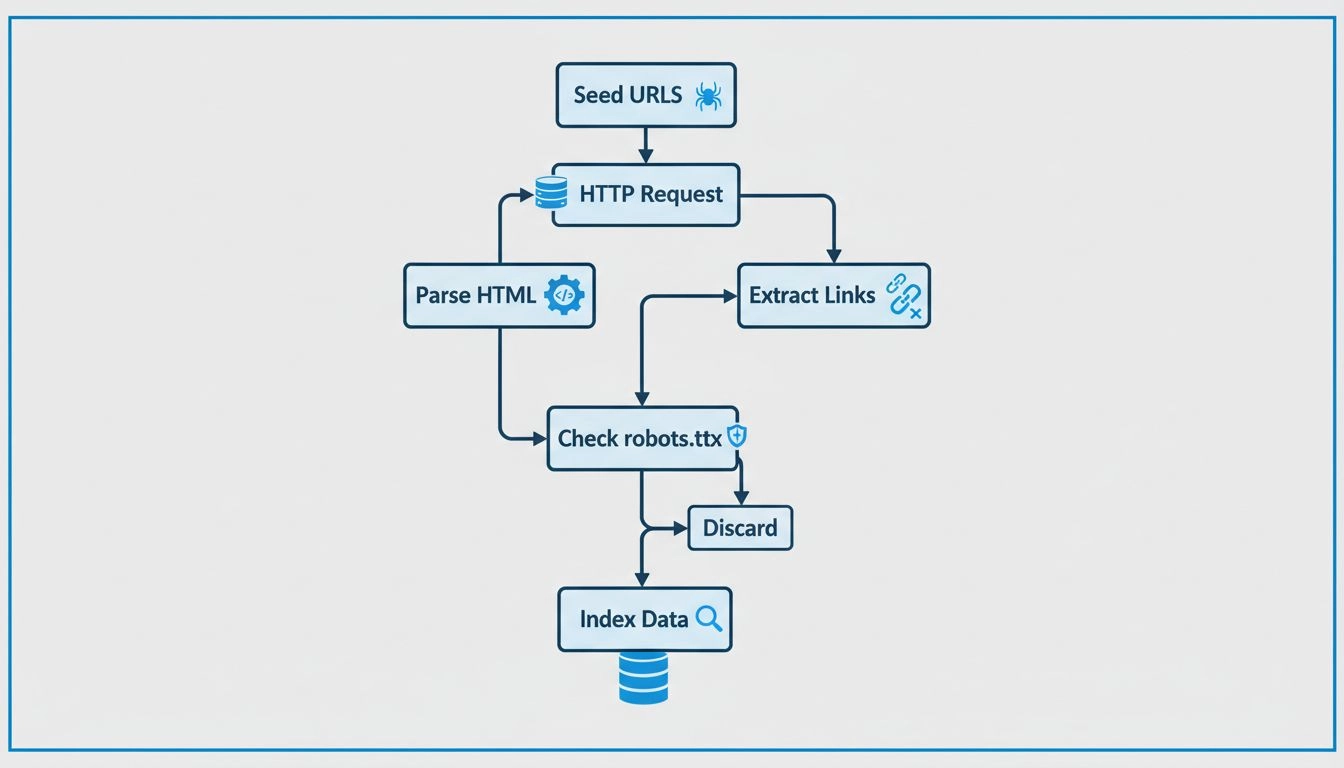
A web crawler operates in a continuous loop built around a few core steps. Understanding these steps helps website owners diagnose why pages may not appear in search results — the problem is often at the crawling stage, long before ranking is even considered.
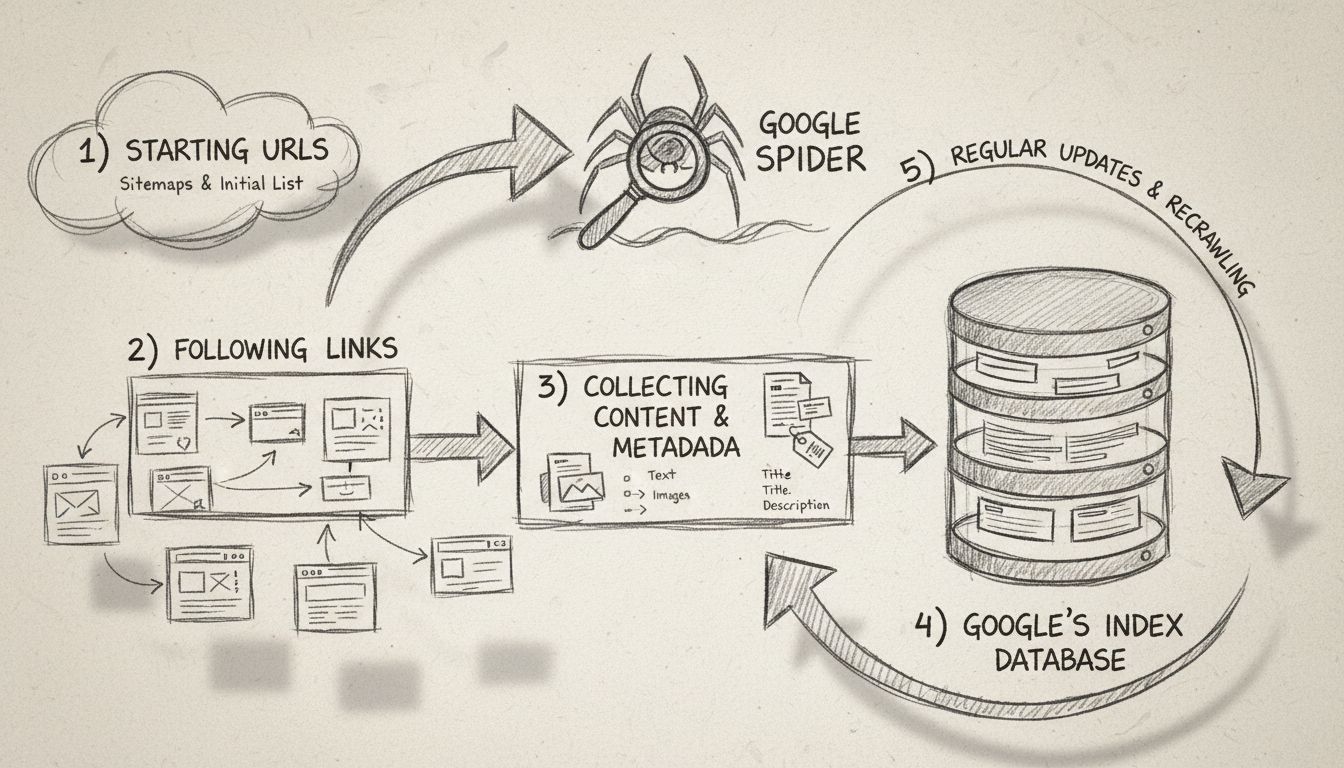
Every crawler starts with a set of known URLs called seed URLs. These might come from previously crawled pages, submitted sitemaps, or hand-picked starting points. The crawler downloads each seed page, extracts every hyperlink it finds, and adds any link it has not seen before to a running queue called the crawl frontier.
The cycle then repeats:
This loop never truly ends. The web changes constantly, and new pages appear every second, so a crawler simply works through whatever is next in the queue, revisiting old pages to check for changes and adding newly discovered URLs.
Once a crawler fetches a page, it renders the content — reading the HTML, executing JavaScript where possible, and extracting the text, images, metadata, and structured data. It then downloads this information and passes it to the search engine’s indexer.
Not every crawler handles JavaScript equally well. Googlebot renders JavaScript and waits for dynamically loaded content, but smaller search engine crawlers may only read static HTML. This is why sites built entirely with client-side JavaScript frameworks can be invisible to some search engines unless server-side rendering is in place.
Crawlers discover new pages through two primary channels:

Set up advanced tracking in minutes. No credit card required.
Crawlers do not treat all pages equally. They operate under a set of crawl policies that determine which pages to visit, in what order, and how often to return.
A crawler must decide which URLs to prioritize from its crawl frontier. Common signals include:
How often a crawler returns to a page depends on how frequently that page changes. A news homepage might be crawled every few minutes. A static “About Us” page might be revisited once every few months. Webmasters can signal change frequency through XML sitemap <changefreq> tags, though search engines treat these as hints, not commands.
Crawlers are programmed to avoid overwhelming web servers. They respect a crawl rate limit — the maximum number of requests they will send to a single site in a given period. If a server responds with HTTP errors like 500 or 503, the crawler backs off to avoid making the problem worse. This is part of what makes crawling at scale a genuine engineering challenge.
The robots.txt file is a plain-text document placed at the root of a domain that tells crawlers which URLs they may and may not request. It is the single most important tool for managing crawler access. A robots.txt entry might look like this:
User-agent: Googlebot
Disallow: /private/
Allow: /public/
/private/ but allows everything under /public/. Other crawlers check the same file and follow their own User-agent directives. It is worth noting that robots.txt is a voluntary protocol — well-behaved crawlers obey it, but malicious bots may ignore it entirely.Crawl budget is the number of pages a search engine will crawl on a site within a given timeframe. It is determined by two factors:
For small sites, crawl budget is rarely a concern. For large ecommerce platforms or content sites with millions of URLs, managing crawl budget becomes essential — wasted crawls on duplicate content, faceted navigation parameters, or low-value pages mean fewer resources for the pages that matter.
Every major search engine operates its own crawler with a distinct user-agent string — an identifier the bot sends with each HTTP request so servers know which crawler is visiting.
| Search Engine | Crawler Name | User-Agent Identifier | Purpose |
|---|---|---|---|
| Googlebot | Googlebot/2.1 | Crawls and indexes web pages for Google Search and other Google services | |
| Bing | Bingbot | Mozilla/5.0 (compatible; bingbot/2.0) | Crawls and indexes pages for Microsoft Bing |
| DuckDuckGo | DuckDuckBot | DuckDuckBot/1.0 | Crawls pages for DuckDuckGo’s search results |
| Yandex | YandexBot | Mozilla/5.0 (compatible; YandexBot/3.0) | Crawls pages for Yandex Search (dominant in Russia) |
| Baidu | Baiduspider | Mozilla/5.0 (compatible; Baiduspider/2.0) | Crawls pages for Baidu Search (dominant in China) |
| Apple | Applebot | Applebot/1.0 | Crawls pages for Spotlight Search and Siri suggestions |
Google also operates specialized crawlers for different content types — Googlebot Image crawls images, Googlebot Video handles video content, Googlebot News targets news articles, and AdsBot checks landing page quality for Google Ads.
Be the first to know about new features and product updates.
Identifying whether a visitor is genuinely Googlebot requires more than checking a user-agent string, since those strings can be spoofed. To verify a Google crawler:
Googlebot.googlebot.com or google.com domain.Google provides official documentation listing its IP ranges at google.com/bot.html. Any visitor claiming to be Googlebot that fails these verification steps is a spoofed bot and should be treated as suspicious.
Yes — but with limits. Major search engines operate dedicated crawlers for non-text content:
VideoObject schema to understand title, description, thumbnail, and duration.However, crawlers cannot “see” images the way a human does or “watch” a video. They rely entirely on text signals — filenames, alt attributes, captions, surrounding body text, and structured data — to determine relevance. Content locked behind login walls, paywalls, or embedded in complex JavaScript players may not be crawled at all.
These terms are often used interchangeably, but they describe different things:
| Aspect | Web Crawler | Web Scraper |
|---|---|---|
| Purpose | Discover and index URLs across the entire web | Extract specific data from targeted pages |
| Scope | Broad — follows links everywhere | Narrow — targets known URLs or domains |
| Output | Feeds a search index | Produces structured data (CSV, database, spreadsheet) |
| Typical operator | Search engines (Google, Bing) | Businesses, researchers, data analysts |
| Respects robots.txt | Yes (legitimate crawlers) | Varies — many scrapers ignore it |
| Examples | Googlebot, Bingbot | Price monitoring tools, lead-generation scrapers, AI training data collectors |
Search engines find new pages through several channels:
The fastest path to getting a new page crawled is submitting its URL directly through Search Console and ensuring it is linked from an already-indexed page on the same site.
There is no fixed schedule. Revisit frequency depends on:
Site owners can influence revisit frequency by publishing content regularly, maintaining fast server response times, and submitting updated sitemaps. But ultimately, the crawler decides its own schedule based on the signals it observes.
Crawlers generally cannot access:
A crawler sees only what is publicly accessible and linked. If a page requires authentication or user interaction to render, it is effectively invisible to search engines — unless the site owner explicitly grants access or provides an alternative path, such as a sitemap listing the URL combined with structured data that describes the content.
Building a crawler that works for a few hundred pages is straightforward. Building one that works for billions is a different problem entirely. Common failure points include:
For most businesses, running a large-scale web crawler is not practical without managed infrastructure. The decision usually comes down to using an existing tool rather than building from scratch.
In the United States, web crawling publicly accessible pages is generally legal. Several court rulings — including *hiQ Labs v.
However, legality depends on several factors:
The distinction between crawling for search indexing (widely accepted) and scraping for commercial data extraction (more legally contested) matters. Most legitimate search engine crawlers operate in clearly legal territory.
No — ChatGPT itself is not a web crawler. ChatGPT is a conversational AI model that generates responses. However, OpenAI does operate a separate web crawler called GPTBot, which crawls public web pages to collect training data for AI models and to support live retrieval features in some OpenAI products.
GPTBot identifies itself with the user-agent token GPTBot and respects robots.txt directives. Site owners who wish to block GPTBot specifically can add the following to their robots.txt file:
User-agent: GPTBot
Disallow: /
Search engine crawlers directly affect everyone in the affiliate marketing ecosystem. If a page is not crawled, it does not rank, and if it does not rank, it generates no organic traffic — and no affiliate revenue.
A publisher’s content site lives or dies by crawlability. Every product review, comparison guide, or deal roundup must be discoverable by crawlers. Common publisher mistakes that block crawling include:
Publishers should verify that their most valuable pages appear in Google Search Console’s index coverage report and that no noindex tags or robots.txt rules block them unintentionally.
An advertiser running an affiliate program needs their product pages crawled and indexed so that publishers can link to live, visible pages. If a merchant’s product pages are not in Google’s index, publishers have nowhere to send traffic. Specific risks include:
Merchants should maintain clean URL structures, submit product sitemaps, and monitor crawl stats in Search Console to catch issues before they affect publisher partners.
Program managers sit between merchants and publishers and should understand crawler behavior to troubleshoot visibility problems. When a publisher reports that a merchant’s product page “does not show up in Google,” the issue is often a crawling or indexing problem — not a ranking one. Practical steps include:
site: search operator.A program manager who can diagnose basic crawl issues adds direct value to both sides of the affiliate relationship — helping merchants fix technical problems and helping publishers confirm that the pages they promote are findable.
Learn how understanding and optimizing for crawlers can boost your website’s visibility and search engine ranking.
Learn how web crawlers work, from seed URLs to indexing. Understand the technical process, crawler types, robots.txt rules, and how crawlers impact SEO and affi...
A search engine spider is an automated bot that crawls web pages to index content for search engines like Google and Bing. Learn how they work.
Learn what Google Spider (Googlebot) is, how it crawls and indexes websites, and why it's essential for SEO. Discover how to optimize your site for better crawl...
Join our community of happy clients and provide excellent customer support with Post Affiliate Pro.




Cookie Consent
We use cookies to enhance your browsing experience and analyze our traffic. See our privacy policy.