


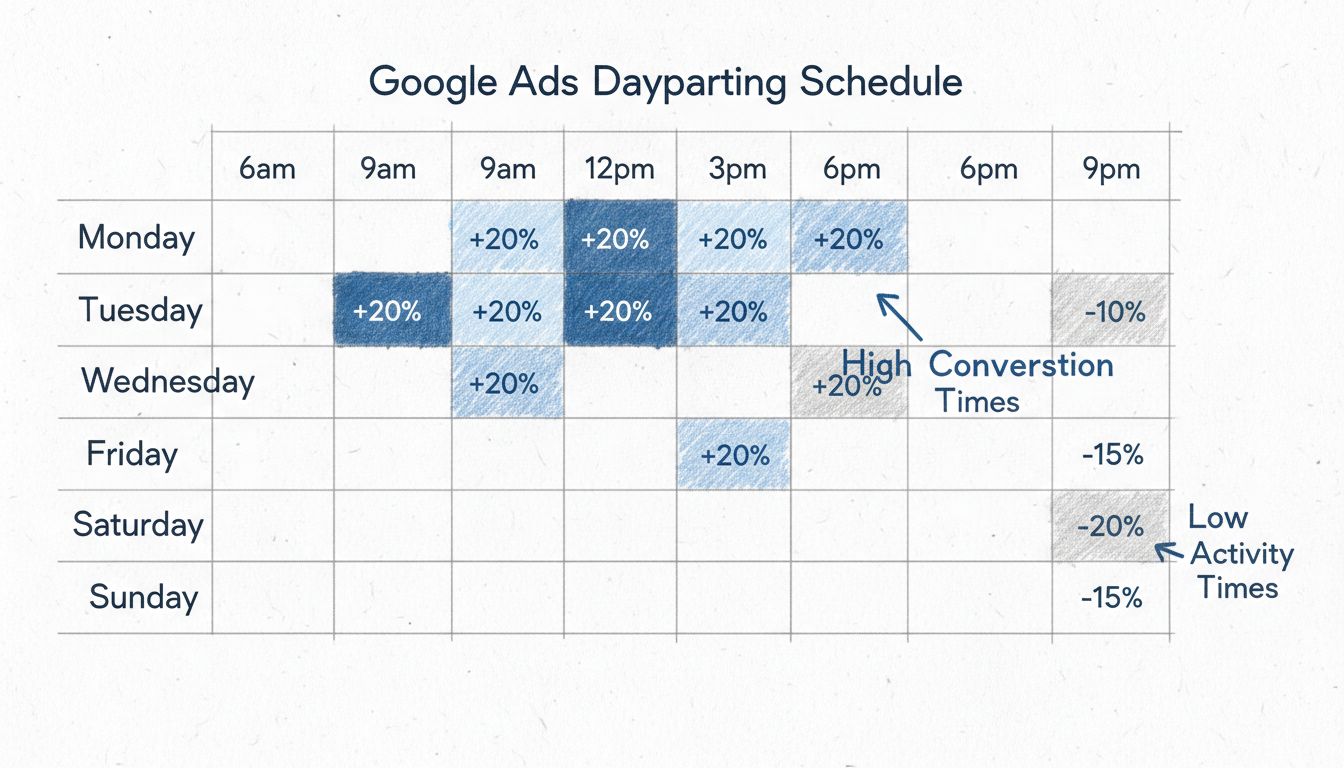
How to Set Up Dayparting on Google Ads
Learn how to set up dayparting in Google Ads to optimize ad scheduling, improve targeting, and maximize ROI. Step-by-step guide with bid adjustment strategies.
8 min read
Dayparting is an ad scheduling strategy that divides the day — and often the week — into specific time segments, then runs or adjusts ad campaigns differently within each segment.
On this page
Dayparting is an ad scheduling strategy that divides the day — and often the week — into specific time segments, then runs or adjusts ad campaigns differently within each segment. An advertiser using dayparting does not let campaigns spend uniformly across 24 hours. Instead, they concentrate budget into the hours and days their data indicates will produce the best results.
The term is sometimes written as day parting. In practice it is synonymous with ad scheduling on platforms like Google Ads and Facebook Ads.
A straightforward example: a pizza restaurant runs search ads aggressively from 11 a.m. to 2 p.m. and 5 p.m. to 9 p.m., then pauses them between 10 p.m. and 8 a.m. when the kitchen is closed and nobody is ordering. The restaurant’s budget is spent where it matters.

Set up advanced tracking in minutes. No credit card required.
Dayparting originated in broadcast programming. Radio and television networks divided the broadcast day into several dayparts — each with distinct audience demographics and advertising rates:
| Daypart | Typical Hours | Audience Profile |
|---|---|---|
| Morning drive | 6 a.m. – 10 a.m. | Commuters, news consumers |
| Daytime | 10 a.m. – 4 p.m. | Stay-at-home audiences, retirees |
| Early fringe | 4 p.m. – 7 p.m. | Mixed; lead-in to prime time |
| Prime time | 7 p.m. – 11 p.m. | Largest, broadest audience |
| Late night | 11 p.m. – 2 a.m. | Younger adults, niche audiences |
| Overnight | 2 a.m. – 6 a.m. | Very small audience |
The concept is far from obsolete. Advertisers who only bid on prime-time slots miss most of the available audience.
Digital platforms adopted the same logic but gave advertisers far more granular control — down to 15-minute increments in some cases.
In advertising, a daypart is a defined block of time within a 24-hour cycle that an advertiser treats as a single scheduling unit. A daypart can be broad (“weekday mornings”) or narrow (“Tuesdays, 9 a.m. to 11 a.m. Eastern”).
Common digital-advertising dayparts include:
The core insight: different people are reachable at different times, and the same ad shown at 10 a.m. Tuesday can perform dramatically differently than at 2 a.m. Sunday.
Be the first to know about new features and product updates.
Google Ads calls dayparting ad scheduling. To set it up:
Facebook (Meta) supports dayparting through the Ad Set > Budget & Schedule section:
A key limitation on Facebook: dayparting is only available with lifetime budgets, which changes how the platform paces your spend. Advertisers who rely on daily budgets need third-party tools or manual pausing to achieve the same effect.
The central argument for dayparting in pay-per-click advertising comes down to conversion rate variability. Not all hours are equal.
Running the same ads across both periods effectively burns budget during the night to produce a fraction of the leads.
Other reasons advertisers choose dayparting:
Dayparting analysis is the systematic examination of campaign performance data segmented by hour, day of the week, and broader time periods. It answers one question: When do my ads actually work?
The analysis typically tracks these metrics across time segments:
A complete dayparting analysis does not stop at one campaign. It compares patterns across campaigns, accounts, and platforms to find reliable, repeatable windows of high performance.
Follow these steps to build a dayparting analysis from your own data:
Collect segmented data. Export performance reports at the hourly and daily level from each ad platform. Accumulate at least four to six weeks of data — fewer than that and random fluctuation will mislead you.
Calculate key metrics per segment. For each hour block (e.g., “Monday 9 a.m.”) compute CTR, conversion rate, CPA, and ROAS. A spreadsheet or BI tool makes this manageable.
Identify statistically significant patterns. A single good Tuesday at 11 a.m. is noise. Look for time segments that consistently outperform or underperform your account average across multiple weeks.
Group segments into dayparts. Once you have reliable patterns, merge adjacent high-performing hours into dayparts (“Weekdays 8 a.m. – 2 p.m.”) and low-performing ones into pause windows.
Test scheduling changes. Apply the new dayparting schedule and measure overall campaign performance for at least two weeks before concluding whether the change helped.
A strong dayparting analysis has the following qualities:
Sufficient data volume. Low-spend campaigns lack the conversion volume to produce reliable hourly data. If a segment has fewer than 30 conversions over the analysis window, treat any conclusions as tentative. Campaigns with less than 500 clicks per week should avoid aggressive dayparting altogether — the data simply is not stable enough.
Time-zone awareness. An ad account targeting the entire United States spans four mainland time zones. A campaign that performs well at “9 a.m.” in aggregate may simply reflect East Coast activity. Segment by geography or adjust schedules to the time zone of your primary audience.
Separation of signal from noise. Random variation is real. Use rolling averages and look for consistency across consecutive weeks rather than reacting to a single strong or weak day.
Seasonal context. Performance patterns that hold in October may not hold in December. A good dayparting analysis accounts for seasonal shifts and re-checks assumptions quarterly.
Several common reasons cause dayparting to underperform:
Not enough conversion data. This is the number-one failure mode. If a campaign generates 50 conversions per month, splitting that across 168 hourly buckets per week produces mostly zeros. The platform cannot optimize, and neither can you.
Automated bidding conflicts. Google’s Smart Bidding and Meta’s Advantage+ already adjust bids based on conversion likelihood signals, including time of day. Layering manual dayparting on top of automated bidding that uses the same signals can confuse the algorithm and hurt performance.
Over-narrowing. Pausing too many hours can starve the platform of data it needs to optimize, reduce impression share, and prevent the algorithm from finding converting users who happen to be active at odd hours.
Ignoring time zones. Running a single schedule for a nationwide campaign means your “morning” bid adjustments hit West Coast users at 6 a.m.
Static schedules. A dayparting calendar set in January and never revisited will decay. Audience behavior shifts — especially around holidays, major events, and seasonal changes.
Dayparting is not cost-free. Before adopting it, consider these tradeoffs:
Data requirements are high. Campaigns need hundreds of conversions per week before hourly analysis becomes meaningful. Below that threshold, dayparting is guesswork.
Shutting ads off completely can backfire. When you pause campaigns during certain hours, you lose visibility into whether those hours might have converted.
Many advertisers have found that removing manual dayparting entirely and feeding the algorithm enough budget and conversion data produces better results than hand-tuned schedules.
The practical rule: use dayparting where your data clearly supports it, and where automated bidding alone is not handling time-of-day optimization well enough. Do not apply it to every campaign by default.
The classic dayparts — morning drive, daytime, prime time, late night — still anchor ad-buy negotiations. However, the growth of streaming and on-demand content means broadcasters increasingly apply dayparting logic to digital channels: serving different ad creative on connected TV apps by time of day, or scheduling podcast ad insertions to align with commute patterns.
Restaurant dayparting is one of the clearest use cases. A daypart in restaurant operations refers to a meal period: breakfast, lunch, dinner, and late-night. Quick-service restaurants use dayparting for both operations (changing menu boards, staffing) and advertising — pushing breakfast deals in the morning daypart and dinner promotions after 4 p.m. A local pizza shop might run Google Ads only from 11 a.m. to 10 p.m. and shift creative from “lunch specials” to “dinner deals” at 4 p.m.
B2B advertisers typically see the strongest performance during business hours, Monday through Friday. A software company selling to enterprise IT buyers might schedule LinkedIn and Google Ads from 7 a.m. to 6 p.m. Eastern, with bid increases during the 10 a.m. to 2 p.m. window when decision-makers are most likely to research solutions. After-hours and weekend campaigns often generate clicks from personal devices with lower purchase intent — clicks that cost money without producing pipeline.
Export real performance data and let it guide the schedule.
Align ad creative with the daypart. Ads running during business hours can use formal, ROI-focused messaging. Ads running in the evening can shift tone. Matching the message to the context of the moment lifts engagement.
Re-evaluate quarterly. Consumer behavior drifts. A quarterly review of hourly performance data keeps the schedule aligned with reality.
Respect automated bidding. If Smart Bidding or Advantage+ is managing a campaign with strong conversion volume, test whether removing manual dayparting improves results before assuming manual control is better.
Segment by geography for multi-time-zone accounts. Run separate campaigns or use platform-level time-zone settings to ensure morning bid adjustments actually land in the morning for everyone.
Harness the power of dayparting to maximize your ad performance and ROI. Learn how strategic ad scheduling can benefit your business.
Learn how to set up dayparting in Google Ads to optimize ad scheduling, improve targeting, and maximize ROI. Step-by-step guide with bid adjustment strategies.
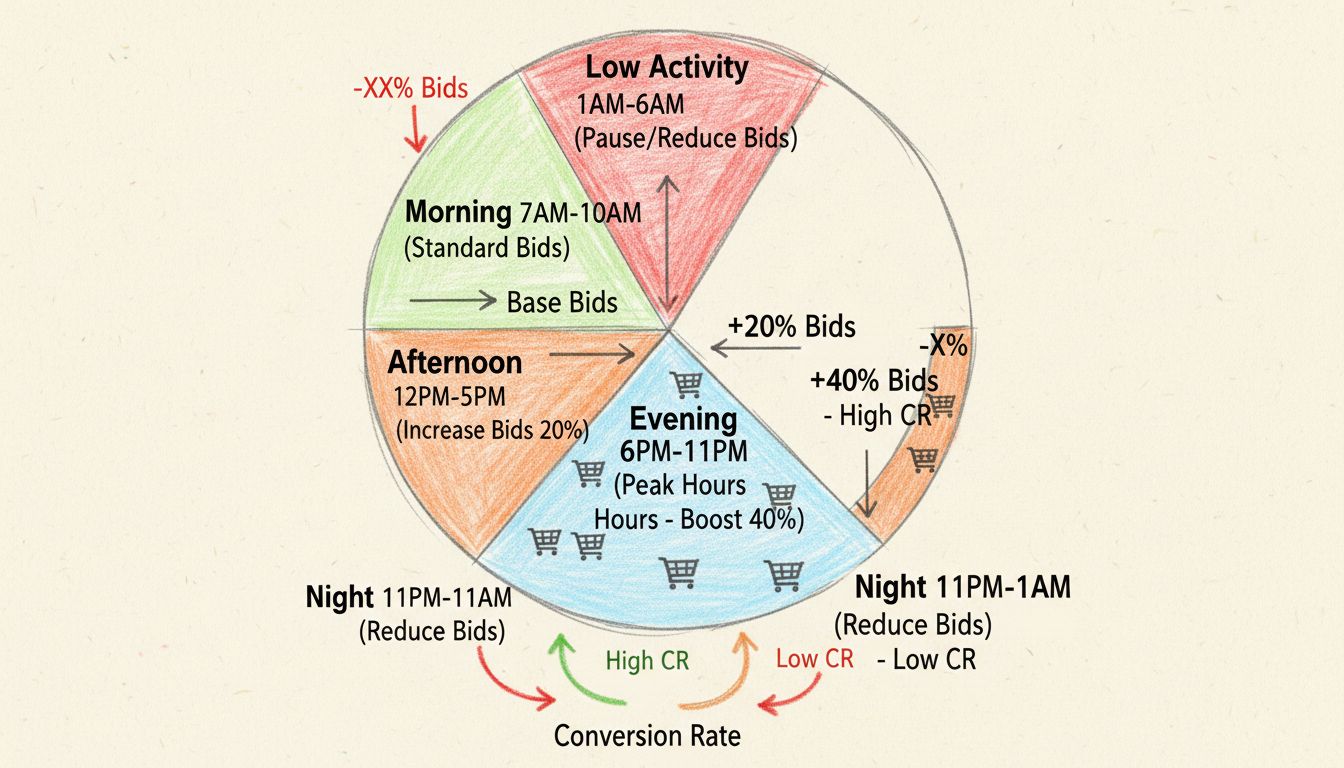
Master dayparting strategy to identify peak audience activity times, create targeted campaigns, and monitor performance. Learn how PostAffiliatePro helps optimi...
A daily budget in advertising limits per-day campaign spend. Learn how major platforms manage it.
Join our community of happy clients and provide excellent customer support with Post Affiliate Pro.




Cookie Consent
We use cookies to enhance your browsing experience and analyze our traffic. See our privacy policy.