


Verified Opt-In
Verified opt-in is a two-step subscription process where a user confirms their email address by clicking a verification link before joining a mailing list.
6 min read
AffiliateMarketing
EmailMarketing
+3
Double opt-in is a two-step subscription verification method in which a person submits their email address or phone number through a signup form and must then confirm their intent by clicking a confirmation link or replying to a verification message before being added to a mailing or SMS list.
Double opt-in is a two-step subscription verification method in which a person submits their email address or phone number through a signup form and must then confirm their intent by clicking a confirmation link or replying to a verification message before being added to a mailing or SMS list. Only after completing both steps does the subscription become active.
On this page
Double opt-in, also called confirmed opt-in, is a subscription process built around explicit, two-step consent. When a visitor fills out a signup form on a website, they are not immediately added to the active mailing list. Instead, the system sends an automated confirmation email — or, for SMS, a text message — containing a unique verification link or reply instruction. The subscription completes only when the recipient clicks that confirmation link or sends the required reply.
This workflow distinguishes double opt-in from single opt-in, where the subscriber is added to the list the moment the form is submitted — no confirmation required.
The term appears interchangeably with “confirmed opt-in” (COI) and “DOI” across email marketing platforms and compliance documentation. All refer to the same core mechanism: the sender must prove the recipient actively chose to receive messages, not just that someone typed an address into a form.

Set up advanced tracking in minutes. No credit card required.
The double opt-in process follows four steps:
If the recipient does not act on the confirmation message, the subscription stays in a pending state. Most platforms delete unconfirmed entries after a set period — commonly 24 hours to 30 days, depending on configuration.
| Aspect | Single Opt-In | Double Opt-In |
|---|---|---|
| Steps required | 1 (submit form) | 2 (submit form + confirm) |
| Subscription speed | Immediate | Delayed until confirmation |
| List growth speed | Faster | Slower — some subscribers drop off |
| Spam risk | Higher | Lower |
| List quality | Mixed — includes typos and fake addresses | Higher — only valid, engaged addresses |
| Consent proof | Weaker — form submission alone | Stronger — confirmation click is auditable |
| Best for | Rapid list growth, time-sensitive promos | Long-term engagement, compliance, deliverability |
Single opt-in makes sense when list growth speed is the priority. A retailer running a flash sale or a content creator launching a new channel may prefer the immediacy of single opt-in — every form submission becomes a subscriber, and no one is lost to a confirmation step they might skip. The friction is minimal, which maximizes conversion from visitor to subscriber.
The trade-off is clear: without a confirmation step, invalid addresses, bots, and people who entered their email by mistake all land on the list.
Double opt-in is the stronger choice when list health, deliverability, and legal compliance matter more than raw subscriber count. Because every address is verified, the list contains fewer bounces and fewer spam complaints. Engagement metrics — open rate, click rate, inbox placement — tend to run higher on double opt-in lists.
For businesses operating in the EU or sending to German, Austrian, or Italian recipients, double opt-in provides the kind of documented consent that satisfies regulatory expectations. Even in the United States, where CAN-SPAM does not mandate double opt-in, the practice protects sender reputation and aligns with the CTIA’s messaging best practices for SMS.
Be the first to know about new features and product updates.
When a subscriber confirms their address, they are far less likely to mark subsequent messages as spam. Mailbox providers track complaint rates closely.
Confirmed addresses rarely bounce. Low bounce rates signal to mailbox providers that the sender practices good list hygiene, which improves inbox placement.
Double opt-in generates a timestamped, IP-logged confirmation record for every subscriber. If a recipient disputes consent, the sender can produce the confirmation click as evidence — far stronger than a form submission log alone.
The double opt-in model extends to SMS, but the mechanics differ slightly from email. After a person submits their phone number, the business sends an automated text message instructing them to reply with a specific keyword — typically “YES” or “Y” — to confirm they want promotional messages. Only after the reply is the number added to the SMS list.
Mobile carriers and the CTIA treat SMS double opt-in as a baseline expectation for promotional messaging in the United States. Without it, messages risk being filtered as spam, and the sender’s 10DLC registration may be jeopardized. For transactional SMS — order confirmations, shipping updates, password resets — double opt-in is generally not required, because the customer triggers the message through their own action.
When a business uses a branded sender ID (an alphanumeric name instead of a phone number), the double opt-in confirmation step is automatically skipped because branded IDs cannot receive replies. In countries where branded sender IDs are supported, the platform typically bypasses the confirmation message and adds the contact immediately.
For SMS transactional consent, the same logic applies. If a person signs up only for transactional SMS — such as delivery notifications — the contact is added immediately. If they opt into both transactional and promotional SMS on the same form, transactional consent is granted immediately while the promotional consent waits for the double opt-in confirmation reply.
When a person fills out a signup form but never clicks the confirmation link or replies to the SMS, their subscription remains in a pending or unconfirmed state. They do not receive marketing emails or promotional texts.
From the sender’s perspective, this means the potential subscriber is lost. That drop-off is the primary reason some marketers resist double opt-in. However, as Campaign Monitor notes, anyone unwilling to take the simple step of clicking a confirmation link was unlikely to engage with the brand’s content in any meaningful way.
It demands that consent be freely given, specific, informed, unambiguous, and demonstrable — but it does not prescribe a particular mechanism.
In practice, however, several countries treat confirmed opt-in as the de facto minimum:
| Country | Status | Recommendation |
|---|---|---|
| Germany | — | Use double opt-in by default |
| Austria | Strong best practice | Use double opt-in |
| Italy | — | Use double opt-in |
| Luxembourg | Strong best practice | Use double opt-in |
| Switzerland | Separate from EU/EEA law but high expectation | Use double opt-in |
| Norway | Strong best practice | Use double opt-in |
| Denmark, Finland, Netherlands | Conservative EU policy zone | Use double opt-in when signup source is public |
Outside Europe, Canada’s CASL places the consent burden on the sender, making double opt-in a practical safeguard. In the United States, CAN-SPAM does not require double opt-in, and single opt-in remains common — though mailbox providers increasingly reward confirmed opt-in with better inbox placement. For SMS specifically, U.S. carriers effectively require double opt-in for promotional messaging under CTIA guidelines and 10DLC registration rules.
Most email marketing platforms and SMS providers include a toggle for double opt-in in their audience or list settings. While the exact steps vary by platform, the general workflow is consistent:
Signup form placement directly affects confirmation rates. High-performing placements include:
This is especially effective in ecommerce, where Shopify merchants routinely pair double opt-in with first-purchase discounts.
After form submission, display a page that tells the recipient exactly what to do next: “Check your inbox — we just sent you a confirmation email. Click the link inside to complete your subscription.” This reduces confusion and primes the recipient to act.
The confirmation message must arrive within seconds of form submission. Delays cause drop-off. If your platform batches confirmation emails, switch to real-time sending. For SMS double opt-in, the text message should appear before the recipient closes the form page.
Double opt-in carries specific weight in affiliate marketing, where email lists are often the primary channel for promoting offers and driving commissions.
Affiliates who build email lists to promote partner products need engaged subscribers who open, read, and click. A list built through double opt-in delivers higher open rates and click-through rates, which translates directly into more affiliate link clicks and conversions. Confirmed subscribers are also less likely to report promotional emails as spam — protecting the affiliate’s sender reputation and, by extension, their ability to reach inboxes at all.
Brands that run affiliate programs often provide creative assets, offers, and email copy to their affiliate partners. If an affiliate sends those promotions to an unverified list, the resulting spam complaints can damage the brand’s domain reputation — even if the brand itself did not send the emails. Requiring or strongly recommending double opt-in as part of affiliate program terms reduces that risk. It also aligns with the compliance expectations of networks and platforms that track consent as part of quality scoring.
Affiliate management platforms that integrate with email marketing tools can support double opt-in by surfacing engagement-quality metrics — such as list health scores or confirmed-subscriber ratios — alongside traditional performance data. This gives program managers a more complete picture of an affiliate’s promotional quality beyond clicks and conversions alone.
Discover how implementing double opt-in can improve your subscriber engagement, list quality, and legal compliance.
Verified opt-in is a two-step subscription process where a user confirms their email address by clicking a verification link before joining a mailing list.
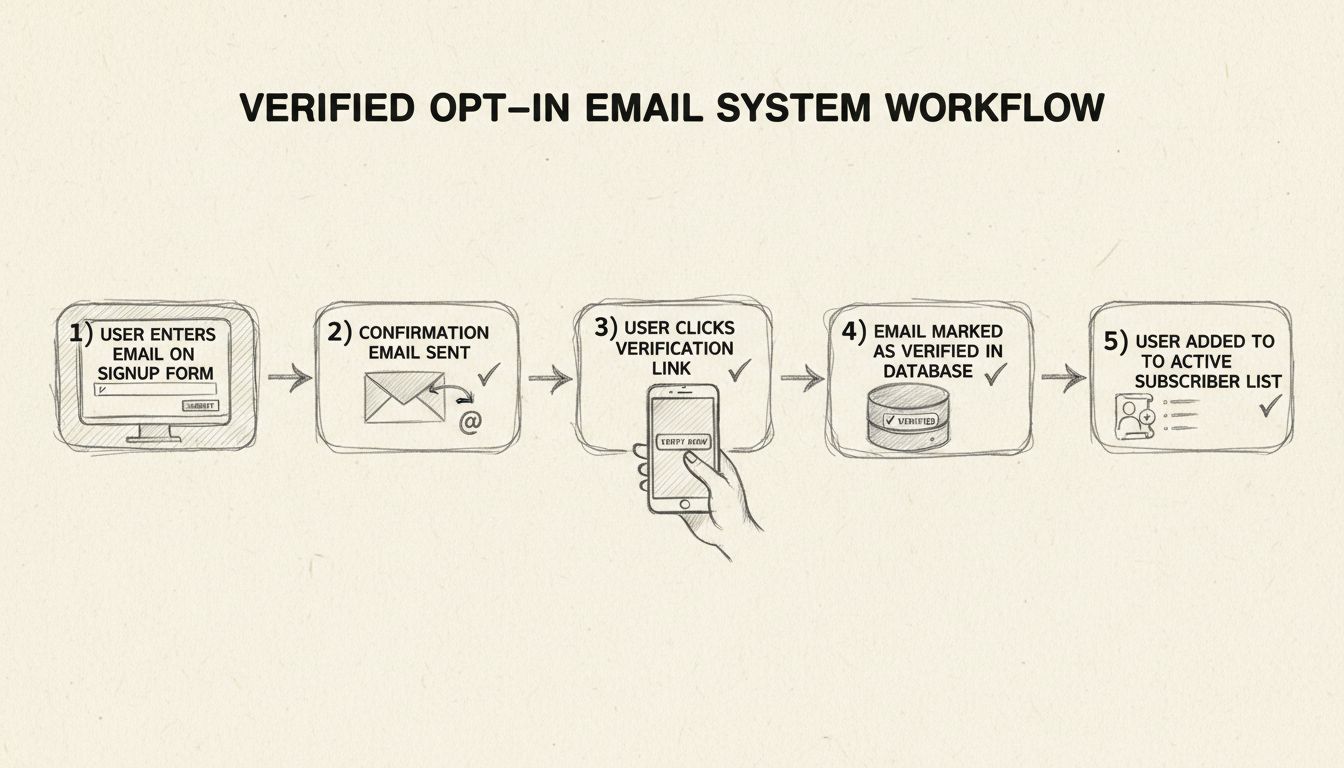
Learn how to implement a verified opt-in (double opt-in) email system to validate subscribers, improve deliverability, ensure regulatory compliance, and build a...
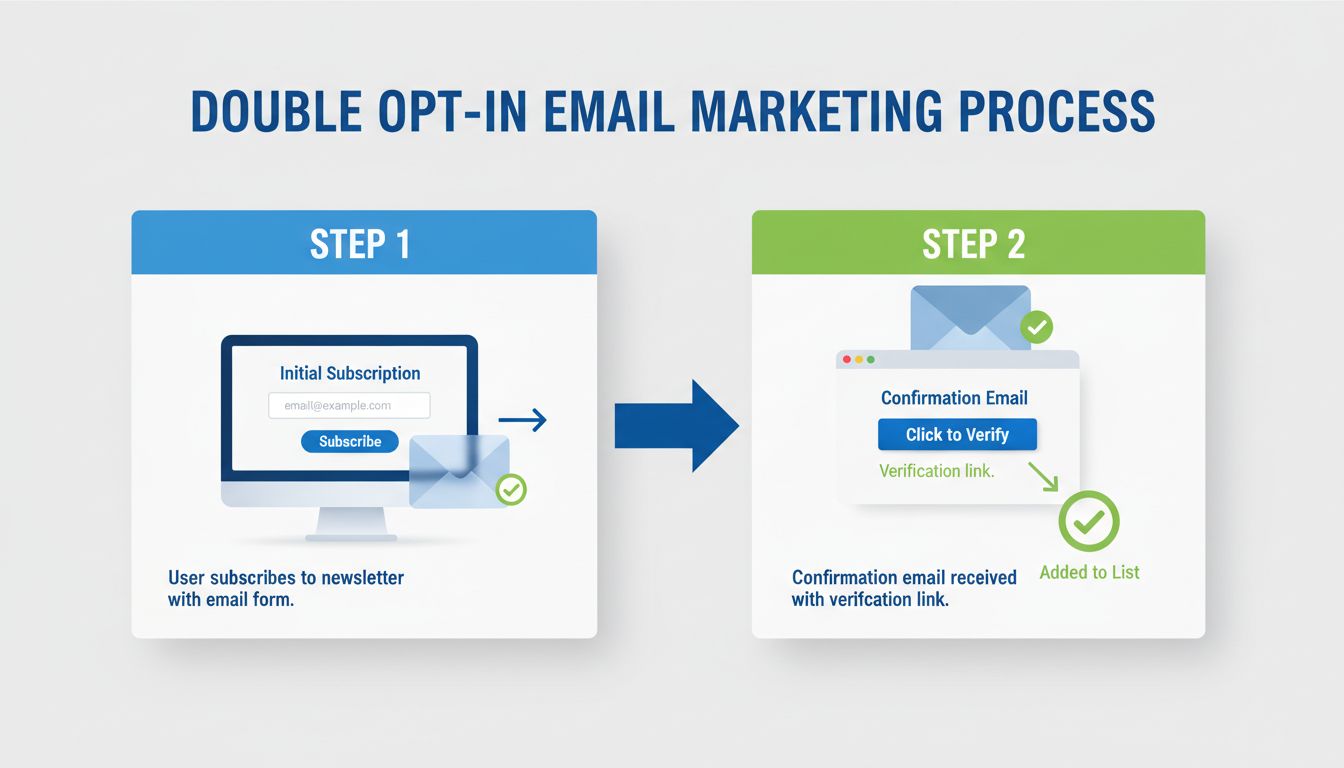
Learn why double opt-in is critical for email marketing compliance, engagement, and sender reputation. Understand GDPR requirements, legal protections, and best...
Join our community of happy clients and provide excellent customer support with Post Affiliate Pro.




Cookie Consent
We use cookies to enhance your browsing experience and analyze our traffic. See our privacy policy.