


How to Fix Duplicate Content Issues: Complete SEO Guide
Learn proven methods to fix duplicate content issues including 301 redirects, canonical tags, and noindex directives. Protect your SEO rankings with PostAffilia...
12 min read
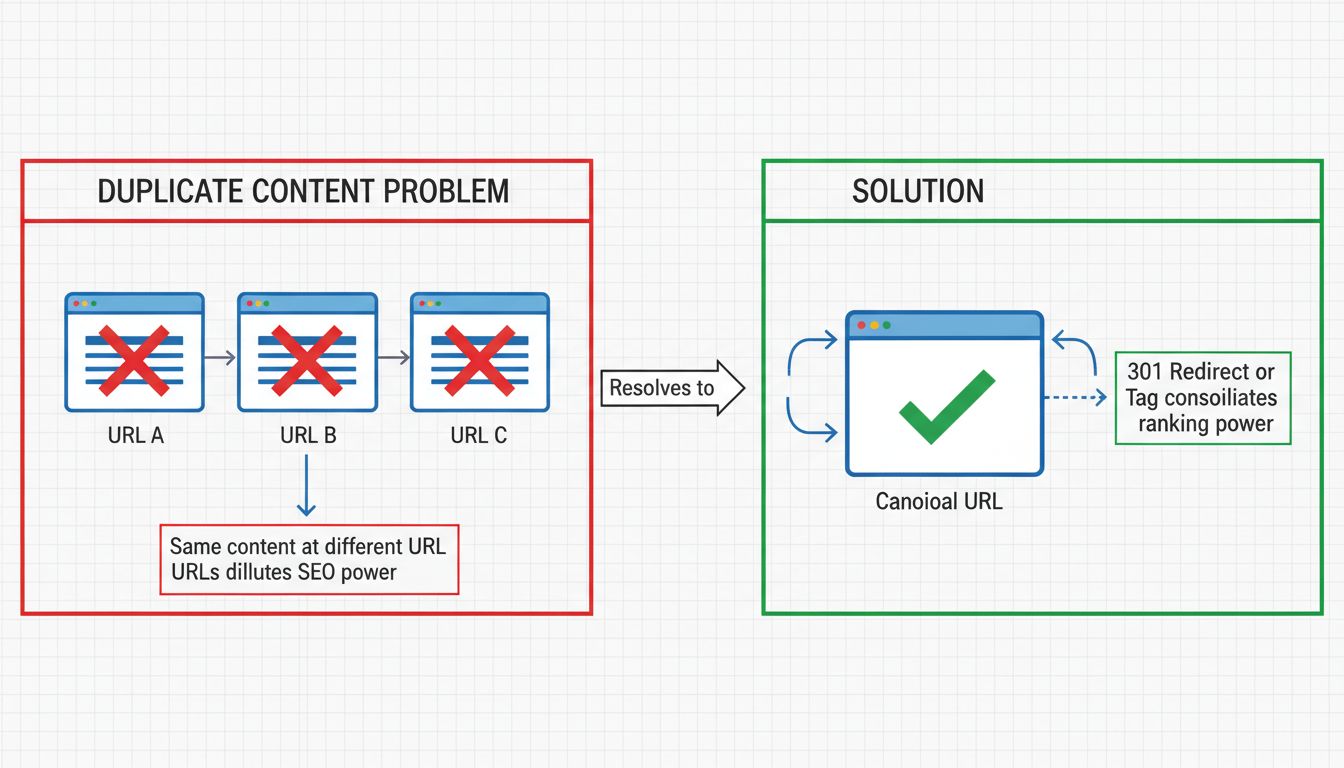
Duplicate content is substantive blocks of text, code, or media that appear in more than one place on the internet — meaning two or more distinct URLs deliver the same or appreciably similar material to users and search engines.
Duplicate content is substantive blocks of text, code, or media that appear in more than one place on the internet — meaning two or more distinct URLs deliver the same or appreciably similar material to users and search engines. When Google, Bing, or any other crawler encounters the same content at multiple web addresses, it must decide which version to index, which to rank, and which to ignore. That decision is not always the one you would make yourself.
Understanding duplicate content matters for anyone who runs a website, manages an affiliate program, or publishes content online. Left unchecked, it splits ranking signals, wastes crawl budget, and confuses the search engines you depend on for traffic.
Duplicate content means the same or substantially similar content lives at more than one URL. Those URLs can belong to the same domain (internal duplication) or span completely different websites (external duplication).
A page qualifies as duplicate when it shows noticeable overlap in wording, structure, and core message with another page, adds little to no original information, and offers no meaningful value beyond what the other version already provides. Headers, footers, and navigation elements that repeat across a site do not count — search engines understand those are part of a template, not the substantive content itself.
Internal duplication happens within a single domain. Common scenarios include:
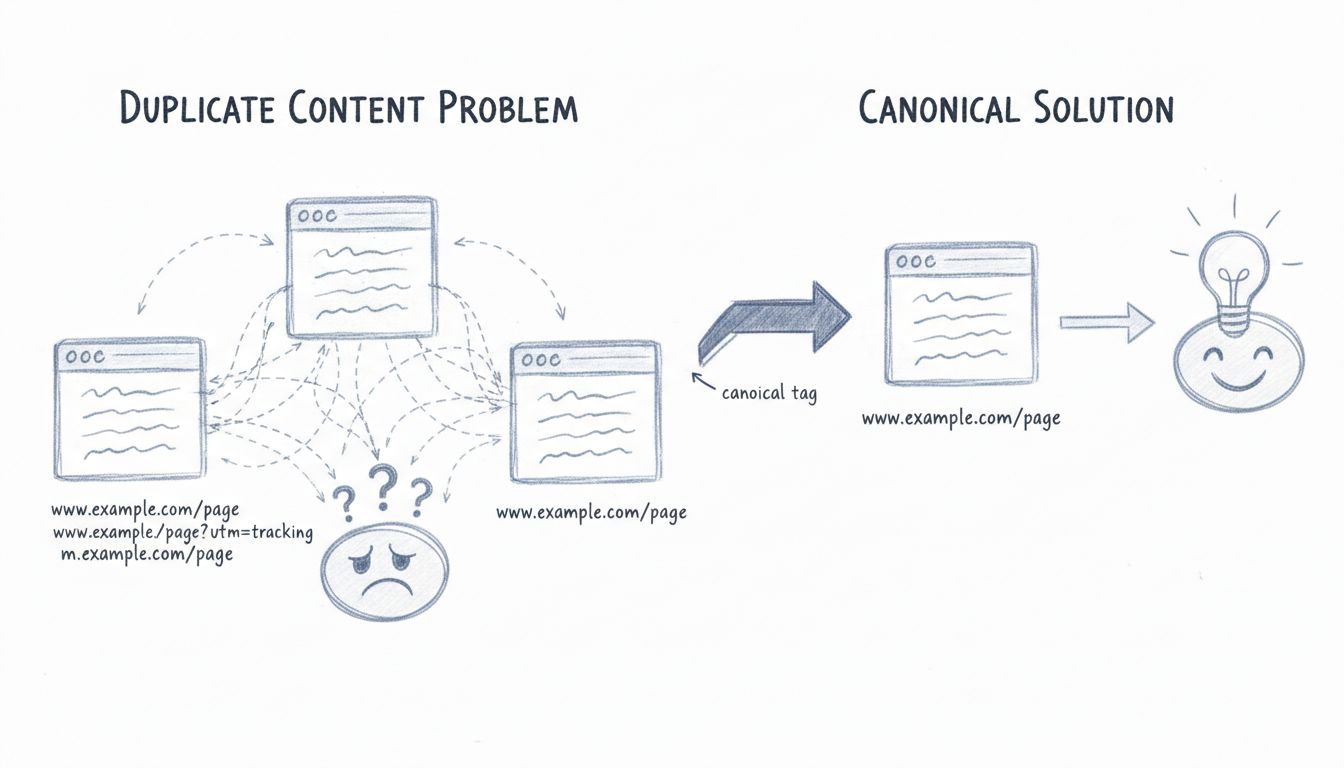
example.com/product and example.com/product?color=blueEach of these creates a separate address for the same underlying content. Search engines see multiple URLs competing for the same query, and they rarely reward all of them.
External duplication occurs when content from one domain appears on another. This can be malicious — content scraped and republished without permission — or entirely legitimate, as with syndicated articles distributed to partner sites. Without a canonical tag pointing back to the original, search engines may rank the copy above the source, or split ranking signals between both.
Not all duplicate content is identical. Near-duplicate content shares the same structure and core message but varies in small details: a product page where only the color name changes, a service-area page where only the city differs, or a translated version of the same article. Google treats these as duplicates when the differences are too thin to justify a separate page. The threshold is not a fixed percentage — it is about whether each page provides genuinely distinct value to a searcher.

Set up advanced tracking in minutes. No credit card required.
Duplicate content creates three concrete problems for search engines and site owners alike.
When multiple URLs deliver the same content, search engines must pick one to store in their index. They might choose the wrong one — an unoptimized parameter-laden URL instead of the clean canonical version. The other versions may be dropped entirely, meaning the page you want ranked never appears in search results at all.
Backlinks are among the strongest ranking signals. When external sites link to different versions of the same content — some to the HTTP version, some to HTTPS, some with a trailing slash and some without — the authority those links carry gets split across multiple URLs instead of concentrated on one. A page that could have ranked in position three might sit at position twelve because its link equity is fragmented across four duplicate URLs.
Search engines allocate a finite amount of time and resources to crawling any given site. Every duplicate URL a crawler processes is one fewer unique, valuable page it can discover and index in that session. On large sites — e-commerce stores with thousands of SKUs, affiliate content hubs with dynamically generated pages — crawl budget waste from duplicates can suppress the visibility of genuinely important pages.
No — not in the sense of a manual penalty. Most duplicate content on the web is accidental, not deceptive, and Google’s systems account for that.
The distinction matters. Google does take action against deliberately manipulative duplication: sites that scrape and republish content at scale solely to attract search traffic, or that generate thousands of near-identical doorway pages stuffed with keywords. In those cases, Google may apply a manual action or algorithmic suppression. But for the ordinary website owner with a handful of parameter-driven duplicate URLs, the consequence is not a penalty — it is the lost opportunity of split signals and diluted rankings.
The practical outcome is similar: your content underperforms. But understanding that this is an algorithmic filtering effect rather than a punitive strike helps you prioritize fixes correctly. You are not racing to escape a penalty; you are consolidating strength that is already yours.
Be the first to know about new features and product updates.
Most duplicate content is created accidentally, by the way content management systems, e-commerce platforms, and site architectures work by default.
Tracking parameters (?utm_source=, ?session_id=), sorting options (?sort=price), and filter combinations generate unique URLs for what is essentially the same page. A single product page on an e-commerce site can spawn dozens of parameterized URLs, each indexed separately unless managed.
If your site is accessible at both http://example.com and https://example.com, or at both https://www.example.com and https://example.com, you have at least two versions of every page. Without a site-wide redirect from one to the other, both versions can be crawled and indexed.
example.com/page and example.com/page/ may serve the same content but register as different URLs. Most modern CMS platforms handle this automatically, but misconfigured servers can expose both.
Separate URLs for print-optimized or AMP versions of articles create duplicates of the main content. If these alternate versions are indexable, they compete with the original.
When other sites copy your content — with or without permission — they create external duplicates. Even legitimate syndication partners need canonical tags pointing to your original; otherwise, their republished version can outrank yours.
Manufacturers often supply the same product description to hundreds of retailers and affiliates. When every seller publishes that identical text, search engines see massive duplication across domains.
E-commerce and listing sites that let users filter by size, color, price range, or rating create combinatorial URL explosions. A category page with five filter options, each with five values, can generate over 3,000 unique URLs — all showing substantially the same product grid.
Staging sites that are accidentally left indexable duplicate the entire production site. A robots.txt misconfiguration or missing noindex tag on a dev server can cause the entire site to be mirrored in search results.
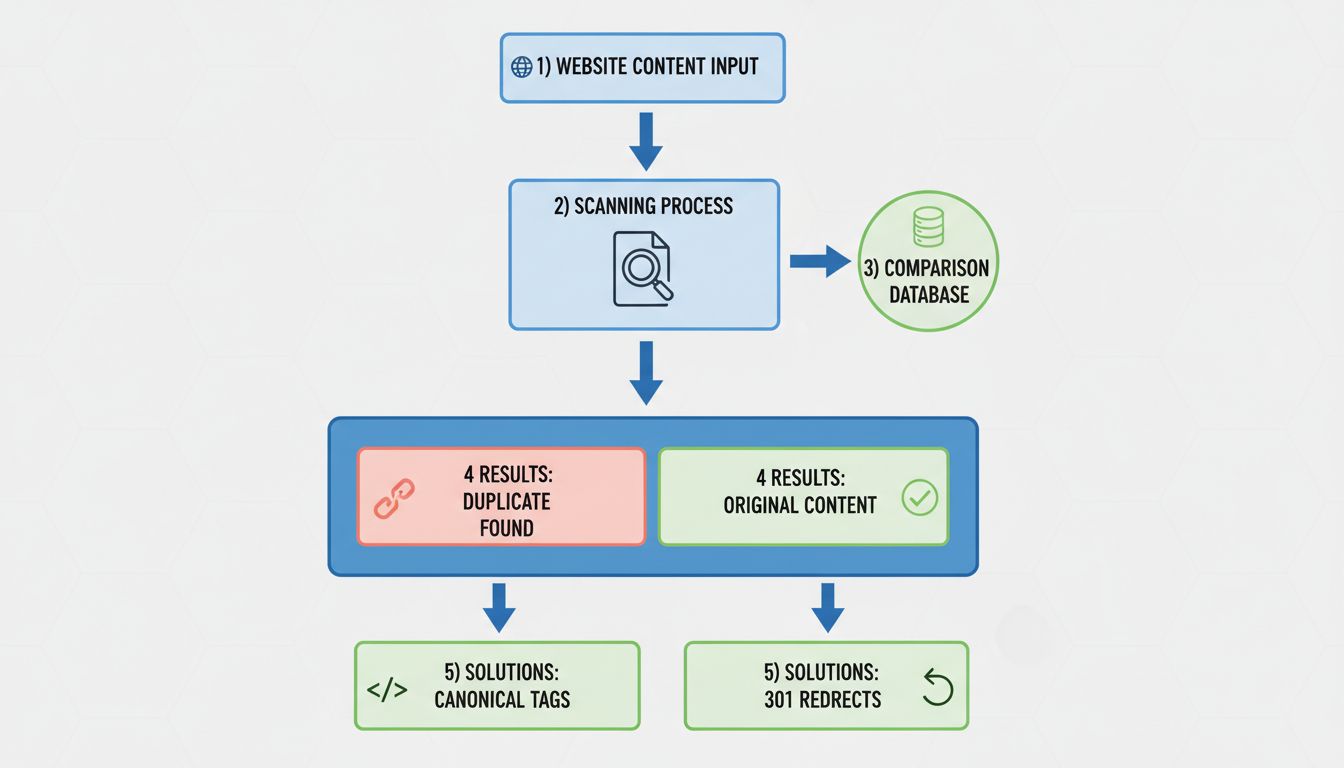
Before you can fix duplicate content, you need to know where it lives. Several methods and tools make this straightforward.
This is the fastest, most authoritative way to spot duplication that is already affecting your rankings.
Dedicated SEO crawlers — Screaming Frog, Sitebulb, Ahrefs Site Audit, Semrush Site Audit — crawl your entire site and flag pages with duplicate titles, duplicate meta descriptions, and near-identical body content. Screaming Frog’s “Duplicate Pages” report, for example, groups URLs by content hash and shows exactly which pages share the same or near-identical content. Most of these tools offer free tiers sufficient for small to medium sites.
Copy a distinctive sentence from your content — wrapped in quotation marks — and paste it into Google. The results show every indexed page containing that exact phrase. If you see URLs you did not expect, you have found external duplicates or internal pages you did not realize were indexed.
Tools like Copyscape and Siteliner compare your content against the web at large and against other pages on your own domain. Copyscape is particularly useful for finding sites that have scraped your content without permission. Siteliner scans internal duplication percentages across your domain.
Check whether your site is accessible at multiple protocol and subdomain variants. Open http://yoursite.com, https://yoursite.com, http://www.yoursite.com, and https://www.yoursite.com. If more than one resolves to a live page instead of redirecting, you have a systemic duplicate content problem that affects every page.
Fixing duplicate content means telling search engines which version of a page is the one you want ranked, and consolidating all signals behind it.
A 301 redirect permanently sends users and search engines from a duplicate URL to the canonical version. This is the strongest signal you can send: it consolidates link equity, removes the duplicate from the index over time, and ensures visitors always land on the right page.
Use 301 redirects when:
<link rel="canonical" href="https://example.com/original-page/" />
Canonical tags are the right tool when:
Unlike a redirect, a canonical tag does not remove the duplicate URL from existence — it only signals preference. Search engines treat it as a strong hint, not an absolute directive.
A noindex tag instructs search engines not to include a page in their index at all. Use it on pages that serve a purpose for users but should never appear in search results: thank-you pages, internal search result pages, printer-friendly versions, and staging environments.
<meta name="robots" content="noindex" />
Combine noindex with follow if you still want link equity to flow through the page to other destinations.
Every time you link to a page on your own site, use the exact same URL format. If your canonical version is https://example.com/page/, do not link to https://www.example.com/page or http://example.com/page/ in your navigation, body content, or footer. Inconsistency in your own linking sends mixed signals that undermine your canonical choices.
Google Search Console’s URL Parameters tool (under Legacy Tools) lets you tell Google how to treat specific parameters. You can specify that ?sort= or ?session_id= does not change page content, which helps Google consolidate parameterized URLs under the canonical version. Use this carefully — misconfiguration can cause Google to ignore parameters that do produce meaningfully different content.
The most durable solution to duplicate content is to create pages that are genuinely distinct. For affiliate marketers, this means writing original product reviews, comparisons, and guides instead of republishing manufacturer descriptions. For e-commerce sites, it means adding unique product photography, customer Q&A, and original buying guides. Search engines reward content that adds value beyond what already exists elsewhere.
Affiliate marketers face a unique duplicate content challenge: they promote products that hundreds or thousands of other affiliates are also promoting, often using the same manufacturer-supplied descriptions, images, and specifications.
When an affiliate copies a product description from the merchant’s site and publishes it verbatim, they join a pool of identical pages competing for the same keywords. Google sees dozens or hundreds of pages with the same text and must choose one — or none — to rank. The merchant’s own product page, with its higher domain authority, almost always wins. The affiliate’s page sinks.
This is not a penalty. It is a relevance and authority problem: identical content adds nothing new to the web, so search engines have no reason to surface multiple copies of it.
Write original product reviews. Instead of repeating the manufacturer’s feature list, describe your hands-on experience with the product. What surprised you? What did you find frustrating? How does it compare to alternatives you have tested? First-hand detail cannot be duplicated by anyone else.
Add unique value beyond the product description. Include original photography, video walkthroughs, comparison tables you built yourself, use-case scenarios, and answers to questions the manufacturer’s page does not address.
Use canonical tags when syndicating. If you publish content that also appears on your merchant’s site or a partner blog, add a canonical tag pointing to whichever version you want ranked. Coordinate with your affiliate program manager to agree on which URL is canonical.
Avoid doorway-page strategies. Creating dozens of near-identical pages targeting slight keyword variations — once a common affiliate tactic — is explicitly against Google’s guidelines and risks algorithmic suppression. One comprehensive page targeting a topic thoroughly will outperform ten thin variations.
Affiliate program managers can reduce duplicate content problems across their affiliate network by:
Merchants and advertisers running affiliate programs benefit when their affiliates publish unique, high-quality content. It expands the brand’s search footprint across more keywords and queries than the merchant’s site alone could capture. Duplicate content from affiliates, by contrast, adds no incremental search presence and can create a negative brand impression when searchers encounter the same text on dozens of low-quality sites. Investing in affiliate education and unique creative assets pays a direct SEO dividend.
There is no official percentage threshold below which duplicate content is “safe.” Google does not use a duplication score that triggers action at a certain level. Instead, the question is whether each page provides incremental value.
The practical standard: if you would not feel confident explaining to a searcher why this page deserves to exist separately from similar pages on your site or elsewhere, it is probably too thin to justify its own URL.
Avoid duplicate content issues and boost your site's search engine rankings. Discover solutions and best practices for affiliate marketers.
Learn proven methods to fix duplicate content issues including 301 redirects, canonical tags, and noindex directives. Protect your SEO rankings with PostAffilia...
Learn why duplicate content hurts SEO, how it impacts rankings, and proven solutions like canonical tags and 301 redirects to fix duplicate content issues in 20...
Learn how to check for duplicate content using tools like Copyscape, Siteliner, and Google Search Console. Discover manual methods, internal duplicate detection...
Join our community of happy clients and provide excellent customer support with Post Affiliate Pro.




Cookie Consent
We use cookies to enhance your browsing experience and analyze our traffic. See our privacy policy.