


What to Put in a Website Footer?
Discover essential website footer elements including contact info, social links, legal pages, and conversion optimization strategies. Learn best practices for f...
9 min read
In web design, a footer is the bottom block of a webpage that appears after the main content area.
In web design, a footer is the bottom block of a webpage that appears after the main content area. It is distinct from the header (top of the page) and the body (the primary content between them). While headers orient users and bodies deliver the core message, footers serve as a closing anchor — a consistent place users learn to rely on when they need utility links, legal pages, or a way to contact the business behind the site.
The transition from print to web changed what a footer does. In print, a footer is passive — a page number or a chapter title. On the web, every element in a footer can be clicked, searched, or acted upon. This shift means the footer is not decorative; it is functional real estate.
<footer> ElementThe <footer> element also carries the implicit ARIA contentinfo landmark role, which helps screen readers identify the footer region and navigate to it directly. This makes the footer not just a visual convention but an accessibility feature built into the structure of the web.
In web design, a footer is the bottom block of a webpage that appears after the main content area. It is distinct from the header (top of the page) and the body (the primary content between them). While headers orient users and bodies deliver the core message, footers serve as a closing anchor — a consistent place users learn to rely on when they need utility links, legal pages, or a way to contact the business behind the site.
The transition from print to web changed what a footer does. In print, a footer is passive — a page number or a chapter title. On the web, every element in a footer can be clicked, searched, or acted upon. This shift means the footer is not decorative; it is functional real estate.
<footer> ElementFrom a technical standpoint, the footer is marked up using the semantic HTML <footer> element. When placed as a direct child of the <body> element, it applies to the entire page. It typically contains information about the author, copyright data, or links to related documents.
The <footer> element also carries the implicit ARIA contentinfo landmark role, which helps screen readers identify the footer region and navigate to it directly. This makes the footer not just a visual convention but an accessibility feature built into the structure of the web.

Set up advanced tracking in minutes. No credit card required.
The contents of a footer depend on the website’s purpose, audience, and business model. However, certain elements appear so consistently across high-performing sites that they have become expected conventions. Removing them can erode user trust.
These items belong in virtually every website footer, regardless of industry:
| Element | Purpose | Example |
|---|---|---|
| Copyright notice | Establishes ownership and currency | All rights reserved. |
| Privacy policy link | Legal compliance and trust | Link to /privacy-policy |
| Terms of service link | Legal protection | Link to /terms |
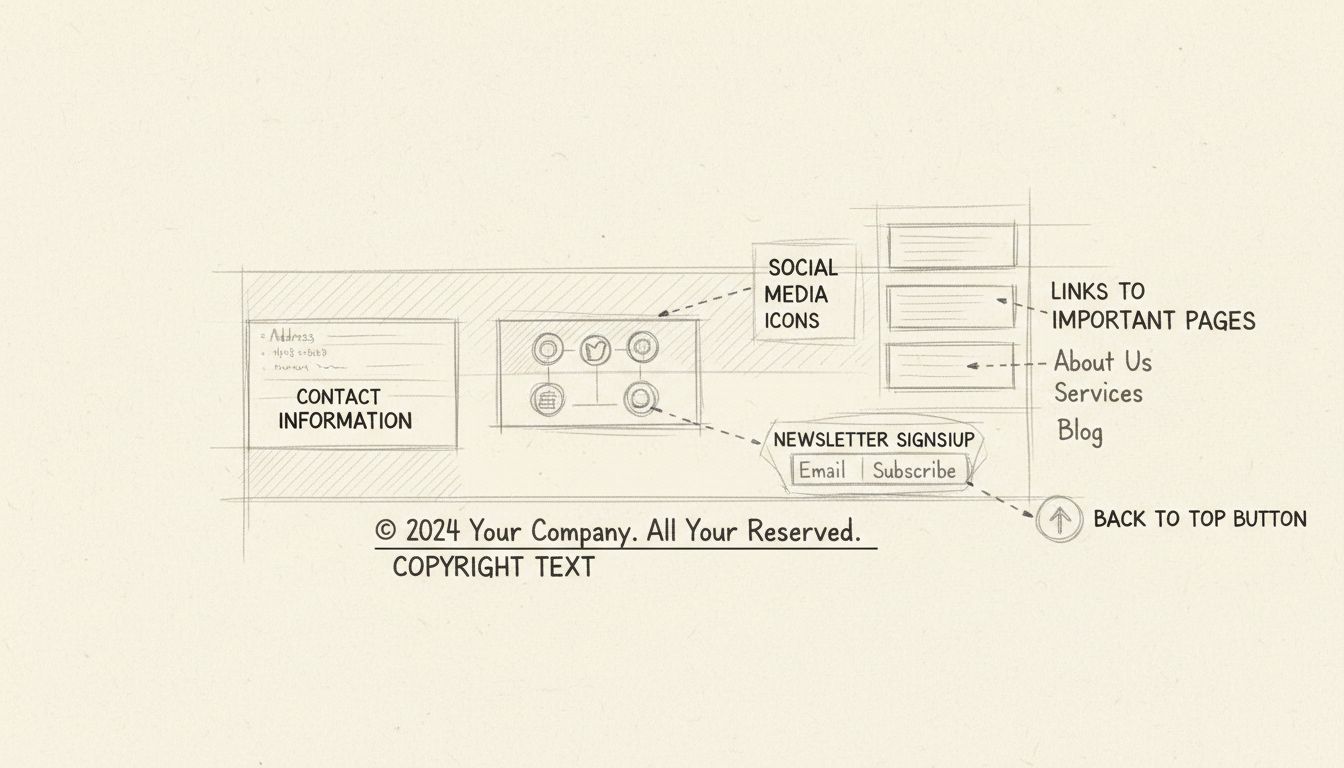
| Contact information | Transparency and accessibility | Email, phone number, physical address |
| Social media icons | Off-site engagement | LinkedIn, X, Instagram, YouTube |
A copyright notice that displays the current year signals that the site is actively maintained.
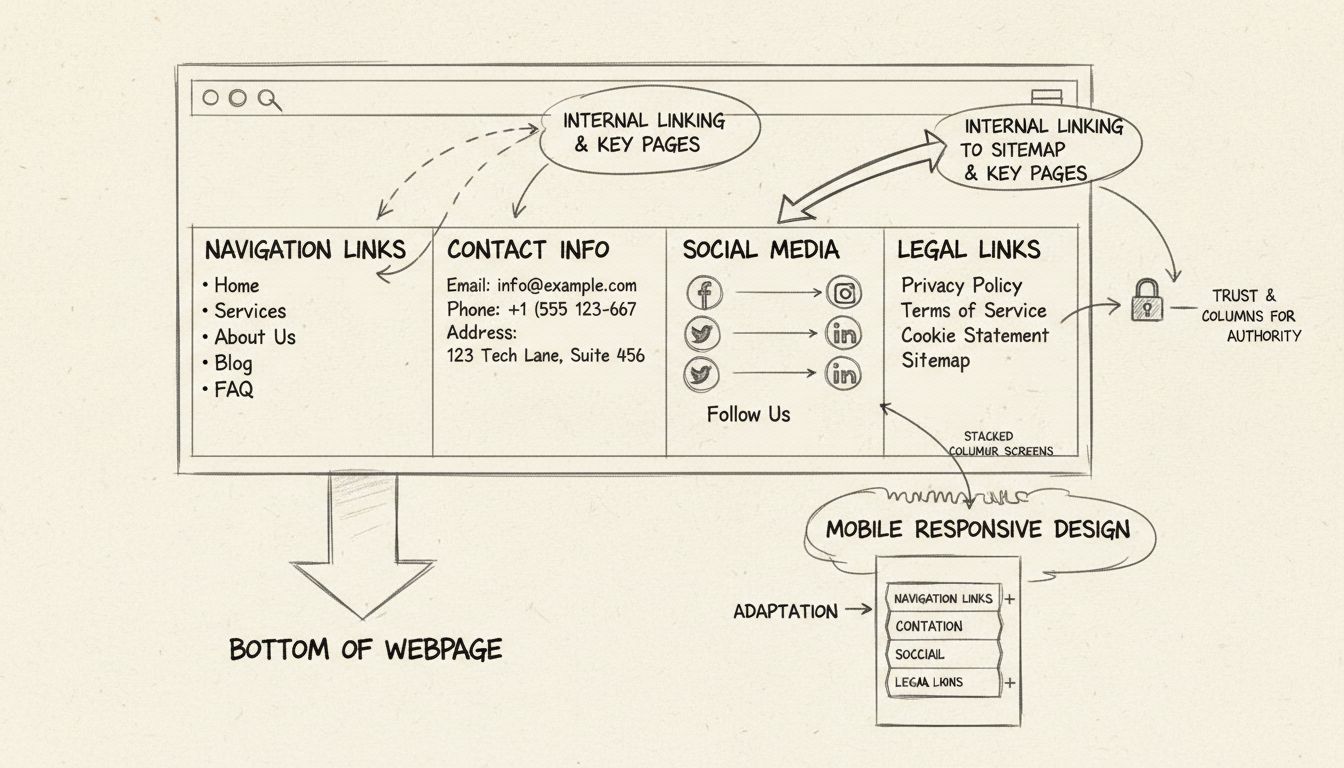
Footers often include a condensed version of the site’s navigation, sometimes called doormat navigation — a term coined by NNGroup to describe a footer that lays out key sections of the site in columns, like a doormat welcoming users to explore further. Common footer navigation links include:
A sitemap link in the footer is particularly useful for both users and search engines. It gives lost visitors a full overview of the site’s structure and provides crawlers with a secondary path to discover pages.
Beyond utility, footers can drive action. Common engagement elements include:
Some site owners ask whether a footer is even necessary. The short answer is yes — and the data backs it up.
Footers function as a safety net for users. When someone scrolls through a page and does not find what they are looking for in the header or body, they instinctively scroll to the bottom. NNGroup’s research confirms that users who scroll spend a disproportionate amount of time near the bottom of a page. If the footer is empty, confusing, or missing key links, that user is likely to leave.
A consistent, well-organized footer catches these users and redirects them to the information they need — whether that is a contact form, a policy page, or a related article.
Footers contribute to search engine optimization in several concrete ways:
However, there is an important caveat: footer links carry less weight than in-content links. Google’s algorithms treat footer links differently from editorial links placed within the body of a page. A footer should complement, not replace, a thoughtful internal linking strategy.
Users expect to find certain information in a footer. When they do, the site feels legitimate. When they do not — missing privacy policy, no contact details, an outdated copyright year — trust erodes. For ecommerce and affiliate sites, where users are deciding whether to make a purchase or click an affiliate link, that trust is directly tied to revenue.
These are not marginal gains; they are meaningful improvements from a section many site owners ignore.
Be the first to know about new features and product updates.
The ideal footer is visually distinct from the body content — typically through a contrasting background color, a horizontal rule, or additional whitespace. It should be organized into clear columns or sections rather than a single long list of links.
An accessible footer benefits all users, including those relying on screen readers or keyboard navigation.
<footer> element so assistive technology can identify the region.<h2> or <h3>) so screen reader users can skip between sections.Several footer practices are common but counterproductive:
Affiliate marketing introduces specific footer requirements that general web design guides rarely address. Advertisers running affiliate programs, publishers promoting affiliate products, and program managers overseeing partner relationships each have distinct footer needs.
Advertisers — businesses that run affiliate programs to drive sales through partners — should use their footer to:
While disclosures should appear near individual affiliate links, a site-wide disclosure in the footer adds an extra layer of compliance. Example: “This site contains affiliate links. We may earn a commission when you purchase through these links, at no additional cost to you.”
A missing or buried disclosure puts both the affiliate and the advertiser at legal risk.
| Obsolete Practice | Current Standard (2026) |
|---|---|
| Keyword-stuffed footer links (e.g., “cheap web hosting Chicago budget hosting”) | Clean, descriptive anchor text that serves users |
| Hidden footer links (white text on white background) | Visible, accessible links — hidden links violate Google guidelines |
| Footer as the only internal linking strategy | Footer as one part of a broader internal linking plan that includes in-content links |
| Auto-generated “latest posts” widgets that create thin, duplicate content | Curated links to cornerstone content or key landing pages |
| Dozens of social media icons for inactive accounts | Only icons for active, maintained social profiles |
A footer should not be designed and forgotten. Testing reveals whether it actually serves users.
Tools like Hotjar, Microsoft Clarity, and Crazy Egg show how far users scroll and where they click. If scroll maps indicate that few visitors reach the footer, the content above it may need restructuring — or the footer itself may need more compelling elements to draw users down. Conversely, if the footer receives heavy click activity, those interactions should be analyzed to see which links users value most.
Periodically review every link in the footer:
rel="sponsored"?Run the footer through automated accessibility checkers like WAVE or Axe, and also test manually:
contentinfo landmark?Discover best practices and strategies for designing footers that improve user experience, boost SEO, and drive engagement on your site.
Discover essential website footer elements including contact info, social links, legal pages, and conversion optimization strategies. Learn best practices for f...
Discover why website footers are essential for user experience and SEO. Learn how proper footer design improves navigation, builds trust, and boosts search rank...
Anchor text is the clickable text in a hyperlink. Learn its types, SEO impact, and best practices.
Join our community of happy clients and provide excellent customer support with Post Affiliate Pro.




Cookie Consent
We use cookies to enhance your browsing experience and analyze our traffic. See our privacy policy.