


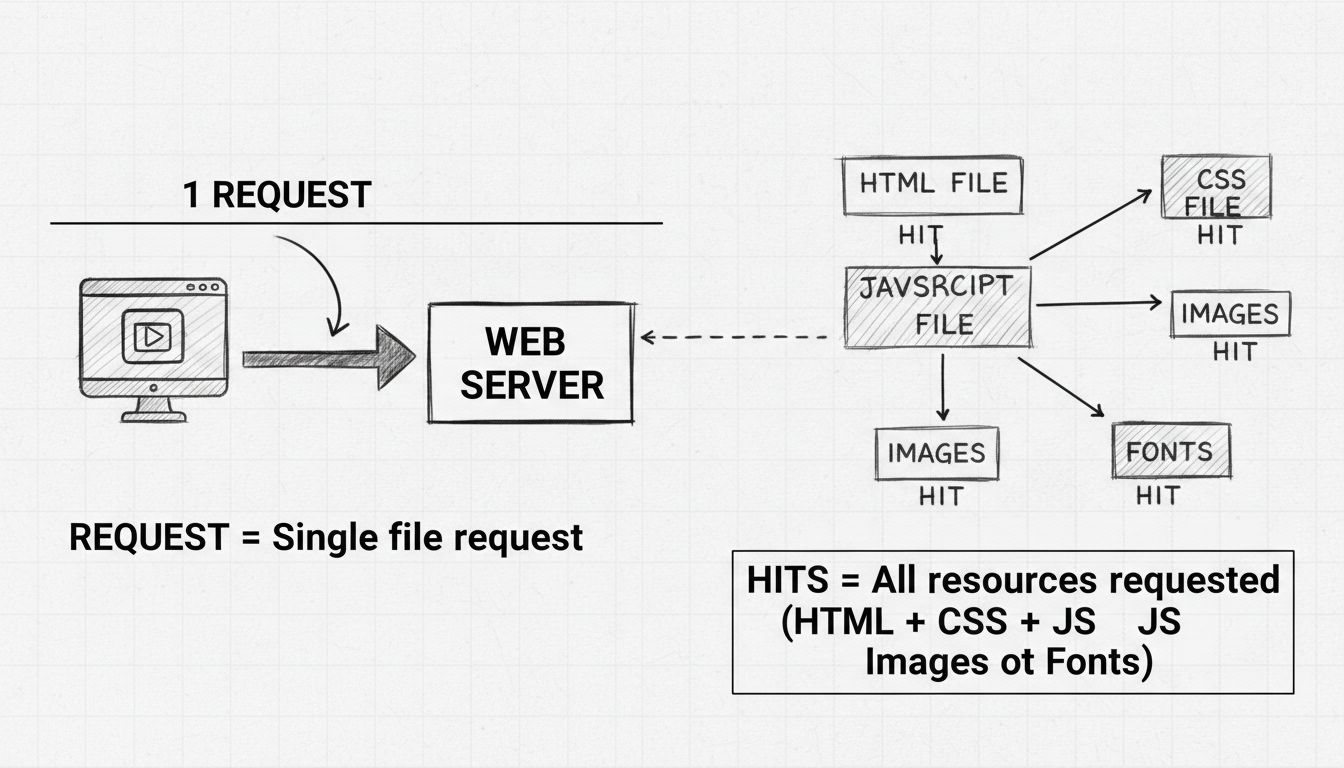
Difference Between HTTP Requests and Hits
Understand the key differences between HTTP requests and hits in web analytics. Learn how requests and hits impact your website traffic measurement and affiliat...
9 min read
A hit in affiliate marketing is a request to a web server, such as a request for a page, image, stylesheet or tracking resource. One pageview can create several hits. A hit is not automatically a unique visitor, an affiliate click or a sale.
On this page
A hit in affiliate marketing is a request to a web server, such as a request for a page, image, stylesheet or tracking resource. One pageview can create several hits. A hit is not automatically a unique visitor, an affiliate click or a sale.
In affiliate marketing, hits enter the picture when a tracking script or pixel fires on a merchant’s site after a user clicks an affiliate link. That server request — the moment the tracking infrastructure records the referral — is technically a hit. But most affiliate software abstracts this away, showing you clicks and conversions instead.
The term originated in server log analysis in the mid-1990s, when webmasters used raw hit counts to gauge traffic. Still, understanding what a hit is matters: it explains why some dashboards show activity that looks inflated, and it clarifies the difference between server-level events and user-level actions.

Set up advanced tracking in minutes. No credit card required.
One of the most persistent sources of confusion in web analytics — and by extension affiliate tracking — is the conflation of hits with other metrics. The table below breaks down what each term actually measures.
| Metric | What It Counts | Example | Useful for Affiliates? |
|---|---|---|---|
| Hit | One server request for any file | A page with 15 images and 3 scripts = 19 hits from one visit | No — measures server load, not behavior |
| Click | One user action on an affiliate link | A reader taps your link to a product | Yes — measures interest and referral volume |
| Pageview | One full webpage load in a browser | Someone reads your review article | Yes — measures content reach |
| Unique visitor | One distinct person (or browser) in a time window | 500 people visited your site this week | Yes — measures audience size |
| Conversion | One completed desired action | A sale, signup, or lead form submission | Yes — the core KPI for affiliate payouts |
A single visitor who lands on a product page with 30 embedded images, 5 CSS files, 8 JavaScript files, and 2 tracking pixels generates 46 hits before they even scroll. That same visitor produces exactly one pageview, and if they arrived via your affiliate link, one click. If they buy, one conversion. The 46:1 ratio of hits to actions illustrates why hits are vestigial in affiliate reporting.
Every webpage is not one file. It is an assembly of resources fetched independently by the browser. When you publish a blog post promoting an affiliate product, here is what happens behind the scenes on every visit:
For a typical affiliate blog post with a featured image, sidebar graphics, a tracking pixel from the affiliate network, Google Analytics, and a social sharing widget, a single reader can generate 40 to 80 hits. Multiply that by the thousands of visitors a successful affiliate site attracts, and hit counts quickly reach six or seven figures — none of which correlates directly with commissions earned.
The SmarterStats documentation captures this with a useful analogy: a visitor is like someone picking up a magazine. Each page they flip through is a pageview. Every image, headline, and ad on each page is a hit. One person browsing one magazine generates one visit, several views, and potentially hundreds of hits.
Be the first to know about new features and product updates.
You can increase hits without attracting a single new visitor. Add 10 more images to a page and hits rise by 10 per pageview. This makes hit counts trivial to manipulate and meaningless as a measure of reach. A competitor could show 10 times your hit count simply by building heavier pages.
A hit reveals nothing about whether the user clicked an affiliate link, read the content, or bounced immediately. Server logs cannot distinguish between a motivated buyer who reads every word and a bot that scraped the page in 0.3 seconds. For an affiliate program manager tracking partner performance, this distinction is everything.
Affiliate software today uses cookie-based and server-to-server tracking to attribute conversions. The industry moved past hit counting as a marketing KPI roughly two decades ago, around the same time Google Analytics popularized session-based metrics.
A dashboard showing 500,000 hits sounds impressive. But if those hits represent 5,000 visitors and zero sales, the number is noise. Affiliates who fixate on hit counts risk optimizing for server load instead of revenue, wasting time on page-weight decisions that do not drive commissions.
The number of times users click your affiliate links. Clicks measure the top of your funnel: how effectively your content drives traffic toward merchant sites. Track click-through rate (CTR) alongside raw clicks to understand conversion efficiency.
A conversion is the completed action that triggers a commission — a sale, a lead form, a trial signup. Conversion rate is the percentage of clicks that result in a conversion. Track this per affiliate, per campaign, and per traffic source.
EPC divides total commission earnings by total clicks. This metric helps affiliates compare programs and decide where to invest promotion time.
If your affiliate program pays a percentage of each sale, AOV directly impacts your earnings. Promoting a product with a $200 AOV and a 10% commission earns $20 per sale. The same click volume on a $30 product at 5% earns $1.50 per sale. Track both figures when choosing which merchants to partner with.
If you drive traffic through paid channels — search engine ads, social media campaigns, or sponsored content — ROAS tells you whether your campaigns are profitable. Divide commission revenue by ad spend. A ROAS of 3.0 means you earn $3 for every $1 spent. Below 1.0, you are losing money on each click.
| Metric | What It Tells You | Healthy Benchmark |
|---|---|---|
| Clicks | Referral volume | Varies by traffic source |
| CTR | Content-to-offer relevance | — |
| Conversion rate | Offer strength & audience fit | — |
| EPC | Revenue efficiency per click | — |
| ROAS | Paid-traffic profitability | 2.0+ |
Not every platform uses “hit” in the strict server-request sense. Some affiliate networks and tracking systems apply the term more loosely, which creates ambiguity. Knowing your platform’s definition matters.
The platform tracks clicks, impressions, sales, commissions, and referral URLs. Hit-level data lives in raw access logs, not the affiliate dashboard.
ClickBank’s reporting uses “hops” rather than hits — each hop represents one click on your affiliate link. This is the metric that matters for ClickBank affiliates. The platform does not expose raw hit counts.
Enterprise affiliate platforms like Impact.com focus on tracked actions: clicks, impressions, conversions, and attributed revenue. Raw server hits are irrelevant to their reporting model and do not appear in partner dashboards.
The lesson: read your platform’s documentation. If your dashboard labels a column “Hits,” check whether it means server requests or link clicks. The distinction determines whether the number is actionable or noise.
If you manage an affiliate program and your tracking software surfaces hit data — perhaps in raw server logs or technical reports — here is how to approach it without wasting time.
Hit spikes can signal technical issues. A sudden 10x increase in hits without a corresponding rise in clicks or visitors may indicate a bot crawl, a scraping attack, or a misconfigured tracking pixel firing repeatedly. In these cases, hit data serves as an early warning system for infrastructure problems — not marketing performance.
For campaign optimization, partner evaluation, commission structures, and revenue forecasting, hits are irrelevant. They tell you nothing about which affiliates drive sales, which landing pages convert, or which traffic sources deliver the highest EPC. Any decision based on hit counts — such as allocating budget or cutting partners — will be wrong.
The transition from hit-counting to conversion tracking is not just modern — it is mandatory.
Discover tools and strategies to go beyond hits and measure what really matters—conversions and revenue. Take your affiliate marketing success to the next level.
Understand the key differences between HTTP requests and hits in web analytics. Learn how requests and hits impact your website traffic measurement and affiliat...
Affiliate tracking records clicks and attributes conversions to the right partner so commissions are accurate. Learn how it works.

Learn how to check server hits with comprehensive methods including access logs, web server analysis tools, and real-time traffic monitoring. Expert guide for a...
Join our community of happy clients and provide excellent customer support with Post Affiliate Pro.




Cookie Consent
We use cookies to enhance your browsing experience and analyze our traffic. See our privacy policy.