


Auto-Approval
Auto-approval automatically accepts affiliate applications without manual review. Learn how it works, its pros and cons, and when to use it.
8 min read
AffiliateMarketing
Automation
+3
Manual approval is a human checkpoint embedded in an otherwise automated workflow.
Manual approval is a human checkpoint embedded in an otherwise automated workflow. When the workflow reaches that checkpoint, execution pauses. The system sends a notification to one or more designated approvers. Those approvers review the request — an affiliate application, a code deployment, a purchase order, an ad creative — and decide whether to approve or reject it. If approved, the workflow resumes. If rejected, it stops or loops back for revision.
The defining trait is that a human must act before the process continues. This distinguishes manual approval from automated approval, where software applies predefined rules — traffic thresholds, fraud scores, budget limits — and makes the decision without human intervention.
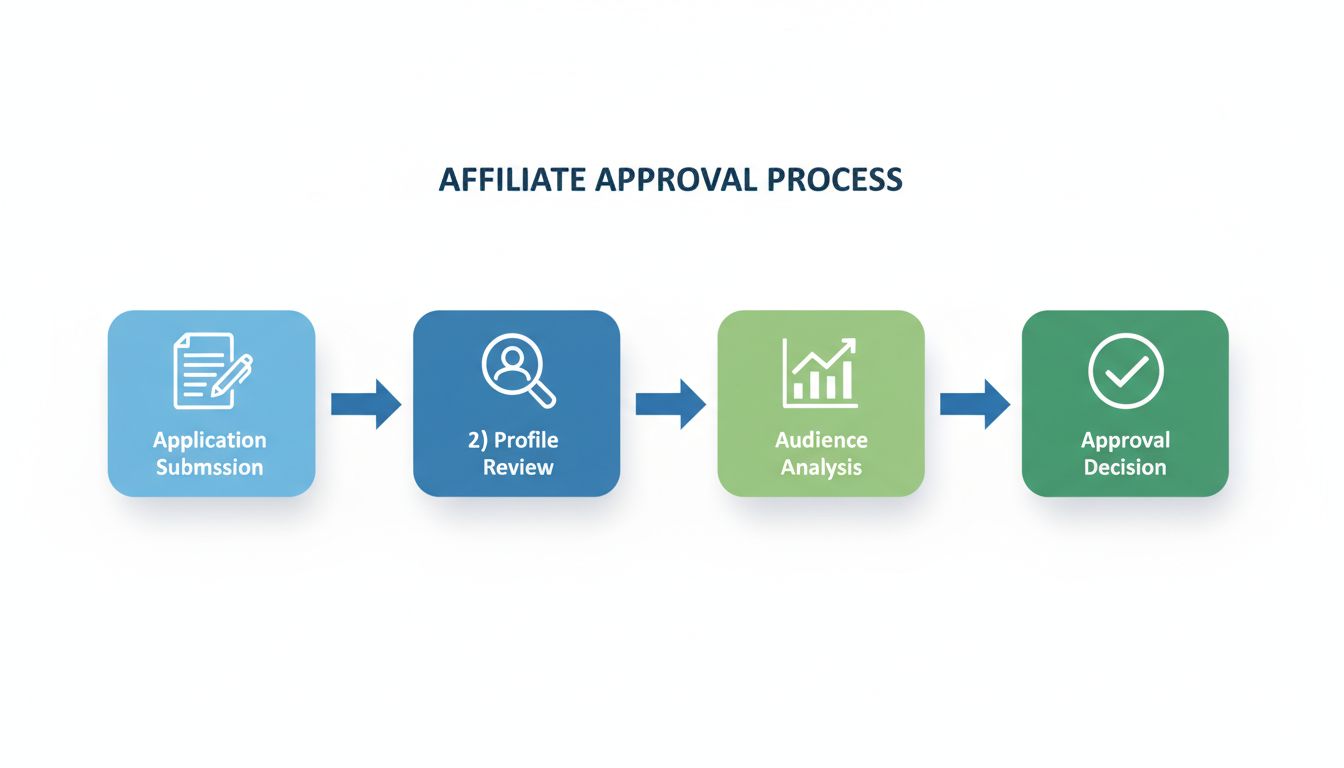
Every manual approval follows the same four-stage cycle:

Set up advanced tracking in minutes. No credit card required.
When a publisher applies to join an affiliate program, the application enters a review queue. An affiliate manager — or, in larger networks, a dedicated vetting team — manually checks the applicant’s website quality, traffic sources, geographic relevance, promotional methods, and compliance history. Networks like Awin and CJ Affiliate require advertisers to manually approve each publisher before they can start earning commissions. Direct offer programs often add a phone call or video verification step.
Ad platforms including Meta, Google Ads, and TikTok run automated scans on every submitted creative. Ads that trigger policy flags — or fall into sensitive categories like finance, health, or politics — skip the automation lane and enter a manual review queue. A human reviewer checks the creative against platform policies before the ad goes live. Internal agency QA teams also use manual approval as the final gate before pushing client campaigns live, verifying tracking setup, landing page parity, and brand safety compliance.
In software delivery, manual approval acts as a release gate in CI/CD pipelines. Platforms like AWS CodePipeline, GitHub Actions, Octopus Deploy, and OpenShift Pipelines all support manual approval actions. A pipeline builds, tests, and stages a release — then pauses. A designated approver (release manager, QA lead, or engineering manager) reviews the deployment artifact and signs off before the code reaches production. This is especially common for high-risk releases, privileged components, and externally distributed software such as browser extensions.
Any stakeholder whose action triggers a gated workflow can initiate an approval request. In affiliate marketing, the publisher initiates by submitting an application. In software, a developer initiates by merging code that triggers a deployment pipeline. In finance, an employee initiates by submitting a purchase request. The common thread: someone creates a request that the system cannot resolve without human judgment.
Once the workflow reaches the approval gate, the system routes the request to the correct approver or approval group. Routing rules may be based on:
Notifications arrive through the platform’s native channels — dashboard alerts, email, or integrated messaging tools.
The approver examines the request against a set of criteria. For an affiliate application, this typically includes:
The approver then selects approve or reject. In Octopus Deploy, the decision is binary — proceed or abort. In AWS CodePipeline, the approver can also include comments explaining the decision. In affiliate platforms, rejection often includes a reason code that the publisher can see, enabling resubmission if the issue is fixable.
Once a decision is made, several things happen:
Be the first to know about new features and product updates.
Manual approval is the right choice when the decision requires context that rules cannot encode:
Manual approval is your primary defense against affiliate fraud and brand-damaging promotion. When you manually review each application, you can:
The tradeoff is time. A program receiving 50 applications per day cannot manually review each one in depth without dedicated staff. This is where hybrid models help: set automated rules to reject obvious spam (empty websites, prohibited countries, known-fraud domains) and manually review the rest.
If you are applying to affiliate programs that use manual approval, your application is being reviewed by a real person. Make their decision easy:
Affiliate platforms handle manual approval in several ways:
Manual approval is a human checkpoint embedded in an otherwise automated workflow. When the workflow reaches that checkpoint, execution pauses. The system sends a notification to one or more designated approvers. Those approvers review the request — an affiliate application, a code deployment, a purchase order, an ad creative — and decide whether to approve or reject it. If approved, the workflow resumes. If rejected, it stops or loops back for revision.
The defining trait is that a human must act before the process continues. This distinguishes manual approval from automated approval, where software applies predefined rules — traffic thresholds, fraud scores, budget limits — and makes the decision without human intervention.
Every manual approval follows the same four-stage cycle:
When a publisher applies to join an affiliate program, the application enters a review queue. An affiliate manager — or, in larger networks, a dedicated vetting team — manually checks the applicant’s website quality, traffic sources, geographic relevance, promotional methods, and compliance history. Networks like Awin and CJ Affiliate require advertisers to manually approve each publisher before they can start earning commissions. Direct offer programs often add a phone call or video verification step.
The automated layer flags high-risk applications — suspicious domains, known-fraud patterns, prohibited categories — and routes only borderline or high-value cases to human reviewers.
Ad platforms including Meta, Google Ads, and TikTok run automated scans on every submitted creative. Ads that trigger policy flags — or fall into sensitive categories like finance, health, or politics — skip the automation lane and enter a manual review queue. A human reviewer checks the creative against platform policies before the ad goes live. Internal agency QA teams also use manual approval as the final gate before pushing client campaigns live, verifying tracking setup, landing page parity, and brand safety compliance.
In software delivery, manual approval acts as a release gate in CI/CD pipelines. Platforms like AWS CodePipeline, GitHub Actions, Octopus Deploy, and OpenShift Pipelines all support manual approval actions. A pipeline builds, tests, and stages a release — then pauses. A designated approver (release manager, QA lead, or engineering manager) reviews the deployment artifact and signs off before the code reaches production. This is especially common for high-risk releases, privileged components, and externally distributed software such as browser extensions.
Accounts payable workflows frequently require a manager to manually approve purchase orders and invoices above a certain threshold before payment is issued. Automated approval workflows cut that to 10–15 minutes per request.
Any stakeholder whose action triggers a gated workflow can initiate an approval request. In affiliate marketing, the publisher initiates by submitting an application. In software, a developer initiates by merging code that triggers a deployment pipeline. In finance, an employee initiates by submitting a purchase request. The common thread: someone creates a request that the system cannot resolve without human judgment.
Once the workflow reaches the approval gate, the system routes the request to the correct approver or approval group. Routing rules may be based on:
Notifications arrive through the platform’s native channels — dashboard alerts, email, or integrated messaging tools.
The approver examines the request against a set of criteria. For an affiliate application, this typically includes:
The approver then selects approve or reject. In Octopus Deploy, the decision is binary — proceed or abort. In AWS CodePipeline, the approver can also include comments explaining the decision. In affiliate platforms, rejection often includes a reason code that the publisher can see, enabling resubmission if the issue is fixable.
Once a decision is made, several things happen:
| Benefit | Drawback | Best Context |
|---|---|---|
| — | Slower launches — 1 to 14 days depending on vertical and queue depth | New partner intake, high-risk categories |
| Quality control — catches off-brand or misleading content that automation misses | Bottleneck risk — a single approver on leave can stall the entire pipeline | Premium direct offers, brand-sensitive campaigns |
| Compliance assurance — required for regulated verticals | Labor cost — each manual review consumes paid staff time | Finance, gambling, health, pharma |
| Relationship building — direct dialogue with high-value publishers | Inconsistent decisions — different approvers apply different standards | Key account management |
| Audit trail — clear record of who approved what and when | Rubber-stamp risk — when approvals become routine, approvers stop reading | Regulated industries with reporting obligations |
Manual approval is the right choice when the decision requires context that rules cannot encode:
Automated approval excels where volume, speed, and consistency dominate:
AI pre-screening handles the initial pass, applying machine learning models trained on historical approval data and fraud patterns.
Affiliate networks, ad platforms, and CI/CD tools have all converged on this architecture.
Manual approval carries a measurable price tag. ApprovalMax calculated that businesses processing 3,000 invoice and purchase-order requests per year spend roughly £36,630 annually on manual approval labor alone — approximately one hour per request at the UK National Living Wage of £12.21 per hour.
Switching to an automated approval workflow with human checkpoints only where needed reduced processing time to 10–15 minutes per request. For US businesses paying higher wage rates, the savings are proportionally larger.
In affiliate marketing, the cost equation is different but equally real. Every day a legitimate publisher sits in the approval queue is a day of lost commission revenue — for both the publisher and the merchant. Networks that process applications in hours rather than days capture publishers who might otherwise join competing programs. The labor cost of a dedicated reviewer is offset by the revenue from faster onboarding and the fraud prevented by thorough vetting.
Manual approval is your primary defense against affiliate fraud and brand-damaging promotion. When you manually review each application, you can:
The tradeoff is time. A program receiving 50 applications per day cannot manually review each one in depth without dedicated staff. This is where hybrid models help: set automated rules to reject obvious spam (empty websites, prohibited countries, known-fraud domains) and manually review the rest.
If you are applying to affiliate programs that use manual approval, your application is being reviewed by a real person. Make their decision easy:
Affiliate platforms handle manual approval in several ways:
The goal is the same across all tools: ensure only qualified, trustworthy affiliates promote your products.
Discover the benefits of manual approval and learn how you can protect your affiliate program from fraud while ensuring high-quality partnerships.
Auto-approval automatically accepts affiliate applications without manual review. Learn how it works, its pros and cons, and when to use it.
Understand how affiliate sign-up approval works in Post Affiliate Pro, including manual and automatic approval options, configuration steps, and best practices ...
Learn what commission approval means, how it works, and which calculation, tracking, or program rules affect affiliate results.
Join our community of happy clients and provide excellent customer support with Post Affiliate Pro.




Cookie Consent
We use cookies to enhance your browsing experience and analyze our traffic. See our privacy policy.