


Meta Tag
A meta tag is hidden HTML code that tells search engines and browsers what a webpage is about. Learn the types and how to use them.
18 min read
SEO
MetaTags
+3
A meta description is an HTML meta tag describing a page’s content. Search engines may use it for a search-result snippet, but can choose other text. For an affiliate review or glossary page, describe the actual topic and benefit without promising a ranking or a purchase outcome.
A meta description is an HTML meta tag describing a page’s content. Search engines may use it for a search-result snippet, but can choose other text. For an affiliate review or glossary page, describe the actual topic and benefit without promising a ranking or a purchase outcome.
Think of it as your page’s elevator pitch in the search results: roughly one to two sentences that tell a searcher why they should click your link instead of the nine others on the page.
On this page
You will not see a meta description on the visible page itself. It lives in the HTML source code, specifically inside the <head> element. There are three common ways to locate and edit it:
<meta name="description" — you will find the tag and its content attribute.If you manage an affiliate program or run a network of publisher sites, checking meta descriptions across dozens or hundreds of landing pages manually is impractical. This is where bulk auditing tools and programmatic templates become essential — more on that below.

Set up advanced tracking in minutes. No credit card required.
Here are three real-world examples, annotated to show what makes each one work:
Example 1 — Ecommerce product page (Shopify-style):
Why it works: It includes the product category, a price-related incentive (free shipping threshold), a trust signal (30-day returns), and a call to action. It stays under 160 characters.
Example 2 — Affiliate comparison post:
Why it works: It signals first-hand research (“we tested”), names specific features searchers care about, and creates a curiosity gap that rewards a click.
Example 3 — Blog how-to guide:
Why it works: It promises a specific outcome, cites data, and offers a downloadable resource — three elements that lift CTR in competitive informational SERPs.
It is, for five reasons:
Be the first to know about new features and product updates.
Drawing from Google’s own documentation, Yoast’s seven characteristics framework, and first-hand testing across affiliate and ecommerce sites, a strong meta description checks these boxes:
| Characteristic | What it means | Example |
|---|---|---|
| Matches search intent | Answers the implicit question behind the query | For “best affiliate software,” describe comparison criteria, not company history |
| Includes the primary keyword | The target term appears naturally, not stuffed | — |
| Stays within length limits | Roughly 120–160 characters; mobile truncation is tighter | Aim for the key message in the first 120 characters |
| Uses active, actionable language | Verbs that tell the searcher what to do or what they will get | “Learn,” “Compare,” “Download,” “Find,” “Get” |
| Is unique per page | No two pages share the same description | Product A and Product B each get their own |
| Includes a call to action | A clear next step | “Read the full comparison” or “Start your free trial” |
| Delivers on the promise | The page actually contains what the description says | No clickbait |
For high-value pages — your homepage, top landing pages, and best-performing blog posts — write each meta description by hand. The process:
Affiliate program managers and publishers with hundreds or thousands of pages cannot write every description by hand. A structured template works well for product pages, category pages, and programmatic content:
Yoast SEO Premium and other tools now offer AI-powered meta description generation. In our testing, AI-generated descriptions are a solid starting point but require human review. The AI often produces grammatically correct but generic text — it rarely captures brand voice or specific value propositions without careful prompting.
There is no fixed character limit.
In practice, the displayed snippet width varies by device:
| Device | Typical visible characters | Notes |
|---|---|---|
| Desktop | 150–160 characters | Roughly 920 pixels wide on a standard viewport |
| Mobile | 110–120 characters | Narrower SERP layout truncates earlier |
| Both (safe zone) | 120–155 characters | The key message should appear in the first 120 |
Google may also append the date to the snippet preview, which consumes characters. If your page is time-sensitive, account for this.
This is one of the most common questions in SEO forums, and the answer is straightforward: Google rewrites snippets when it believes page content describes the query better than your meta description does.
Common reasons Google ignores your meta description:
What you can do about it: Write a description that genuinely matches the page content and the searcher’s likely intent. If Google still rewrites it, check whether the auto-generated snippet is better than yours. Sometimes it is — and that is fine.
Google’s snippet generation is automated and query-dependent. The same page can show different snippets for different search queries. Here is how the process works, based on Google’s published documentation:
This means your meta description is not a guarantee — it is a suggestion. The best approach is to write a strong description and ensure the page body itself contains clear, query-relevant passages that could serve as alternative snippets.
In some cases, you may want to control or suppress snippets entirely — for example, on a login page, a thank-you page, or a page with sensitive content.
| Goal | HTML tag | Example |
|---|---|---|
| Prevent any snippet | <meta name="robots" content="nosnippet"> | Use on pages where no description should appear in SERPs |
| Limit snippet length | <meta name="robots" content="max-snippet:50"> | Limits the text snippet to 50 characters |
| Prevent specific text from appearing | data-nosnippet attribute on any HTML element | Wrap sensitive or irrelevant text blocks |
These are edge cases. For most pages, the better strategy is to write a compelling meta description and let Google decide.
Meta descriptions also power social media previews when your page is shared on platforms like Facebook, LinkedIn, and X. However, social platforms use their own meta tags — Open Graph (og:description) and Twitter Cards (twitter:description) — which take priority over the standard meta description.
Best practice: Set both the standard meta description and the Open Graph description. If you use Yoast SEO or a similar plugin, this is handled automatically. If you manage tags manually, your <head> should include:
<meta name="description" content="Your standard meta description.">
<meta property="og:description" content="Your social-optimized description.">
Your affiliate landing pages compete not only with other merchants but also with review sites, comparison engines, and marketplaces. A well-written meta description on each landing page:
These are the pages affiliates link to most often, and they deserve the strongest SERP presentation.
Your review posts, comparison articles, and how-to guides are competing in some of the most crowded SERPs. The difference between position #4 and position #1 is often CTR, not content quality. Specific tactics:
Managing meta descriptions across a network of affiliates or multiple program landing pages requires process:
This is a real operational challenge for affiliate sites with hundreds of product reviews or program pages. Here is a prioritization framework:
| Priority | Page type | Action |
|---|---|---|
| High | Top 20 pages by organic traffic | Write manually, review monthly |
| Medium | Pages ranking positions 4–15 | Use a template with manual customization |
| Low | Pages ranking position 16+ or not yet indexed | Use a programmatic template; revisit when they gain traction |
| None (intentional) | Utility pages (login, cart, thank-you) | Use nosnippet to suppress descriptions entirely |
For programmatic generation at scale, tools like SE Ranking’s Website Audit, Moz Pro’s Site Crawl, and Semrush’s On-Page SEO Checker can flag pages missing descriptions and suggest templates based on page type.
| Obsolete (pre-2015) | Current (2026) |
|---|---|
| Meta descriptions must be exactly 155 characters | No fixed limit; key message in first 120 characters |
| Stuff the description with keywords | Write naturally for searchers; one mention of the primary keyword is enough |
| Same description across related pages is fine | Every page needs a unique description |
| Meta descriptions directly boost rankings | They influence CTR, which indirectly affects rankings |
| Write descriptions for search engines | Write for the person scanning results; the search engine follows |
Enhance your SEO strategy and drive more conversions by mastering the art of meta descriptions. Discover expert tips and tools to improve your affiliate marketing results.
A meta tag is hidden HTML code that tells search engines and browsers what a webpage is about. Learn the types and how to use them.
A meta title is the HTML title tag that names a webpage and appears as the clickable headline in search results and browser tabs.
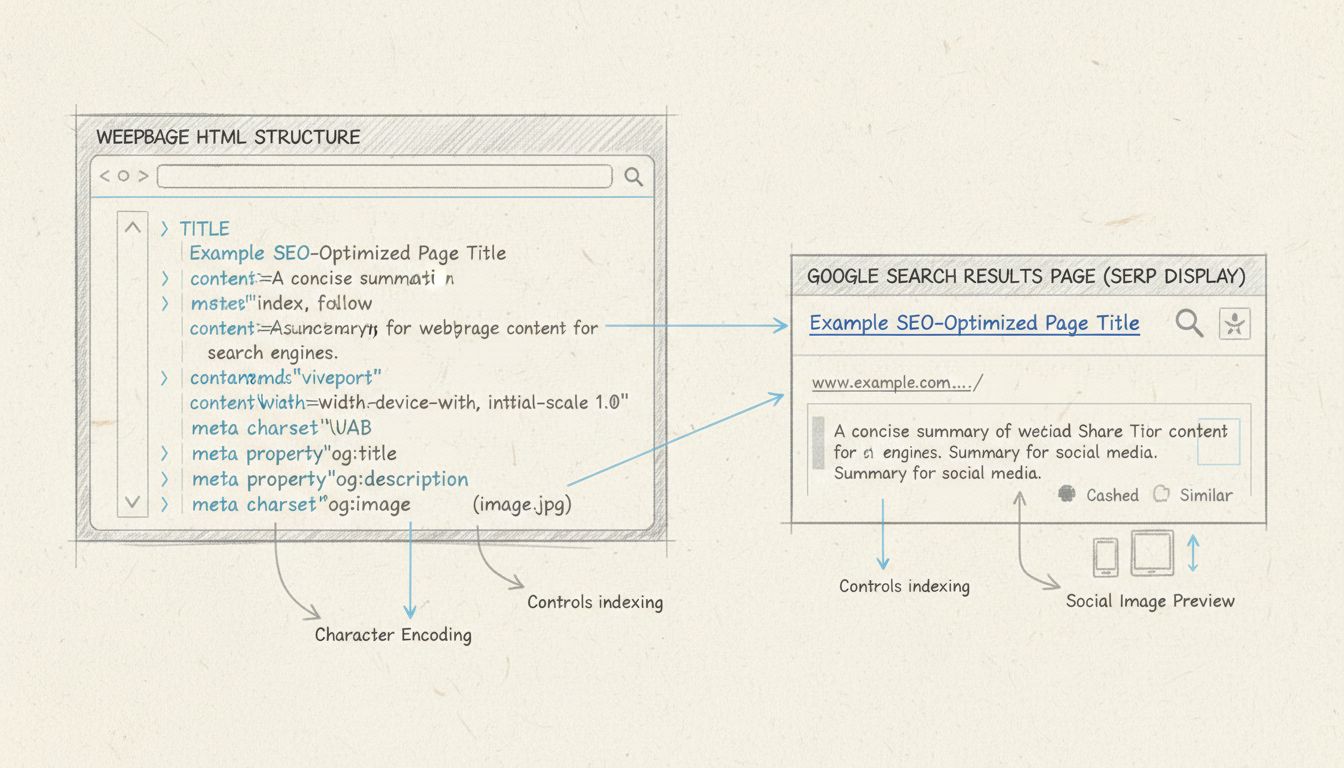
Learn how to use meta tags for SEO effectively. Discover essential meta tags like title, description, robots, and Open Graph tags to boost your search rankings ...
Join our community of happy clients and provide excellent customer support with Post Affiliate Pro.




Cookie Consent
We use cookies to enhance your browsing experience and analyze our traffic. See our privacy policy.