


How Can I Use Meta Tags for SEO?
Learn how to use meta tags for SEO effectively. Discover essential meta tags like title, description, robots, and Open Graph tags to boost your search rankings ...
11 min read
A meta tag is a snippet of HTML code placed in the <head> section of a webpage that provides structured information — called metadata — about that page to browsers, search engines, and social platforms.
A meta tag is a snippet of HTML code placed in the <head> section of a webpage that provides structured information — called metadata — about that page to browsers, search engines, and social platforms. Visitors never see meta tags on the page itself. They exist purely for machines: Google reads them to decide what snippet to show in search results, browsers use them to render content correctly on mobile screens, and social networks pull them to generate preview cards when someone shares a link.
A meta tag is an HTML element that supplies machine-readable information about a webpage. It uses a name (or http-equiv or charset) attribute paired with a content attribute to deliver a specific instruction or description. Unlike visible elements such as headings and paragraphs, meta tags operate entirely behind the scenes.
When a browser loads a page, it parses the <head> section before rendering anything visible. Meta tags live there. A search engine crawler does the same: it reads the raw HTML, extracts the meta tags, and uses them to understand the page’s topic, language, character encoding, and indexing rules. If a crawler encounters a meta tag it does not recognize, it simply ignores it — there is no penalty for including unsupported tags.
The basic syntax follows this pattern:
<meta> — the tag itself; it is self-closing and requires no end tag.name — the type of metadata being provided (e.g., description, robots, viewport).content — the actual value or instruction associated with that name.Some meta tags use http-equiv instead of name. These simulate HTTP header directives. Others use charset to declare the document’s character encoding directly.
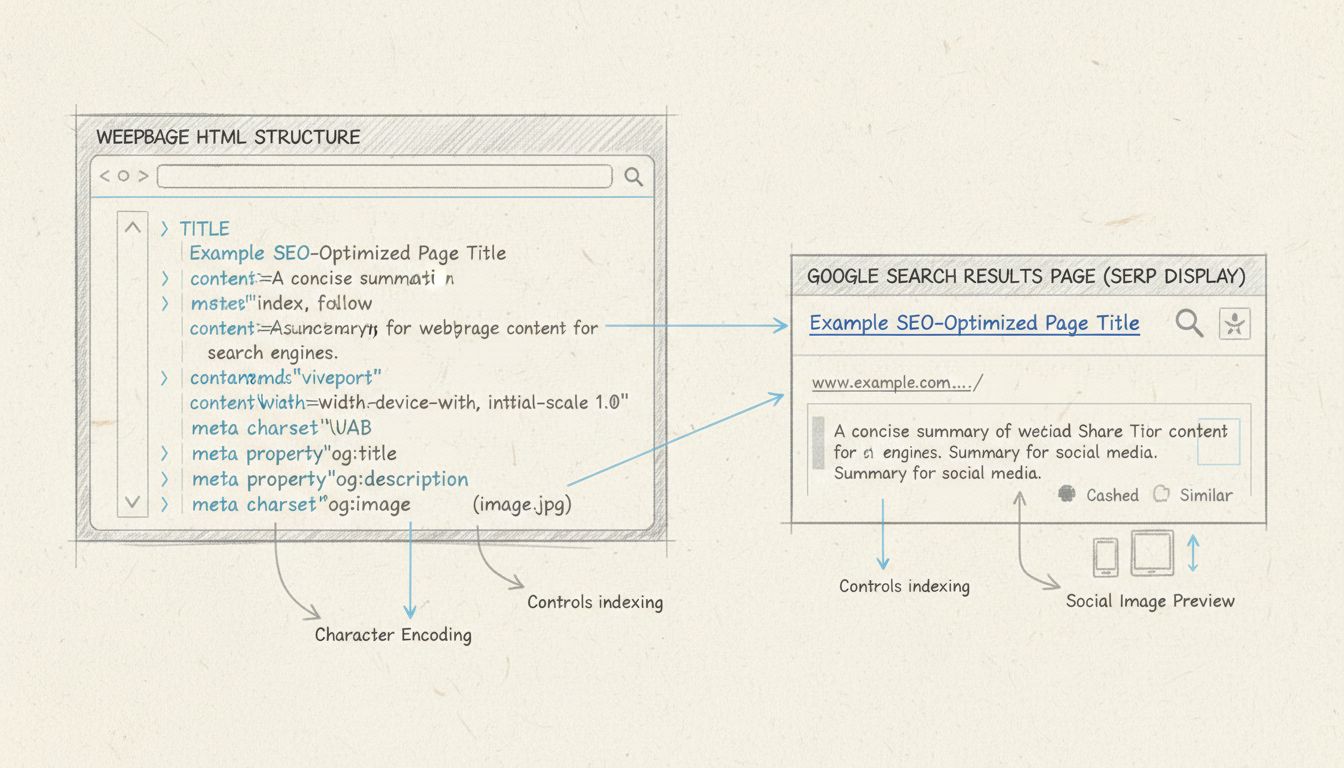
Each line serves a distinct purpose — character encoding, mobile rendering, search snippet control, indexing instructions, and social preview formatting. None of it appears on the visible page, but all of it shapes how the page performs across platforms.
The meta description provides a short summary of the page. Google often — though not always — displays it as the snippet beneath the blue link in search results. While the description itself is not a direct ranking factor, a well-written one can improve click-through rate, which does influence rankings indirectly.
For affiliate publishers writing product reviews or comparison posts, the meta description is prime real estate. It should state the page’s value proposition clearly and include the primary keyword naturally. Avoid duplicating descriptions across pages; Google may ignore them or, worse, choose an irrelevant snippet from the body text.
<meta name="robots" content="index, follow">
| Directive | Meaning |
|---|---|
index | Allow the page to appear in search results (default) |
noindex | Exclude the page from search results |
follow | Crawl and pass link equity through links on the page (default) |
nofollow | Do not crawl or pass equity through links on the page |
noarchive | Prevent Google from showing a cached copy |
nosnippet | Prevent a text snippet from appearing in search results |
For affiliate program managers, the robots tag solves a common problem: thin or duplicate pages. Thank-you pages, login portals, and printer-friendly versions of articles add no value in search results. Adding <meta name="robots" content="noindex, follow"> to those pages keeps them out of the index while still allowing crawlers to follow their links.
Advertisers running paid landing pages sometimes use noindex on PPC-specific URLs to prevent them from competing with organic listings.
<meta charset="UTF-8">
This tag should appear as early as possible in the <head>, ideally within the first 1,024 bytes of the document. Browsers need the encoding information before they can parse the rest of the page correctly.
The viewport meta tag controls how a page is displayed on mobile devices. Without it, mobile browsers default to a desktop-width viewport and shrink the page to fit, making text illegible and buttons impossible to tap.
The standard value width=device-width, initial-scale=1.0 tells the browser to match the viewport width to the device’s screen width and start at a 1:1 zoom level. This is a prerequisite for responsive design — and since Google uses mobile-first indexing, a missing or broken viewport tag can harm rankings.
For affiliate sites that rely on mobile traffic (which, in most niches, is the majority), the viewport tag is non-negotiable.
Content-Type (legacy):
<meta http-equiv="Content-Type" content="text/html; charset=UTF-8">
<meta charset="UTF-8"> instead. It remains in older codebases but offers no advantage over the shorter charset declaration.Refresh:
<meta http-equiv="refresh" content="30; url=https://example.com/new-page">
These meta tags control how a page appears when shared on social platforms. They use property instead of name:
| Tag | Platform | Purpose |
|---|---|---|
og:title | Facebook, LinkedIn, others | The title shown in the share card |
og:description | Facebook, LinkedIn, others | The description shown in the share card |
og:image | Facebook, LinkedIn, others | The thumbnail image |
og:url | Facebook, LinkedIn, others | The canonical URL |
twitter:card | X (Twitter) | Card type: summary or summary_large_image |
twitter:title | X (Twitter) | Title for the Twitter card |
twitter:description | X (Twitter) | Description for the Twitter card |
twitter:image | X (Twitter) | Image for the Twitter card |
For affiliate publishers who distribute content on social media, Open Graph tags are essential. A shared link without them displays a bare URL — no image, no description, no title. With them, the same link becomes a rich preview card with a headline, image, and summary, dramatically increasing click-through.

Set up advanced tracking in minutes. No credit card required.
description — may be used for the search result snippet.robots — controls indexing and crawling behavior for all search engines.googlebot — a Google-specific variant of robots; overrides the generic robots tag for Google’s crawler only.google-site-verification — used to verify site ownership in Google Search Console.content-type — declares character encoding (though charset is preferred).referrer — controls the Referer header sent with outgoing links.viewport — while not an indexing tag, Google recommends it for mobile-friendly rendering and factors mobile usability into rankings.The meta keywords tag is the most famous casualty. In the early 2000s, site owners stuffed it with irrelevant terms to manipulate rankings. Google stopped using it as a ranking signal in 2009, and it has never returned. Bing confirmed the same. Including meta keywords today does no harm, but it provides zero benefit and signals to anyone who checks your source code that your SEO knowledge may be outdated.
Other tags Google ignores include revisit-after (which purported to tell crawlers how often to return), rating (intended for content maturity labels), and generator (which identifies the software used to create the page). None of these affect indexing or ranking.
A meta tag is an HTML element that supplies machine-readable information about a webpage. It uses a name (or http-equiv or charset) attribute paired with a content attribute to deliver a specific instruction or description. Unlike visible elements such as headings and paragraphs, meta tags operate entirely behind the scenes.
When a browser loads a page, it parses the <head> section before rendering anything visible. Meta tags live there. A search engine crawler does the same: it reads the raw HTML, extracts the meta tags, and uses them to understand the page’s topic, language, character encoding, and indexing rules. If a crawler encounters a meta tag it does not recognize, it simply ignores it — there is no penalty for including unsupported tags.
The basic syntax follows this pattern:
<meta name="description" content="A short summary of the page content.">
<meta> — the tag itself; it is self-closing and requires no end tag.name — the type of metadata being provided (e.g., description, robots, viewport).content — the actual value or instruction associated with that name.Some meta tags use http-equiv instead of name. These simulate HTTP header directives. Others use charset to declare the document’s character encoding directly.
Here is a representative <head> section from a well-optimized affiliate landing page:
<head>
  <meta charset="UTF-8">
  <meta name="viewport" content="width=device-width, initial-scale=1.0">
  <meta name="description" content="Compare the top affiliate tracking software of 2026. Honest reviews, pricing details, and feature breakdowns for publishers and program managers.">
  <meta name="robots" content="index, follow">
  <meta property="og:title" content="Best Affiliate Tracking Software Compared — 2026">
  <meta property="og:description" content="Side-by-side comparison of the leading affiliate platforms. Pricing, features, and real user ratings.">
  <meta name="twitter:card" content="summary_large_image">
</head>
Not all meta tags carry equal weight. Some directly influence rankings and click-through rates. Others affect rendering, security, or social sharing.
<meta name="description" content="A concise summary of the page, ideally 120 to 160 characters.">
For affiliate publishers writing product reviews or comparison posts, the meta description is prime real estate. It should state the page’s value proposition clearly and include the primary keyword naturally. Avoid duplicating descriptions across pages; Google may ignore them or, worse, choose an irrelevant snippet from the body text.
Keep it between 120 and 160 characters. Lead with the most compelling information.
<meta name="robots" content="index, follow">
| Directive | Meaning |
|---|---|
index | Allow the page to appear in search results (default) |
noindex | Exclude the page from search results |
follow | Crawl and pass link equity through links on the page (default) |
nofollow | Do not crawl or pass equity through links on the page |
noarchive | Prevent Google from showing a cached copy |
nosnippet | Prevent a text snippet from appearing in search results |
For affiliate program managers, the robots tag solves a common problem: thin or duplicate pages. Thank-you pages, login portals, and printer-friendly versions of articles add no value in search results. Adding <meta name="robots" content="noindex, follow"> to those pages keeps them out of the index while still allowing crawlers to follow their links.
Advertisers running paid landing pages sometimes use noindex on PPC-specific URLs to prevent them from competing with organic listings.
<meta charset="UTF-8">
This tag should appear as early as possible in the <head>, ideally within the first 1,024 bytes of the document. Browsers need the encoding information before they can parse the rest of the page correctly.
<meta name="viewport" content="width=device-width, initial-scale=1.0">
The standard value width=device-width, initial-scale=1.0 tells the browser to match the viewport width to the device’s screen width and start at a 1:1 zoom level. This is a prerequisite for responsive design — and since Google uses mobile-first indexing, a missing or broken viewport tag can harm rankings.
For affiliate sites that rely on mobile traffic (which, in most niches, is the majority), the viewport tag is non-negotiable.
Meta tags with the http-equiv attribute simulate HTTP response headers.
Content-Type (legacy):
<meta http-equiv="Content-Type" content="text/html; charset=UTF-8">
<meta charset="UTF-8"> instead. It remains in older codebases but offers no advantage over the shorter charset declaration.Refresh:
<meta http-equiv="refresh" content="30; url=https://example.com/new-page">
These meta tags control how a page appears when shared on social platforms. They use property instead of name:
| Tag | Platform | Purpose |
|---|---|---|
og:title | Facebook, LinkedIn, others | The title shown in the share card |
og:description | Facebook, LinkedIn, others | The description shown in the share card |
og:image | Facebook, LinkedIn, others | The thumbnail image |
og:url | Facebook, LinkedIn, others | The canonical URL |
twitter:card | X (Twitter) | Card type: summary or summary_large_image |
twitter:title | X (Twitter) | Title for the Twitter card |
twitter:description | X (Twitter) | Description for the Twitter card |
twitter:image | X (Twitter) | Image for the Twitter card |
For affiliate publishers who distribute content on social media, Open Graph tags are essential. A shared link without them displays a bare URL — no image, no description, no title. With them, the same link becomes a rich preview card with a headline, image, and summary, dramatically increasing click-through.
description — may be used for the search result snippet.robots — controls indexing and crawling behavior for all search engines.googlebot — a Google-specific variant of robots; overrides the generic robots tag for Google’s crawler only.google-site-verification — used to verify site ownership in Google Search Console.content-type — declares character encoding (though charset is preferred).referrer — controls the Referer header sent with outgoing links.viewport — while not an indexing tag, Google recommends it for mobile-friendly rendering and factors mobile usability into rankings.The meta keywords tag is the most famous casualty. In the early 2000s, site owners stuffed it with irrelevant terms to manipulate rankings. Bing confirmed the same. Including meta keywords today does no harm, but it provides zero benefit and signals to anyone who checks your source code that your SEO knowledge may be outdated.
Other tags Google ignores include revisit-after (which purported to tell crawlers how often to return), rating (intended for content maturity labels), and generator (which identifies the software used to create the page). None of these affect indexing or ranking.
Be the first to know about new features and product updates.
Meta tags are not just a developer concern. They have direct, practical consequences for three distinct roles in the affiliate ecosystem.
Advertisers running affiliate programs need their landing pages to appear correctly in search results and to be verifiable in Google Search Console. The google-site-verification meta tag is the simplest way to prove site ownership without uploading files or modifying DNS records.
A well-crafted meta description for a program sign-up page — for example, “Join our affiliate program and earn 30% recurring commission. Real-time tracking, monthly payouts, dedicated support.” — can be the difference between a click and a scroll-past. The description does not directly affect ranking, but it directly affects whether someone chooses your result over a competitor’s.
The robots tag also protects advertisers: use noindex on thank-you pages, internal dashboards, and duplicate campaign landing pages so they do not dilute the site’s index quality.
Publishers — bloggers, review sites, comparison portals — live and die by organic traffic. Every meta description on every post is an opportunity to earn a click. A review of affiliate tracking software needs a description that names the products compared and hints at the verdict. Generic descriptions (“We review software. Read more.”) waste the opportunity.
A site that is unreadable on a phone loses rankings and conversions in one stroke.
Open Graph tags turn every social share into a mini-advertisement for the content. A publisher who shares a comparison article on Facebook without OG tags gets a text-only link. With OG tags, the same share displays a headline, image, and summary — all of which increase the likelihood of a click and, ultimately, an affiliate conversion.
Program managers sit between advertisers and publishers. Their job includes maintaining the program’s public-facing pages: the sign-up form, the terms and conditions, the FAQ, and the resource center. Each of these pages needs appropriate meta tags.
The robots tag is particularly useful here. Program managers often deal with pages that should not appear in search: application confirmation screens, internal reporting dashboards, and legacy pages that have been replaced. Adding noindex to these pages keeps the site’s index clean and focused on pages that actually drive value.
Meta descriptions on program information pages also matter. A publisher searching for “affiliate programs in SaaS” will see your program’s listing in the search results. The description should answer, in one or two sentences, what the program offers, what the commission structure is, and why it is worth joining.
If you edit HTML directly, add meta tags inside the <head> section, between the opening <head> and the closing </head>. A minimal setup for a new page looks like this:
<head>
  <meta charset="UTF-8">
  <meta name="viewport" content="width=device-width, initial-scale=1.0">
  <meta name="description" content="Your page description here.">
  <meta name="robots" content="index, follow">
  <title>Your Page Title</title>
</head>
A meta tag generator tool lets you fill in fields — title, description, image URL, social handles — and outputs the complete set of meta tags to copy into your <head>. This is especially useful for Open Graph and Twitter Card tags, where the syntax varies slightly between platforms.
To check what meta tags are already on a page:
Ctrl+U / Cmd+Option+U). Search for <meta to find all meta tag instances.F12 or Ctrl+Shift+I), go to the Elements panel, and expand the <head> section. All meta tags are listed there.og:title, og:description, and og:image.noindex is applied only to pages you genuinely want to exclude. Accidentally noindexing your homepage or top-performing article can cause a sharp traffic drop.The role of meta tags has evolved significantly over the past two decades. In the early 2000s, meta keywords were a primary ranking signal — and were abused so thoroughly that search engines abandoned them entirely. The meta description has never been a direct ranking factor, but its influence on click-through rate makes it indirectly important.
Google has also become more aggressive about rewriting meta descriptions in search results. This does not mean descriptions are pointless — it means they should be accurate and relevant, because Google is more likely to use them when they are.
AI-driven search engines and large language models (LLMs) are changing how content is discovered. When an AI overview generates an answer, it pulls from page content — and meta descriptions are one of the signals it weighs. Structured, accurate metadata helps LLMs understand what a page is about and whether it is relevant to a query.
The robots tag is also gaining new relevance. As AI crawlers from OpenAI, Anthropic, and others scan the web for training data, site owners are using robots directives to control access. Expect the meta robots tag to play a role in the emerging standard for AI crawler opt-out.
Master the essentials of meta tags to boost your website's visibility and drive targeted traffic in affiliate marketing.
Learn how to use meta tags for SEO effectively. Discover essential meta tags like title, description, robots, and Open Graph tags to boost your search rankings ...
A meta title is the HTML title tag that names a webpage and appears as the clickable headline in search results and browser tabs.
A meta description is an HTML tag that summarizes a webpage for search engines and searchers. Learn how to write one that drives clicks.
Join our community of happy clients and provide excellent customer support with Post Affiliate Pro.




Cookie Consent
We use cookies to enhance your browsing experience and analyze our traffic. See our privacy policy.