


How Can I Use Meta Tags for SEO?
Learn how to use meta tags for SEO effectively. Discover essential meta tags like title, description, robots, and Open Graph tags to boost your search rankings ...
11 min read
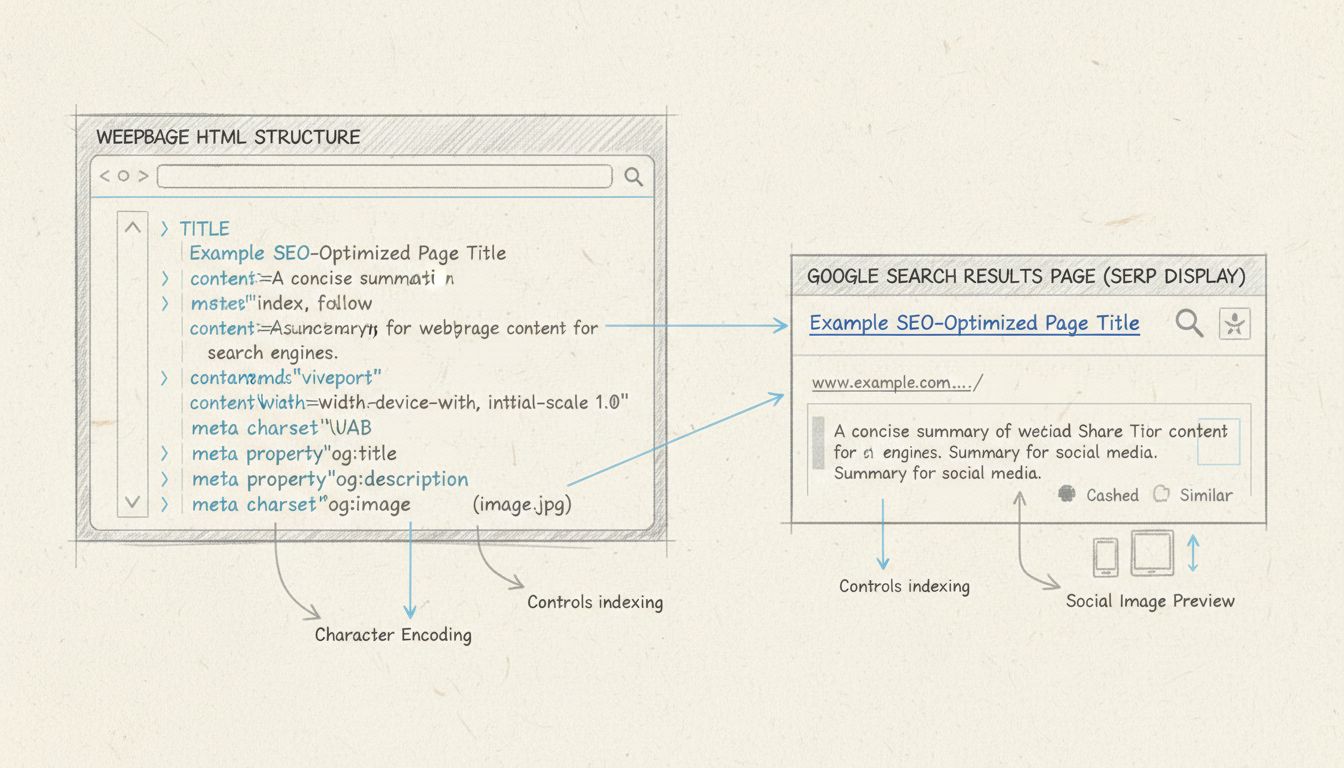
A meta title is the HTML <title> element that names a webpage.
A meta title is the HTML <title> element that names a webpage. It appears as the clickable blue headline on search engine results pages (SERPs), in browser tabs, and in social media previews when a page is shared. Also called a title tag or page title, it is the single most influential on-page SEO element for telling search engines and users what your page is about.
Search engines use the meta title to understand page relevance and determine ranking. Users scan it to decide whether to click. A well-written meta title improves click-through rates (CTR), drives qualified traffic, and signals topic authority — making it a foundational piece of any SEO strategy, including for affiliate marketers managing large content libraries.
On this page
There is no functional difference.
The confusion exists because the title tag is not technically a <meta> element — unlike the meta description (<meta name="description">) or meta robots tag. The title tag is a standalone HTML element with its own <title> syntax. Despite this, the phrase “meta title” has become standard industry shorthand, and Google itself acknowledges both terms as interchangeable in practice.
| Term | HTML Syntax | Category | Common Usage |
|---|---|---|---|
| Meta title | <title>…</title> | Standalone element | Marketing, CMS fields, SEO plugins |
| Title tag | <title>…</title> | Standalone element | Developer docs, Google Search Central |
| Meta description | <meta name="description" content="…"> | True meta tag | Marketing, CMS fields, SEO plugins |

Set up advanced tracking in minutes. No credit card required.
This is the most visible and consequential placement. The meta title becomes the clickable headline for your listing.
When a user has multiple tabs open, the meta title labels each one. A descriptive, front-loaded title helps users find your page among a row of crowded tabs — a small but real usability win that affects return visits.
When a URL is pasted into Facebook, LinkedIn, or Twitter, the meta title is pulled into the link card preview. Platforms may use Open Graph (og:title) or Twitter Card tags if present; if not, they fall back to the <title> element. For affiliate marketers sharing deal pages or comparison posts on social channels, this is often the first impression a potential buyer sees.
The meta title is a confirmed ranking factor. Google’s algorithm analyzes the words in the title tag to determine topical relevance. Pages with a title that matches a searcher’s query are more likely to rank for that term — especially when the keyword appears near the beginning of the title.
Even if a page ranks well, it earns no traffic unless users click. A compelling meta title can lift CTR by 5–15% or more versus a generic one. Higher CTR signals to Google that the result satisfies the query, which can indirectly improve rankings over time.
When a user’s search term appears in the meta title, Google bolds those words in the SERP listing. This visual highlight draws the eye and increases the likelihood of a click. For competitive affiliate keywords — such as “best email marketing software” or “affiliate tracking platform comparison” — bolded terms in the title can be the difference between a click and a scroll-by.
Be the first to know about new features and product updates.
An effective meta title balances search engine requirements with human readability. The best-performing titles share a set of measurable traits:
Primary Keyword | Brand Name — builds recognition without sacrificing keyword prominence.The meta title and meta description function as a pair in the SERP. The title grabs attention; the description provides context and a reason to click.
| Element | Purpose | Character Limit | Ranking Factor? |
|---|---|---|---|
| Meta title | Identifies the page; primary ranking signal | 50–60 characters | Yes |
| Meta description | Summarizes page content; encourages click | 140–160 characters | No (indirect via CTR) |
Google may rewrite either element if it determines the provided text does not adequately match the query or page content.
For affiliate marketers, this means the meta title should be treated as the higher-priority optimization target. A strong title paired with a clear, intent-aligned description gives Google less reason to rewrite either.
Start with the single term or phrase the page is targeting. Use keyword research tools (Ahrefs, Semrush, SE Ranking, or Google Keyword Planner) to confirm search volume and competition. For an affiliate comparison page, the primary keyword might be “ConvertKit vs Mailchimp” or “best affiliate tracking software.”
Use a pipe (|) or dash (–) separator, then the brand. The pipe uses fewer pixels, leaving more room for the keyword portion.
Use a SERP preview tool — Moz’s Title Tag Preview Tool or Capitalize My Title’s checker — to confirm the title fits within 600 pixels. Count characters: aim for 50–60.
Search the site to ensure no other page uses the same or a near-identical title. Duplicate titles are a missed ranking opportunity and a common technical SEO flaw.
The method depends on your platform, but the underlying HTML is always the same:
Direct HTML:
<head>
<title>Your Page Title Here | Brand</title>
</head>
<title> tag.Shopify: Navigate to Online Store → Preferences, or edit individual product/collection pages. The “Page title” field in the search engine listing preview controls the meta title.
When configuring landing pages or affiliate-facing campaign pages, the page title field in the page settings directly sets the <title> tag. Affiliate program managers can customize meta titles per campaign landing page to improve organic discoverability of their partner program.
Webflow: In the page settings panel, the “Title tag” field under SEO settings controls the meta title.
The most common triggers for rewriting:
To reduce rewriting risk: make every title unique, descriptive, and aligned with the H1 and body content. The meta title and H1 should be related but not identical — the title targets search intent broadly, while the H1 can be more specific to the on-page content.
Publishers managing review sites, comparison pages, or niche blogs rely on meta titles to capture search traffic for buyer-intent queries.
Workflow example: A publisher writing a software roundup identifies the primary keyword, drafts 3–5 title variations, previews each in a SERP simulator, and selects the one that balances keyword placement with click appeal. They then set the title in their CMS (e.g., WordPress + Yoast) and monitor CTR in Google Search Console over the following 4–6 weeks.
Program managers at SaaS companies (including those running affiliate platforms) optimize meta titles on recruitment pages, program landing pages, and resource centers.
Workflow example: A program manager audits all public-facing program pages, verifies that each has a unique meta title, front-loads the primary keyword, and appends the company brand. They then track organic impressions and clicks to those pages via Search Console, adjusting underperforming titles quarterly.
Merchants running affiliate programs need their product and category pages to rank for commercial queries. Meta titles on product pages should include the product name, primary keyword, and a differentiator (brand, model year, or key feature).
Limitations to note: Meta titles alone do not guarantee rankings. They must be supported by quality content, page speed, backlinks, and technical SEO. Additionally, Google may still rewrite a title even when best practices are followed — especially for dynamic product pages where title tags are auto-generated from product names and categories.
Open any page in a browser, right-click, and select “View Page Source” (or press Ctrl+U / Cmd+Option+U). Search for <title> in the HTML. The text between the opening and closing tags is the meta title.
The Performance report shows which queries your pages rank for and the CTR for each. Filter by page and compare the meta title to the queries driving impressions — if the title doesn’t match user intent, CTR will lag.
Screaming Frog, Sitebulb, Ahrefs Site Audit, and SE Ranking can crawl an entire site and flag pages with missing, duplicate, too-long, or too-short title tags. For sites with hundreds of pages — common among affiliate content publishers — this is the only practical way to audit at scale.
Moz’s Title Tag Preview Tool, Capitalize My Title, and the Yoast/ Rank Math snippet previews all simulate how a meta title will appear on Google.
| Mistake | Why It Hurts | How to Fix It |
|---|---|---|
| Missing title tag | Google generates its own, often poorly | Add a unique, keyword-rich title to every page |
| Duplicate titles across pages | Competing against yourself; diluted relevance | Audit with a crawler; write distinct titles per page |
| Title too long (>60 chars) | Truncated in SERPs; key info hidden | Trim to 50–60 characters; front-load keywords |
| Title too short or vague | Doesn’t communicate value; low CTR | Expand to describe the page’s specific value |
| Keyword stuffing | Looks spammy; Google likely to rewrite | Use primary keyword once, naturally |
| Brand name at the front | Pushes keyword out of prime position | Move brand to the end with a pipe separator |
| Title identical to H1 | Missed opportunity to target related terms | Differentiate: title for SERP appeal, H1 for on-page clarity |
| No current year in time-sensitive content | Lower CTR for queries expecting freshness | — |
Learn how crafting effective meta titles can boost your search rankings and increase click-through rates. Start optimizing your website today!
Learn how to use meta tags for SEO effectively. Discover essential meta tags like title, description, robots, and Open Graph tags to boost your search rankings ...
A title tag is an HTML element that defines a webpage's title for search engines, browser tabs, and social shares. Learn how to write one.
A meta tag is hidden HTML code that tells search engines and browsers what a webpage is about. Learn the types and how to use them.
Join our community of happy clients and provide excellent customer support with Post Affiliate Pro.




Cookie Consent
We use cookies to enhance your browsing experience and analyze our traffic. See our privacy policy.