


Redirect Link
A redirect link automatically sends visitors from one URL to another. Learn how redirects work, the types, and best practices.
16 min read
AffiliateMarketing
Redirects
+3
A redirect is an HTTP response that tells a browser or search engine crawler that the requested URL is available at a different location.
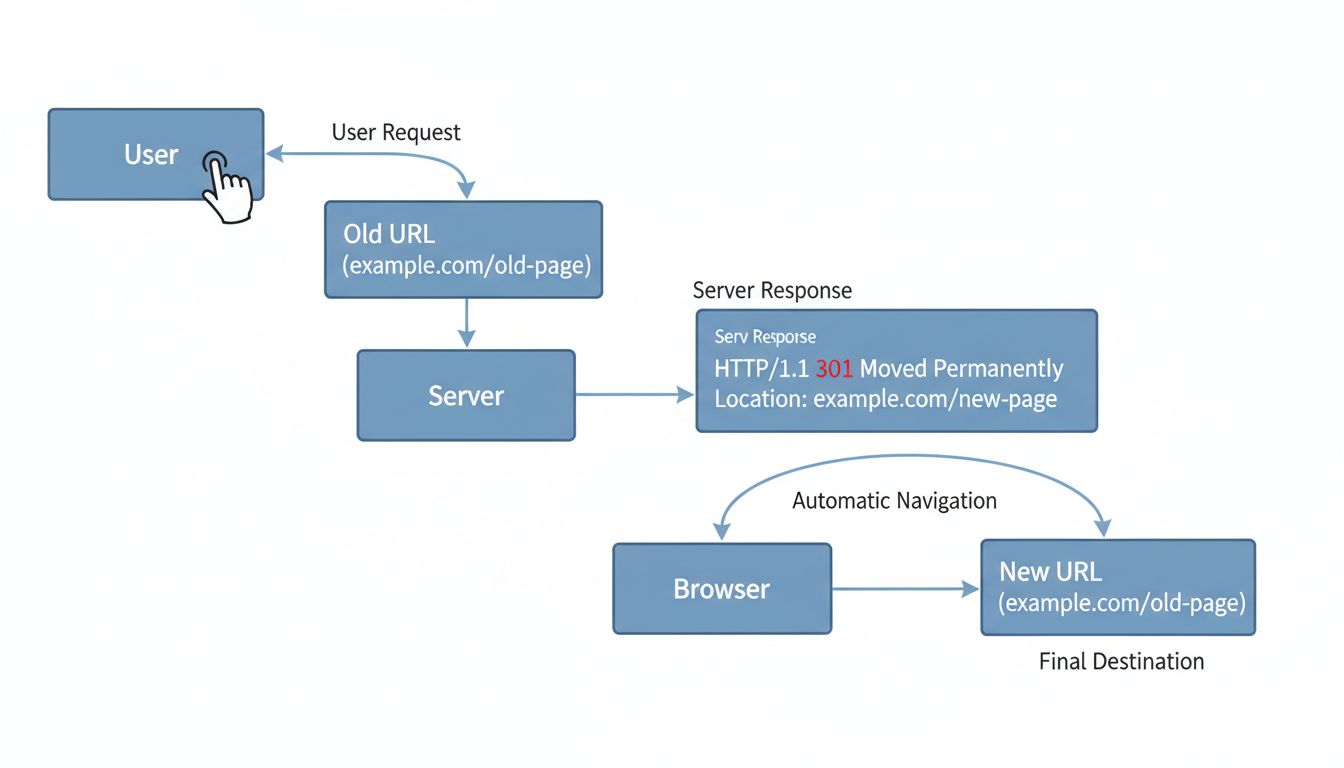
A redirect is an HTTP response that tells a browser or search engine crawler that the requested URL is available at a different location. The server returns a 3xx status code and a Location header containing the target URL. The client then makes a second request to that new address — all in a fraction of a second.
In plain terms: a redirect automatically forwards visitors from one web address to another. If someone types example.com/old-page into their browser and the server has been configured to redirect that URL, they will land on example.com/new-page without taking any extra action.
When a browser requests a URL, the following sequence plays out:
GET request to https://example.com/old-page.200 OK with page content, the server returns a 301 Moved Permanently status code plus a Location: https://example.com/new-page header.GET request to https://example.com/new-page.200 OK with the actual page content.The user sees only the final page. The redirect itself takes milliseconds, though each additional hop adds latency — which is why redirect chains (A → B → C) degrade performance.
The terms are often used interchangeably, but there is a nuance. URL forwarding typically refers to domain-level redirection configured at the registrar level — for example, pointing myoldsite.com to mynewsite.com. HTTP redirects are server-level responses using 3xx status codes. Both achieve the same outcome (sending traffic from one address to another), but the implementation layer differs. In practice, most people in SEO and web development use “redirect” as the umbrella term.
A redirect is an HTTP response that tells a browser or search engine crawler that the requested URL is available at a different location. The server returns a 3xx status code and a Location header containing the target URL. The client then makes a second request to that new address — all in a fraction of a second.
In plain terms: a redirect automatically forwards visitors from one web address to another. If someone types example.com/old-page into their browser and the server has been configured to redirect that URL, they will land on example.com/new-page without taking any extra action.
When a browser requests a URL, the following sequence plays out:
GET request to https://example.com/old-page.200 OK with page content, the server returns a 301 Moved Permanently status code plus a Location: https://example.com/new-page header.GET request to https://example.com/new-page.200 OK with the actual page content.The user sees only the final page. The redirect itself takes milliseconds, though each additional hop adds latency — which is why redirect chains (A → B → C) degrade performance.
The terms are often used interchangeably, but there is a nuance. URL forwarding typically refers to domain-level redirection configured at the registrar level — for example, pointing myoldsite.com to mynewsite.com. HTTP redirects are server-level responses using 3xx status codes. Both achieve the same outcome (sending traffic from one address to another), but the implementation layer differs. In practice, most people in SEO and web development use “redirect” as the umbrella term.

Set up advanced tracking in minutes. No credit card required.
Not all redirects are equal. The HTTP status code determines how search engines interpret the move and whether link equity transfers to the new URL.
Use a 301 when:
A 302 redirect indicates a temporary move. It normally leaves the original URL as the intended canonical, while a permanent redirect signals that the destination should become canonical. Other indexing signals can affect the result; the status code alone does not guarantee how rankings or link signals will change.
Use a 302 when:
A common mistake is using a 302 for a permanent change. If a 302 stays in place for months, search engines may eventually treat it as a de facto 301 — but the transition is slower and less reliable than using the correct code from the start.
307 Temporary Redirect and 308 Permanent Redirect are the HTTP/1.1 successors to 302 and 301, respectively, with one critical difference: they preserve the original request method. If a client sends a POST request, a 307 or 308 ensures the redirected request also uses POST. A 302 or 301 may cause the browser to switch to GET.
In SEO practice, 307 and 308 are less common than their 301/302 counterparts, but they are the technically correct choice when the HTTP method must be preserved — for example, during a form-submission redirect.
Meta refresh redirects happen at the HTML level, not the HTTP level. A <meta http-equiv="refresh" content="0; url=https://example.com/new-page"> tag in the <head> tells the browser to load a different URL after a set delay (0 seconds for an immediate redirect). Google can interpret meta refresh redirects, but they are slower than server-side redirects and offer a poorer user experience.
JavaScript redirects use window.location.href = "https://example.com/new-page" to change the page client-side. Googlebot can execute JavaScript and follow these redirects, but the process depends on rendering — which adds delay and complexity compared to server-side 301s. For SEO-critical moves, always prefer server-side redirects.
| Redirect Type | Status Code | Permanent or Temporary | Passes Link Equity | Best Use Case |
|---|---|---|---|---|
| 301 | HTTP 301 | Permanent | Yes (most) | Domain migration, HTTPS switch, deleted pages |
| 302 | HTTP 302 | Temporary | No (indexes original) | A/B tests, short-term maintenance |
| 307 | HTTP 307 | Temporary | No (preserves method) | Temporary form-handling redirects |
| 308 | HTTP 308 | Permanent | Yes (preserves method) | Permanent POST-endpoint moves |
| Meta Refresh | HTML tag | Either | Partial | Low-priority redirects; avoid for SEO |
| JavaScript | Client-side | Either | Unreliable | SPAs; avoid for critical redirects |
A redirect chain occurs when URL A redirects to B, which redirects to C, which finally resolves. Each hop adds latency and dilutes link equity. Google recommends redirecting directly to the final destination. Chains also waste crawl budget: Googlebot spends its limited crawl allowance following intermediate URLs that contribute nothing.
Google’s official guidance: keep redirects in place for at least one year after a move. In practice, many SEO professionals recommend keeping permanent redirects indefinitely if the old URLs have backlinks. Even after Google re-indexes the new URL, external sites may continue linking to the old one. Removing a redirect breaks those links permanently.
Monitor your redirect traffic periodically. If an old URL no longer receives any visitors or backlinks after 12–18 months, you can consider retiring it — but the cost of keeping a redirect rule active is negligible on modern servers.
When you move a page that has backlinks, those links still point to the old URL. Without a redirect, every one of those links becomes a dead end — a 404 error — and the authority they carried evaporates.
The transfer is not lossless. The key variable is relevance: redirecting a product page about running shoes to a general homepage will transfer far less value than redirecting it to an equivalent product page.
A redirect chain occurs when URL A redirects to B, which redirects to C, which finally resolves. Each hop adds latency and dilutes link equity. Google recommends redirecting directly to the final destination. Chains also waste crawl budget: Googlebot spends its limited crawl allowance following intermediate URLs that contribute nothing.
A redirect loop is worse: URL A redirects to B, and B redirects back to A. Loops make pages completely inaccessible and can occur inadvertently when redirect rules conflict — for example, an HTTP-to-HTTPS rule combined with a www-to-non-www rule that are not coordinated.
Google’s official guidance: keep redirects in place for at least one year after a move. In practice, many SEO professionals recommend keeping permanent redirects indefinitely if the old URLs have backlinks. Even after Google re-indexes the new URL, external sites may continue linking to the old one. Removing a redirect breaks those links permanently.
Monitor your redirect traffic periodically. If an old URL no longer receives any visitors or backlinks after 12–18 months, you can consider retiring it — but the cost of keeping a redirect rule active is negligible on modern servers.
Be the first to know about new features and product updates.
Affiliate marketing depends on redirects more than most website owners realize. Every time a publisher’s link sends a visitor to an advertiser’s site, a redirect is almost certainly involved — and it is doing more than just forwarding traffic.
A typical affiliate link looks like this:
https://trackingdomain.com/aff_c?offer_id=123&aff_id=456
When a visitor clicks that link, the following sequence occurs:
The redirect is the mechanism that makes tracking invisible to the user while capturing the data that drives commission payouts.
As an advertiser running an affiliate program, you need to understand redirects at two levels:
Landing page redirects: When you update your site, you must maintain redirects from old product URLs that affiliates have been promoting. If an affiliate embedded yoursite.com/old-product in their content and that URL returns a 404, you lose the sale and damage the publisher relationship. Maintain a redirect map of every URL change and ensure old affiliate-linked URLs always resolve.
As a publisher (affiliate), redirects affect you in two practical ways:
Link management: Affiliate links are long, parameter-heavy, and visibly tracking-oriented. Many publishers use their own redirects — for example, mysite.com/go/product-name → affiliate tracking URL — to create clean, branded, memorable links. This is a 301 or 302 redirect at the publisher’s domain level. It also lets you swap the destination affiliate link without updating every instance across your content.
Link monitoring: Broken redirects on the advertiser’s side mean lost commissions. Use a redirect checker or link monitoring tool to periodically verify that your affiliate links still resolve to active landing pages. A 404 at the end of a tracking chain is revenue lost silently.
Server-side redirects are the gold standard — fast, reliable, and correctly interpreted by all search engines.
Apache (.htaccess):
Redirect 301 /old-page https://example.com/new-page
RewriteEngine On
RewriteRule ^old-directory/(.*)$ /new-directory/$1 [R=301,L]
rewrite ^/old-page$ https://example.com/new-page permanent;
For WordPress sites, several plugins handle redirects without editing server configuration files:
Plugin-based redirects are convenient but add a small PHP overhead. For high-traffic sites, server-level redirects remain preferable.
Testing redirects verifies that they work correctly and return the expected status code. Methods include:
curl -I https://example.com/old-page returns the HTTP headers, including the status code and Location header.After any migration, test a representative sample of old URLs — especially high-traffic pages and pages with backlinks — to confirm they resolve to the correct new destinations with the intended status code.
A chain like http://example.com/page → https://example.com/page → https://www.example.com/page adds unnecessary hops. Each step consumes crawl budget and adds latency. The fix: redirect directly from the original URL to the final canonical destination. Audit your redirect map for chains using Screaming Frog or Sitebulb, and consolidate intermediate redirects.
A permanent change implemented with a 302 temporary redirect tells search engines to keep indexing the old URL. The new page may not appear in search results, and link equity does not transfer. This is one of the most common SEO errors in site migrations. If the change is permanent, use 301.
When deleting pages in bulk, the path of least resistance is redirecting every removed URL to the homepage. Google may interpret this as a soft 404 — a page that returns 200 OK but provides no relevant content. The result: the redirect is ignored for ranking purposes, and link equity is lost. Instead, redirect each deleted page to the most topically relevant alternative. If no relevant alternative exists, let the page return a genuine 404 with a helpful custom error page.
Redirects are a safety net, not a permanent routing layer. After implementing redirects, update all internal links to point directly to the new URLs. Leaving internal links pointing to redirected URLs creates unnecessary redirect chains within your own site — a self-inflicted performance and crawl-budget penalty.
Inconsistent handling of https://www.example.com/page vs. https://example.com/page/ can create duplicate content issues and redirect chains. Standardize early: choose one canonical format (with or without www, with or without trailing slash) and enforce it with a single redirect rule.
Server-side redirects are the gold standard — fast, reliable, and correctly interpreted by all search engines.
Apache (.htaccess):
Redirect 301 /old-page https://example.com/new-page
RewriteEngine On
RewriteRule ^old-directory/(.*)$ /new-directory/$1 [R=301,L]
rewrite ^/old-page$ https://example.com/new-page permanent;
For WordPress sites, several plugins handle redirects without editing server configuration files:
Plugin-based redirects are convenient but add a small PHP overhead. For high-traffic sites, server-level redirects remain preferable.
Testing redirects verifies that they work correctly and return the expected status code. Methods include:
curl -I https://example.com/old-page returns the HTTP headers, including the status code and Location header.After any migration, test a representative sample of old URLs — especially high-traffic pages and pages with backlinks — to confirm they resolve to the correct new destinations with the intended status code.
A chain like http://example.com/page → https://example.com/page → https://www.example.com/page adds unnecessary hops. Each step consumes crawl budget and adds latency. The fix: redirect directly from the original URL to the final canonical destination. Audit your redirect map for chains using Screaming Frog or Sitebulb, and consolidate intermediate redirects.
A permanent change implemented with a 302 temporary redirect tells search engines to keep indexing the old URL. The new page may not appear in search results, and link equity does not transfer. This is one of the most common SEO errors in site migrations. If the change is permanent, use 301.
When deleting pages in bulk, the path of least resistance is redirecting every removed URL to the homepage. Google may interpret this as a soft 404 — a page that returns 200 OK but provides no relevant content. The result: the redirect is ignored for ranking purposes, and link equity is lost. Instead, redirect each deleted page to the most topically relevant alternative. If no relevant alternative exists, let the page return a genuine 404 with a helpful custom error page.
Redirects are a safety net, not a permanent routing layer. After implementing redirects, update all internal links to point directly to the new URLs. Leaving internal links pointing to redirected URLs creates unnecessary redirect chains within your own site — a self-inflicted performance and crawl-budget penalty.
Inconsistent handling of https://www.example.com/page vs. https://example.com/page/ can create duplicate content issues and redirect chains. Standardize early: choose one canonical format (with or without www, with or without trailing slash) and enforce it with a single redirect rule.
Discover how correct use of redirects can improve your site's SEO and optimize your affiliate marketing strategy. Learn about the best tools and techniques.
A redirect link automatically sends visitors from one URL to another. Learn how redirects work, the types, and best practices.
A 301 redirect is an HTTP status code that permanently moves one URL to another, passing link equity and SEO value to the new destination.
Learn how redirect links work, including HTTP status codes, redirect types (301, 302), and best practices for maintaining SEO value. Expert guide for 2025.
Join our community of happy clients and provide excellent customer support with Post Affiliate Pro.




Cookie Consent
We use cookies to enhance your browsing experience and analyze our traffic. See our privacy policy.