


Why Are Sitemaps Important for SEO?
Learn why sitemaps are crucial for SEO success. Discover how XML and HTML sitemaps improve crawlability, indexing, and search engine visibility for your website...
8 min read
A sitemap is a file that lists the pages, videos, images, and other content on a website, along with the relationships between them.
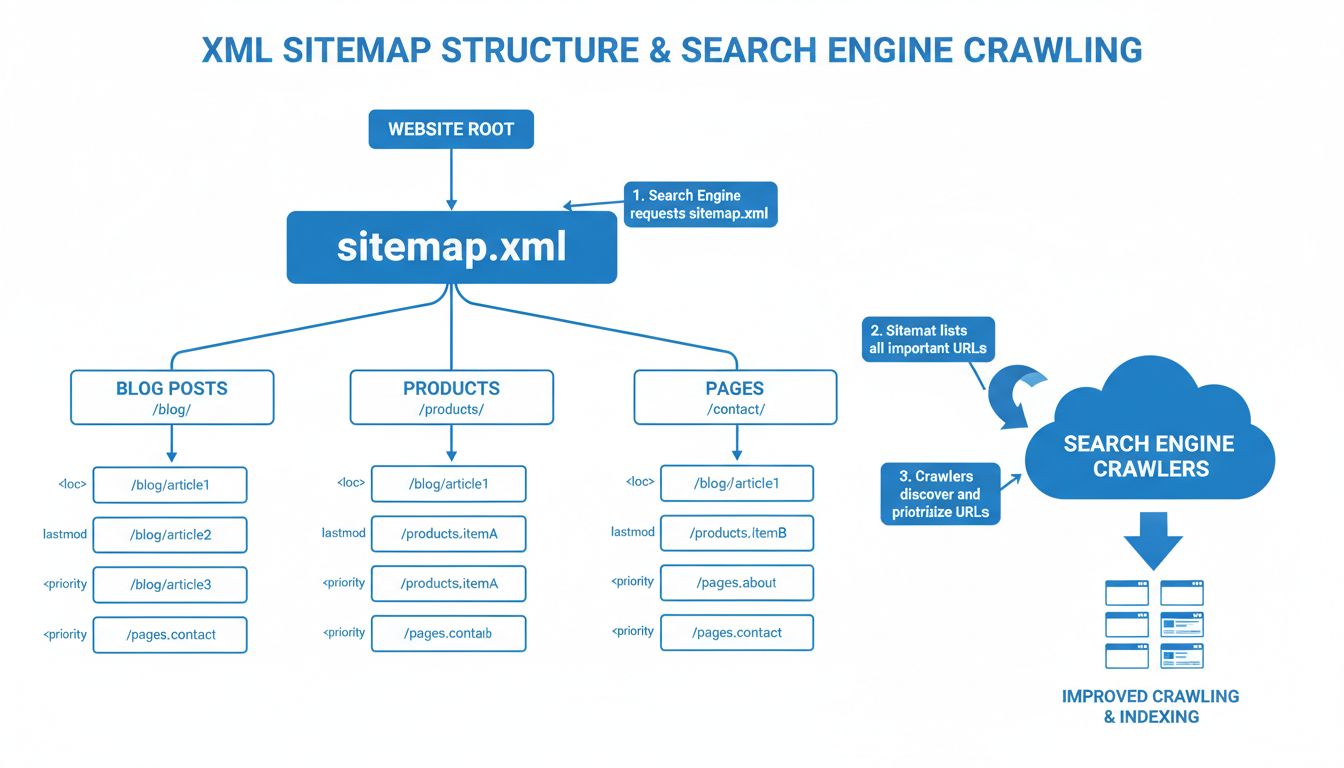
A sitemap is a file that lists the pages, videos, images, and other content on a website, along with the relationships between them. Search engines like Google read this file to crawl a site more efficiently — discovering new pages, identifying recently updated content, and understanding which URLs the site owner considers most important. Think of it as a structured table of contents built for search engine crawlers rather than human readers.
Sitemaps come in two primary forms: XML sitemaps, machine-readable files designed for search engine bots, and HTML sitemaps, visible pages that help human visitors navigate a site. Both serve the same core purpose — making content findable — but they target different audiences.
On this page
A sitemap provides search engines with a structured roadmap of a website. Its primary function is to supplement the normal crawling process, in which bots follow links from one page to another. When internal linking is imperfect — and on large sites it often is — a sitemap fills the gaps.
Specifically, a sitemap helps search engines:
<lastmod> metadata tag, reducing the time between publication and indexation.For a typical website, Google can discover most pages through normal link-following. The sitemap becomes critical when that assumption breaks down — on sites with thousands of product pages, dynamic URLs, limited navigation, or rich media that normal crawlers struggle to parse.

Set up advanced tracking in minutes. No credit card required.
Not all sitemaps are the same file. The sitemap protocol, originally proposed by Google, Yahoo!, and Microsoft in 2005 and hosted at sitemaps.org, defines a family of formats, each tailored to a specific content type.
The <lastmod> tag is the most practically useful of the optional fields. Google has stated that it largely ignores <changefreq> and <priority>, but <lastmod> helps the crawler decide whether a page needs reindexing.
An HTML sitemap is a visible, user-facing page that lists a site’s important sections and pages in a hierarchical layout — typically grouped by category. It functions as an alternative navigation aid, especially on large content sites where the main menu cannot link to every page.
| Sitemap Type | Purpose | Typical Use Case |
|---|---|---|
| Video sitemap | Provides metadata about video content (title, description, duration, thumbnail) | Streaming platforms, tutorial sites, product demo pages |
| Image sitemap | Lists image URLs so search engines can index them for image search | Photography portfolios, e-commerce product galleries |
| News sitemap | Flags time-sensitive articles for accelerated indexing in Google News | News publishers, blogs covering breaking stories |
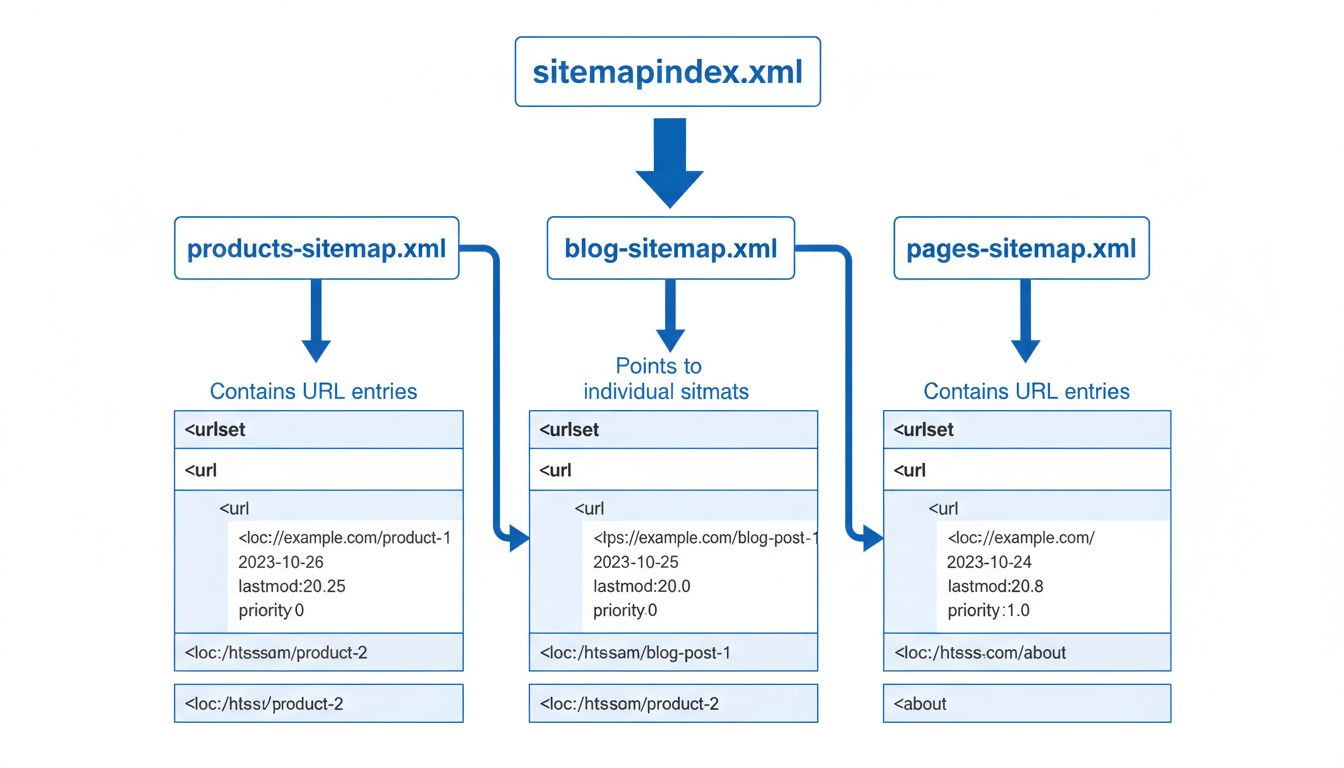
| Sitemap index file | A sitemap of sitemaps — used when a site exceeds 50,000 URLs or 50 MB per file | Enterprise sites, large e-commerce stores, multi-region platforms |
The sitemap index file is worth special attention. When a site outgrows the 50,000-URL or 50 MB limit (whichever comes first), the sitemap protocol requires splitting entries across multiple sitemap files and referencing them all from a single sitemap index. Most CMS plugins handle this automatically.
An XML sitemap viewed in a browser appears as a structured but unstyled document — tags, URLs, and metadata in plain text. It is not meant to be read by humans in raw form. An HTML sitemap, by contrast, looks like any other webpage: headings, categorized links, and sometimes brief descriptions.
You can find most sitemaps by appending /sitemap.xml to a domain (e.g., https://example.com/sitemap.xml). Other common locations include /sitemap_index.xml, /sitemap-index.xml, or paths specified in the site’s robots.txt file under a Sitemap: directive.
Be the first to know about new features and product updates.
The short answer: a sitemap improves the odds that search engines find and index your content, especially when your site is large, new, or media-rich. The longer answer depends on what kind of site you run.
<lastmod> tags that tell crawlers what changed and when.That said, there is no downside to having one. Most content management systems, including WordPress, generate XML sitemaps automatically through plugins like Yoast SEO or Rank Math. The cost of having a sitemap is effectively zero, while the cost of missing one — even on a small site — is that a page you care about might go undiscovered.
If your site runs on WordPress, the easiest path is an SEO plugin. Yoast SEO and Rank Math both generate XML sitemaps automatically and update them whenever you publish, edit, or delete content. The sitemap regenerates on the fly — no manual intervention needed. Yoast SEO is free for basic sitemap functionality; Rank Math offers a free tier with sitemap support as well.
For other CMS platforms:
For small, static sites, you can write an XML sitemap by hand. Create a file named sitemap.xml, place it in your site’s root directory, and follow the sitemap protocol structure. Ensure the file is UTF-8 encoded and that all special characters are properly escaped (use & for &, " for ").
Crawl budget — the number of pages Googlebot will crawl on your site in a given period — is a finite resource. On large sites, inefficient crawling means important pages wait in line behind low-value ones. A well-maintained sitemap optimizes crawling in three ways:
noindex directive), the sitemap tells crawlers which pages deserve attention.<lastmod> tag allows crawlers to skip pages that have not changed since the last visit, conserving crawl budget for updated content.If your site runs on WordPress, the easiest path is an SEO plugin. Yoast SEO and Rank Math both generate XML sitemaps automatically and update them whenever you publish, edit, or delete content. The sitemap regenerates on the fly — no manual intervention needed. Yoast SEO is free for basic sitemap functionality; Rank Math offers a free tier with sitemap support as well.
For other CMS platforms:
For static sites or custom setups, online tools like XML-Sitemaps.com crawl your site and produce a sitemap file you can download and upload.
For small, static sites, you can write an XML sitemap by hand. Create a file named sitemap.xml, place it in your site’s root directory, and follow the sitemap protocol structure. Ensure the file is UTF-8 encoded and that all special characters are properly escaped (use & for &, " for ").
Creating the file is only half the task. Search engines need to know it exists.
https://yoursite.com/sitemap.xml).Sitemap: https://yoursite.com/sitemap.xml to your robots.txt file. This is the first place crawlers look.After submission, monitor the Search Console sitemap report periodically. It shows how many submitted URLs were indexed, flags errors (broken URLs, redirects, blocked resources), and confirms the last time Google processed the file.
A sitemap that contains errors is worse than no sitemap at all — it wastes crawl budget and can confuse crawlers. Review yours regularly by checking:
| Issue | How to Detect | Fix |
|---|---|---|
| Broken URLs (404) | Google Search Console sitemap report | Remove or fix the URL; regenerate the sitemap |
| Redirected URLs (301/302) | Screaming Frog or Sitebulb crawl | Replace with the destination URL |
| Non-canonical URLs | Manual audit or crawling tool | Include only canonical URLs in the sitemap |
| Noindex pages | Search Console coverage report | Remove any URL with a noindex meta tag |
| Blocked by robots.txt | Search Console URL inspection tool | Either unblock the URL or remove it from the sitemap |
| File size exceeded | Check sitemap file size | Split into multiple sitemaps with a sitemap index file |
Run a review after any major site restructure, migration, or content audit. For most sites, a monthly check in Search Console is sufficient.
The sitemap protocol sets two hard limits per sitemap file:
If your site exceeds either limit, you must split the sitemap into multiple files and use a sitemap index file to reference them all. A sitemap index is itself an XML file that lists each child sitemap:
<?xml version="1.0" encoding="UTF-8"?>
<sitemapindex xmlns="http://www.sitemaps.org/schemas/sitemap/0.9">
  <sitemap>
    <loc>https://example.com/sitemap-pages-1.xml</loc>
  </sitemap>
  <sitemap>
    <loc>https://example.com/sitemap-posts-1.xml</loc>
  </sitemap>
</sitemapindex>
A sitemap should list only the URLs you want search engines to index. Exclude:
noindex meta tag — contradictory signals confuse crawlers.A clean sitemap signals quality to search engines. A cluttered one signals neglect.
The sitemap should reflect the current state of your site at all times. For most sites, this means:
The <lastmod> tag should accurately reflect when each page was last meaningfully updated — not when the sitemap file itself was regenerated.
For anyone running an affiliate program — whether as an advertiser managing a program, a publisher creating content, or a program manager overseeing operations — sitemaps play a specific, practical role in organic visibility.
Your affiliate program’s landing pages, signup forms, and resource hubs need to be indexed. An XML sitemap ensures that search engines discover:
When publishers search for “[brand] affiliate program,” the pages you want them to find must be in Google’s index. A sitemap helps search engines discover those URLs, but submission does not guarantee indexing or a faster crawl.
Affiliate sites often have hundreds or thousands of content pages — product reviews, comparison tables, buying guides. These pages compete for organic traffic, and every unindexed page is a missed earning opportunity. A well-structured XML sitemap:
<lastmod> signals when you update older content, which is common in affiliate marketing as products change, prices shift, and recommendations evolve.An HTML sitemap can also serve publishers by giving visitors a browsable overview of all content categories — useful on review sites where users want to browse by product type rather than search.
Program managers sit between advertisers and publishers. Your role touches both sides: you need the program’s own pages indexed, and you benefit when your publishers’ content ranks well. Practical steps:
These two files are often mentioned together but serve opposite functions:
| Sitemap | Robots.txt | |
|---|---|---|
| Purpose | Tells search engines which pages to crawl | Tells search engines which pages to avoid |
| Format | XML (or HTML for user-facing sitemaps) | Plain text |
| Location | Root directory (commonly /sitemap.xml) | Root directory (/robots.txt) |
| Effect of errors | Pages may go undiscovered | Pages may be blocked from crawling entirely |
| Best practice | Reference the sitemap URL from robots.txt | Use robots.txt to block non-essential paths (admin, API, cart) |
A common mistake: blocking a URL in robots.txt while also including it in the sitemap. Crawlers encountering this contradiction will typically respect robots.txt and skip the URL — but the inconsistency signals poor site maintenance. Keep both files aligned.
noindex, no redirects.<lastmod> tag accurately — it is the only optional metadata field Google treats as a meaningful signal.Discover the importance of sitemaps for SEO and user experience. Learn best practices and tools to create effective sitemaps for your affiliate site.
Learn why sitemaps are crucial for SEO success. Discover how XML and HTML sitemaps improve crawlability, indexing, and search engine visibility for your website...
Learn which pages to include in your XML sitemap for optimal SEO. Discover best practices for canonical URLs, indexable content, and sitemap structure to improv...
Learn how search engine crawlers discover and index web pages and why it matters for SEO.
Join our community of happy clients and provide excellent customer support with Post Affiliate Pro.




Cookie Consent
We use cookies to enhance your browsing experience and analyze our traffic. See our privacy policy.