


Search Engine Spider
A search engine spider is an automated bot that crawls web pages to index content for search engines like Google and Bing. Learn how they work.
10 min read
SEO
DigitalMarketing
+3
Spider detection is the process of identifying automated software programs — called spiders, web crawlers, or bots — that visit a website, and determining whether each one serves a legitimate purpose or represents a threat to data integrity, ad spend, or affiliate program revenue.
Spider detection is the process of identifying automated software programs — called spiders, web crawlers, or bots — that visit a website, and determining whether each one serves a legitimate purpose or represents a threat to data integrity, ad spend, or affiliate program revenue.
Spider detection is a security and analytics discipline that identifies automated HTTP clients by examining their technical signatures, behavioral patterns, and network characteristics. The term “spider” comes from how these programs crawl the web — following hyperlinks from page to page the way a spider traverses its web.
In practice, spider detection answers one question for every visitor: is this a human, a friendly bot, or a malicious script? The answer determines whether the visit gets counted in your analytics, whether the click triggers a commission, and whether the lead enters your CRM.
The three terms are often used interchangeably, but they carry different connotations depending on context:
Not all automated traffic is hostile. Effective spider detection distinguishes between categories:
| Bot Category | Examples | Should You Block? |
|---|---|---|
| Search engine crawlers | Googlebot, Bingbot, YandexBot | No — blocking them removes you from search results |
| SEO and marketing tools | AhrefsBot, SemrushBot, Moz Dotbot | Case by case — they consume resources but can help visibility |
| Monitoring and validation | IAB Tech Lab crawler, uptime monitors | No — they verify ads.txt, SSL, and site health |
| Content scrapers | Unidentified bots copying your content | Yes — they steal content and offer no value |
| Click fraud bots | Scripts clicking affiliate links or ads | Yes — they directly steal from your budget |
| Lead fraud bots | Automated form-fillers submitting fake signups | Yes — they waste CPA spend and pollute your CRM |
| Credential stuffers | Bots testing stolen login credentials | Yes — they are a security threat |
The line between “good” and “bad” is not always sharp. An SEO crawler from a legitimate tool can still skew your analytics if you count its visits as human traffic. Spider detection gives you the data to make informed decisions, not just block everything indiscriminately.
Spider detection is a security and analytics discipline that identifies automated HTTP clients by examining their technical signatures, behavioral patterns, and network characteristics. The term “spider” comes from how these programs crawl the web — following hyperlinks from page to page the way a spider traverses its web.
In practice, spider detection answers one question for every visitor: is this a human, a friendly bot, or a malicious script? The answer determines whether the visit gets counted in your analytics, whether the click triggers a commission, and whether the lead enters your CRM.
The three terms are often used interchangeably, but they carry different connotations depending on context:
Not all automated traffic is hostile. Effective spider detection distinguishes between categories:
| Bot Category | Examples | Should You Block? |
|---|---|---|
| Search engine crawlers | Googlebot, Bingbot, YandexBot | No — blocking them removes you from search results |
| SEO and marketing tools | AhrefsBot, SemrushBot, Moz Dotbot | Case by case — they consume resources but can help visibility |
| Monitoring and validation | IAB Tech Lab crawler, uptime monitors | No — they verify ads.txt, SSL, and site health |
| Content scrapers | Unidentified bots copying your content | Yes — they steal content and offer no value |
| Click fraud bots | Scripts clicking affiliate links or ads | Yes — they directly steal from your budget |
| Lead fraud bots | Automated form-fillers submitting fake signups | Yes — they waste CPA spend and pollute your CRM |
| Credential stuffers | Bots testing stolen login credentials | Yes — they are a security threat |
The line between “good” and “bad” is not always sharp. An SEO crawler from a legitimate tool can still skew your analytics if you count its visits as human traffic. Spider detection gives you the data to make informed decisions, not just block everything indiscriminately.

Set up advanced tracking in minutes. No credit card required.
Modern spider detection combines multiple signals. No single check is reliable on its own — sophisticated bots spoof user-agents, rotate IPs, and mimic human behavior. Effective detection layers several methods together.
Every HTTP request includes a User-Agent header that identifies the client making the request. Legitimate crawlers declare themselves openly:
Mozilla/5.0 (compatible; Googlebot/2.1; +http://www.google.com/bot.html)
Mozilla/5.0 (compatible; Bingbot/2.0; +http://www.bing.com/bingbot.htm)
Limitation: Any bot can claim to be Googlebot by copying its user-agent string. User-agent analysis is a first-pass filter, not a conclusive check.
The reliable way to verify a claimed crawler identity is to cross-check its IP address. For major search engines, the process works like this:
*.googlebot.com for Googlebot).If all four steps match, the crawler is authentic. Google, Bing, and Yandex all publish their IP ranges and verification methods. Any bot that claims to be Googlebot but connects from an AWS datacenter IP is immediately flagged.
Humans browse unpredictably. They pause between page views, scroll at variable speeds, and click in patterns that are hard to replicate programmatically. Bots leave different fingerprints:
Behavioral signals are harder to spoof than headers or IPs. They require the bot operator to simulate human interaction, which increases the cost and complexity of the attack enough to deter many fraudsters.
Device fingerprinting collects attributes of the connecting client — browser version, installed fonts, screen resolution, WebGL renderer, and dozens of other signals — to create a unique identifier. When the same fingerprint appears across hundreds of “different” visitors, or when a fingerprint doesn’t match the claimed user-agent, spider detection systems flag the traffic.
| Method | What It Checks | Strength | Weakness |
|---|---|---|---|
| User-agent analysis | Browser/client identifier string | Fast, zero-cost first filter | Easily spoofed |
| IP/reverse DNS verification | Network origin and hostname match | Conclusive for known crawlers | Only works for declared bots |
| Behavioral analysis | Request timing, navigation patterns | Hard to fake at scale | Requires session data |
| Device fingerprinting | Browser and hardware attributes | Strong fraud signal | Privacy regulations may apply |
| JavaScript challenges | Ability to execute scripts | Blocks simple scripts | Legitimate crawlers may not run JS |
| Honeypot traps | Hidden links only bots follow | High-confidence bot detection | Requires site instrumentation |
Affiliate programs pay partners for performance — clicks, leads, or sales. Every fraudulent event that gets counted as legitimate costs real money. Spider detection is the first line of defense against several categories of affiliate fraud.
Click fraud is the most direct attack on affiliate budgets. A bot simulates clicks on affiliate links, inflating click metrics without any human engagement. The affiliate gets paid for traffic that never had a chance of converting.
Spider detection catches click fraud by identifying the automated patterns behind the clicks: datacenter IPs, repeated clicks from identical device fingerprints, and click velocities no human could produce.
In cost-per-lead (CPL) affiliate programs, bots submit fake signup forms to trigger commission payouts. These leads look real at first glance — they have names, email addresses, and phone numbers — but they never convert further.
Spider detection flags fake leads by checking whether the submission came from a datacenter IP, a spoofed device, or a disposable email domain — signals that a human user would rarely produce.
Cookie stuffing is a stealthier form of fraud. A script drops affiliate tracking cookies onto a user’s browser without their knowledge — often through a pop-under, a 1×1 pixel image, or a script injected into a compromised page. When that user later makes a purchase, the fraudster claims the commission.
Spider detection identifies the automated scripts that perform cookie stuffing by their behavioral signature: rapid, invisible requests that set cookies without any corresponding page visit or user interaction.
Beyond direct financial loss, bot traffic corrupts every metric you rely on. Conversion rates drop because bot traffic inflates your denominator. Campaign performance becomes unreadable. Marketing teams optimize toward cohorts that never existed.
Clean spider detection restores trust in your data. When you filter out bot traffic before it hits your analytics, you see what your human users actually do — and you can make decisions based on reality.
Be the first to know about new features and product updates.
The Interactive Advertising Bureau (IAB) Tech Lab maintains the industry-standard reference for spider detection: the IAB/ABC International Spiders and Bots List. It is the foundation that most serious fraud prevention systems build on.
The list consists of two text files updated regularly:
The IAB prescribes a two-step approach defined in its Ad Impression Measurement Guidelines:
This dual-pass method is the standard for MRC-accredited invalid traffic (IVT) detection. It ensures that declared crawlers get filtered out while unknown bots don’t slip through simply because they aren’t on any list.
Access requires a signed data subscription agreement and is provisioned through the Tech Lab Tools Portal. One account login per subscribing company. For most affiliate program managers, the list is accessed indirectly — through the fraud detection platform or analytics tool they already use, which licenses the list on their behalf.
These built-in systems filter bot traffic from your reports automatically, so clicks and conversions attributed to known crawlers never enter your commission calculations.
The advantage of platform-level detection is that it requires no setup — it works out of the box, maintained by the vendor, with the IAB list integrated.
For programs with higher fraud exposure — large CPA payouts, high traffic volumes, or industries targeted by fraud rings — dedicated fraud prevention platforms add layers beyond basic spider detection:
Even without a dedicated platform, program managers can monitor several signals manually:
A spider trap is a set of dynamically generated pages that create an infinite loop for web crawlers. Common examples include:
A legitimate crawler encountering a spider trap can burn through its crawl budget — the number of pages it allocates to your site — indexing thousands of near-duplicate pages while missing your actual content.
Spider traps harm your site in two ways. First, they waste crawl budget: Googlebot spends its allocation on meaningless URLs instead of your product pages and blog posts. Second, they can degrade server performance as crawlers hammer dynamically generated pages.
The fix is straightforward: use robots.txt to disallow crawling of trap-prone URL patterns, add rel="canonical" tags to consolidate duplicate pages, and avoid exposing infinite URL spaces through internal linking. Spider detection systems can also identify when a known crawler is stuck in a trap and throttle its access accordingly.
Safeguard your affiliate campaigns and data integrity with advanced spider detection tools and fraud prevention strategies.
A search engine spider is an automated bot that crawls web pages to index content for search engines like Google and Bing. Learn how they work.
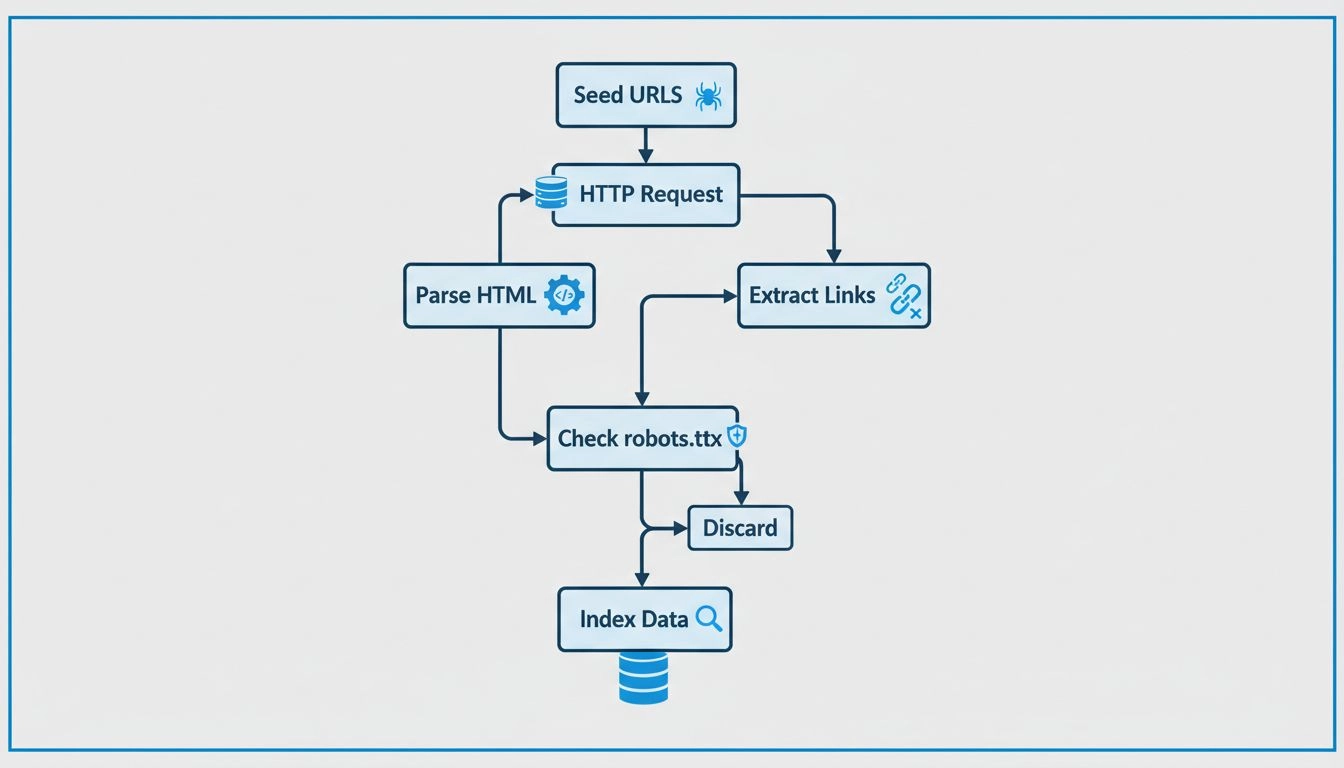
Learn how web crawlers work, from seed URLs to indexing. Understand the technical process, crawler types, robots.txt rules, and how crawlers impact SEO and affi...
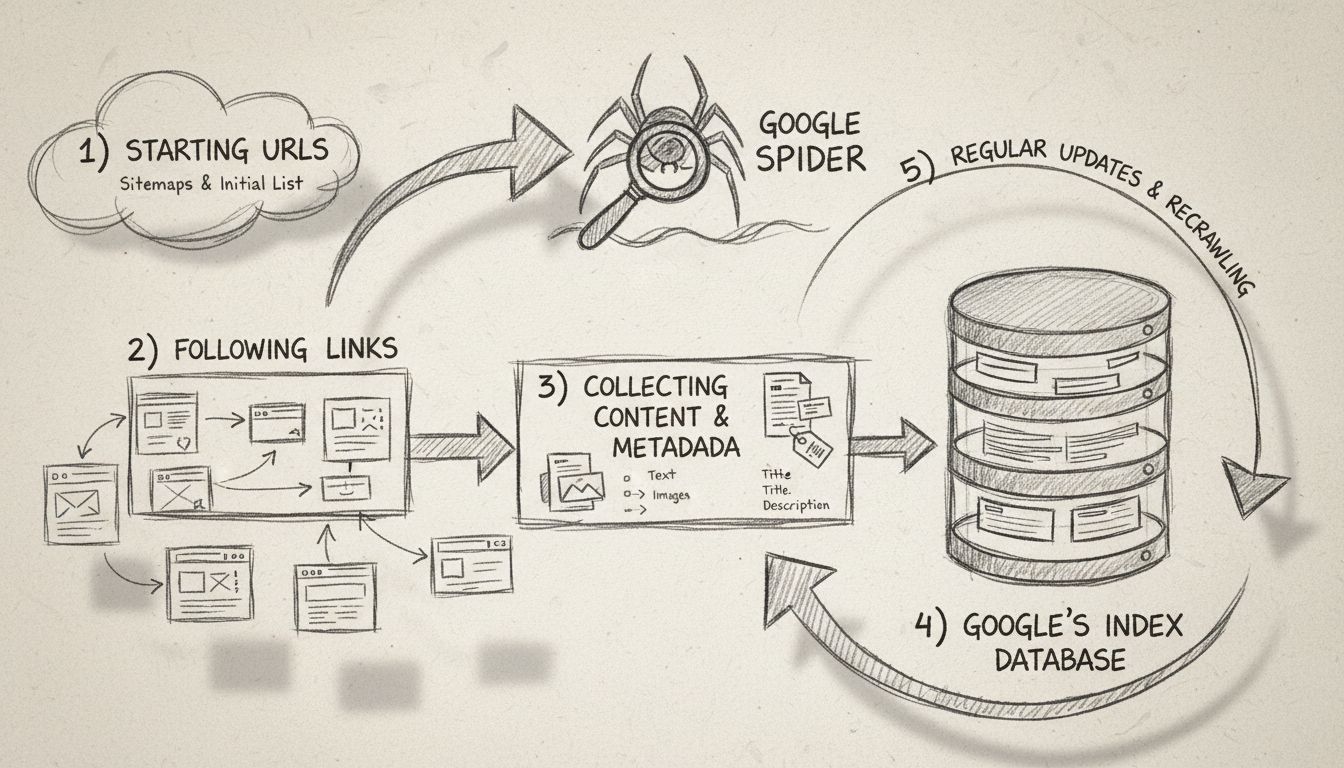
Learn what Google Spider (Googlebot) is, how it crawls and indexes websites, and why it's essential for SEO. Discover how to optimize your site for better crawl...
Join our community of happy clients and provide excellent customer support with Post Affiliate Pro.




Cookie Consent
We use cookies to enhance your browsing experience and analyze our traffic. See our privacy policy.