


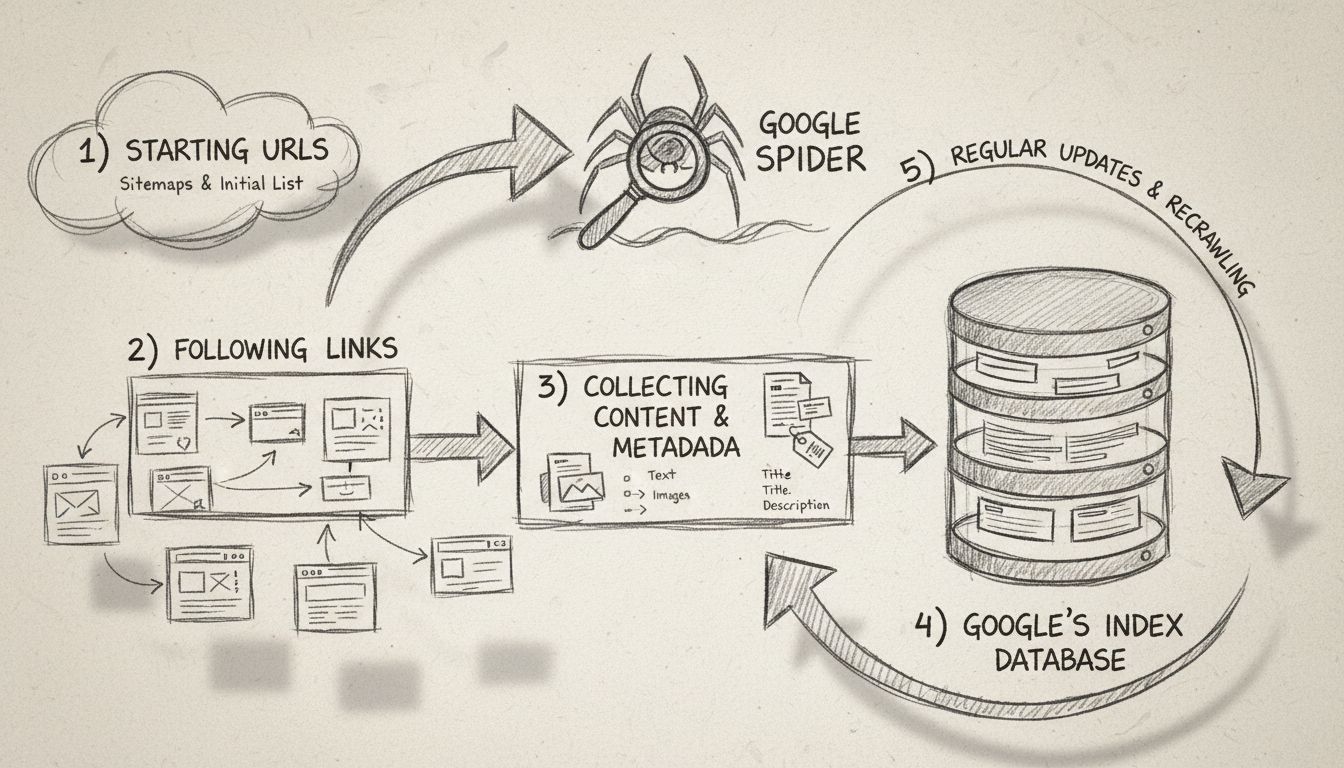
What is the Google Spider? Complete Guide to Googlebot Crawling
Learn what Google Spider (Googlebot) is, how it crawls and indexes websites, and why it's essential for SEO. Discover how to optimize your site for better crawl...
8 min read
A search engine spider is an automated program — also called a web crawler, spider bot, or simply a bot — that systematically browses the World Wide Web to discover, read, and collect information from web pages.
Google’s crawler documentation explains the crawler and fetcher categories used by Google. Use that documentation when checking how a particular Google crawler accesses an affiliate website.
On this page
A search engine spider is an automated program — also called a web crawler, spider bot, or simply a bot — that systematically browses the World Wide Web to discover, read, and collect information from web pages. The data a spider gathers is sent back to a search engine, which organizes it into a massive database called an index. When someone runs a search query, the engine pulls relevant results from that index, not from the live web.
The term “spider” comes from the way these programs navigate the web: they follow hyperlinks from page to page, much like a spider moves across the threads of its web. The earliest well-known crawler, WebCrawler, launched in 1994 and helped popularize the metaphor that stuck.
A search engine spider is an automated program — also called a web crawler, spider bot, or simply a bot — that systematically browses the World Wide Web to discover, read, and collect information from web pages. The data a spider gathers is sent back to a search engine, which organizes it into a massive database called an index. When someone runs a search query, the engine pulls relevant results from that index, not from the live web.
The term “spider” comes from the way these programs navigate the web: they follow hyperlinks from page to page, much like a spider moves across the threads of its web. The earliest well-known crawler, WebCrawler, launched in 1994 and helped popularize the metaphor that stuck.
Google uses Googlebot, Bing uses Bingbot, and both are spiders performing the same core function.

Set up advanced tracking in minutes. No credit card required.
Understanding the crawl process helps site owners make better decisions about site structure, page priority, and technical SEO.
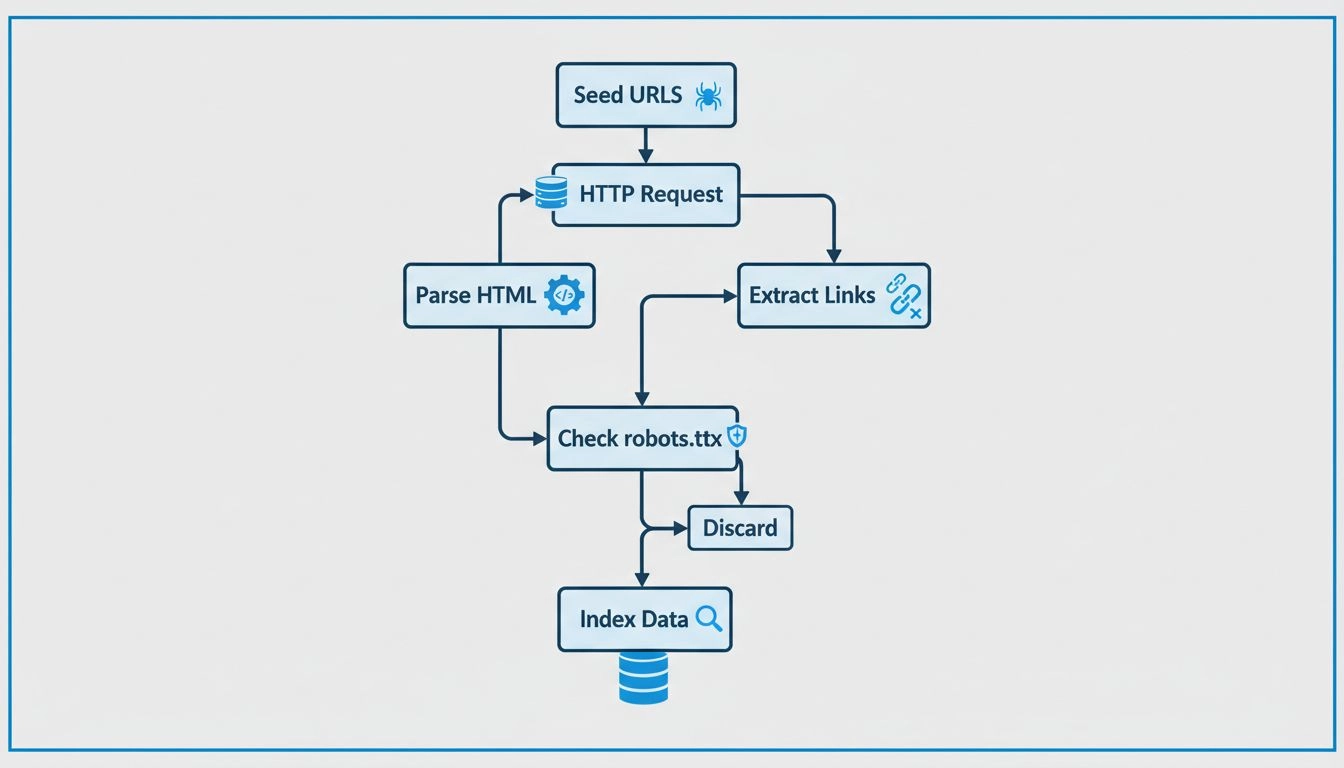
Every spider starts with a list of known web addresses called seed URLs. These might come from previously crawled pages, submitted XML sitemaps, or links discovered during earlier crawls. From each seed, the spider downloads the page and extracts every hyperlink it contains. Those links form a queue — sometimes called the crawl frontier — of pages to visit next.
When a spider reaches a page, it does three things:
User-Agent header string (e.g., Googlebot/2.1).The process runs in a continuous loop:
A spider also checks the robots.txt file before crawling any page on a domain. If the file disallows a path, a well-behaved spider will skip it. Spiders also obey meta robots tags and X-Robots-Tag HTTP headers that instruct them not to index a page or not to follow its links.
Every major search engine operates its own spider. Here are the ones most likely to visit your site:
| Spider Name | Search Engine | User-Agent Token |
|---|---|---|
| Googlebot | Googlebot | |
| Bingbot | Bing | Bingbot |
| Slurp Bot | Yahoo (powered by Bing) | Slurp |
| DuckDuckBot | DuckDuckGo | DuckDuckBot |
| Baiduspider | Baidu (China) | Baiduspider |
| Yandex Bot | Yandex (Russia) | YandexBot |
| Applebot | Apple (Siri, Spotlight) | Applebot |
Googlebot comes in two variants: a desktop crawler that simulates a desktop browser and a mobile crawler that simulates a smartphone. Since Google switched to mobile-first indexing, the mobile Googlebot is the primary crawler for the vast majority of sites.
Bingbot powers Bing’s index and also supplies results to Yahoo and other syndication partners. DuckDuckBot crawls for DuckDuckGo, which supplements its own index with results from Bing. Baiduspider and Yandex Bot serve the Chinese and Russian markets respectively and are worth allowing if you have audiences in those regions.
Be the first to know about new features and product updates.
Search engine spiders can see all of the following when they visit a page:
Spiders do not “see” pages the way a human does. Content embedded in images without alt text, text rendered inside complex JavaScript that fails to execute, and content behind login walls or paywalls is invisible to most spiders. Interactive elements like forms, dropdowns, and infinite-scroll content that requires user clicks may also be missed unless the site uses proper server-side rendering or dynamic rendering techniques.
Crawl budget is the number of pages a search engine spider will crawl on your site within a given timeframe. Google determines crawl budget based on two factors:
For large sites — e-commerce catalogs, news publishers, or affiliate sites with thousands of product pages — crawl budget matters. If spiders spend time on low-value URLs (filter parameters, session IDs, duplicate pages), they may not get to your important content before the crawl window closes.
You have three primary tools for guiding spider behavior.
A robots.txt file, placed at the root of your domain, tells spiders which parts of your site they may and may not visit. It uses a simple syntax:
User-agent: *
Disallow: /admin/
Disallow: /search/
/admin/ and /search/. You can target specific spiders by using their user-agent token:User-agent: Googlebot
Disallow: /private/
For page-level control, use the meta robots tag in the HTML <head>:
<meta name="robots" content="noindex, nofollow">
X-Robots-Tag), which is useful for non-HTML files like PDFs.An XML sitemap lists the URLs you want spiders to prioritize. Submit it through Google Search Console or Bing Webmaster Tools. A sitemap does not guarantee crawling, but it helps spiders discover new and updated pages faster — especially on sites with deep architecture or limited internal linking.
The terms are often confused, but they describe different purposes:
| Aspect | Web Crawler (Spider) | Web Scraper |
|---|---|---|
| Purpose | Discover and index pages for search | Extract specific data from pages |
| Operator | Search engines (Google, Bing) | Individuals, companies, researchers |
| Scope | Broad — the entire reachable web | Targeted — specific sites or data points |
| Output | A searchable index | Structured data (CSV, database, API) |
| Respects robots.txt | Yes (legitimate ones) | Varies; many scrapers ignore it |
A spider builds the map; a scraper mines the territory. Both are automated, but they serve fundamentally different goals. Some tools, like Screaming Frog SEO Spider, blur the line — they crawl like a spider but are used for site auditing, not search indexing.
Not inherently. Legitimate search engine spiders are beneficial — without them, your site would not appear in search results. However, not all bots are friendly.
Signs of harmful bot activity include:
OpenAI’s GPTBot is a web crawler used to collect training data for AI models. It is not a search engine spider — it does not power a public search index.
User-agent: GPTBot
Disallow: /
If you are concerned about privacy, DuckDuckGo and Brave Search are the two major search engines that do not track users or build personal profiles. Both operate their own spiders (DuckDuckBot and Brave’s crawler) and supplement their indexes with results from other sources. They rely on contextual keywords rather than user history to rank results, which means your site’s on-page SEO matters even more for visibility on these platforms.
Search engine spiders directly affect every role in the affiliate marketing ecosystem.
Your affiliate program landing pages, terms pages, and promotional content must be crawlable and indexable. If spiders cannot reach your program information, potential affiliates searching for “[your brand] affiliate program” may not find you organically. Key steps:
Every product review, comparison article, and guide you publish depends on being found through search — and that means being crawled and indexed. Spiders are the gatekeepers. Best practices:
lastmod date in your sitemap can prompt spiders to revisit your pages sooner.Understanding spider behavior helps you support your affiliates better:
site: search) and whether they are blocking spiders unintentionally.Discover how understanding web spiders can help you optimize your site for better search rankings and increased affiliate revenue.
Learn what Google Spider (Googlebot) is, how it crawls and indexes websites, and why it's essential for SEO. Discover how to optimize your site for better crawl...
Learn how search engine crawlers discover and index web pages and why it matters for SEO.
Learn how web crawlers work, from seed URLs to indexing. Understand the technical process, crawler types, robots.txt rules, and how crawlers impact SEO and affi...
Join our community of happy clients and provide excellent customer support with Post Affiliate Pro.




Cookie Consent
We use cookies to enhance your browsing experience and analyze our traffic. See our privacy policy.