


What is a Tracking Link in Affiliate Marketing?
Learn what tracking links are in affiliate marketing, how they work, and why they're essential for accurate commission tracking and performance measurement. Com...
10 min read
A tracking URL is a web address modified with parameters — extra text appended after a question mark — so that every click generates measurable data about where the visitor came from, which campaign or creative they engaged with, and when the click happened.
A tracking URL is a web address modified with parameters — extra text appended after a question mark — so that every click generates measurable data about where the visitor came from, which campaign or creative they engaged with, and when the click happened. Unlike a regular link that simply delivers a page, a tracking URL turns a click into a record that analytics platforms, ad networks, and affiliate software can read and attribute.
For example, a standard link to a product page looks like this:
https://www.example.com/product
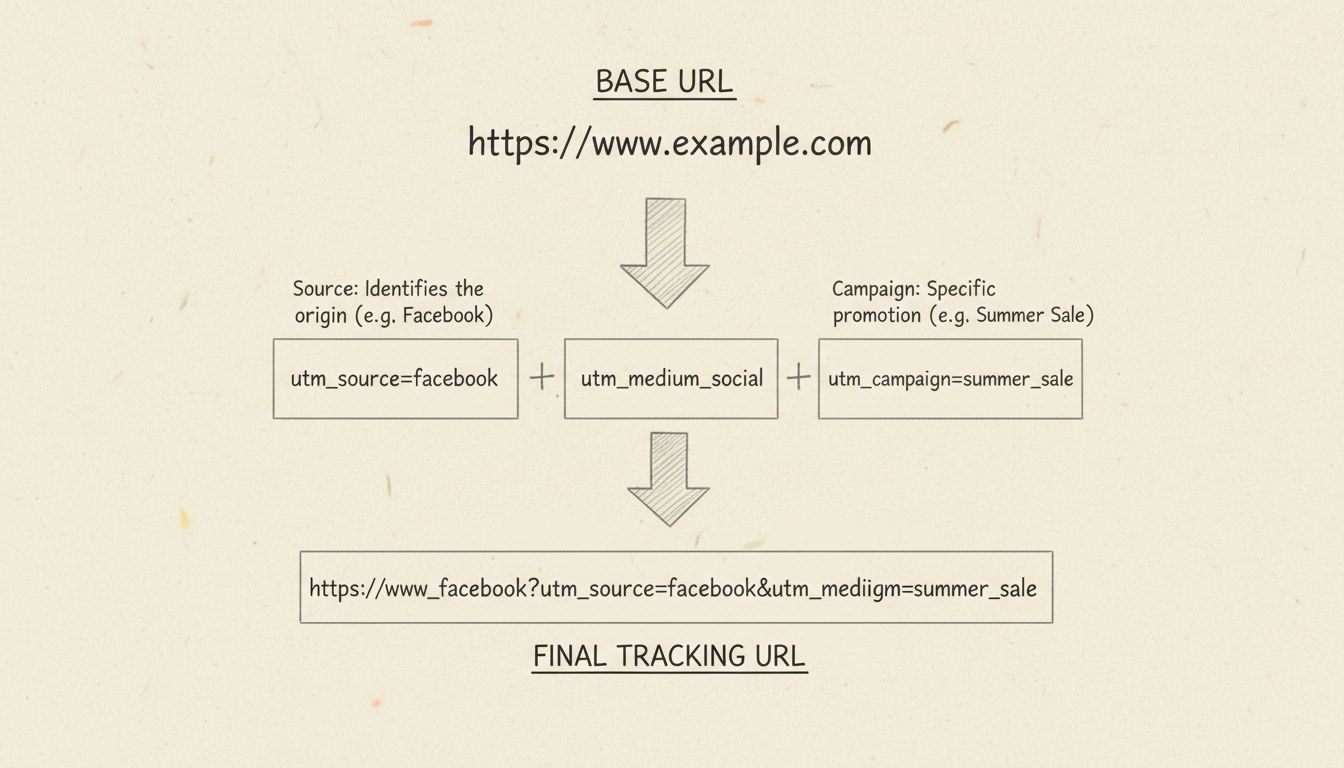
https://www.example.com/product?utm_source=newsletter&utm_medium=email&utm_campaign=spring_sale
utm_source, utm_medium, utm_campaign — tell your analytics platform exactly which channel, medium, and campaign produced that visit. Without them, every click looks the same and attribution collapses into a single “direct” bucket.On this page
A tracking URL operates on a simple mechanism: parameters sit in the URL as plain text until something reads them. When a browser lands on the destination page, the analytics script installed on that page — typically a JavaScript snippet from Google Analytics, an affiliate platform, or an ad network — parses the URL, extracts the recognized parameters, and attaches that information to the session record.
The URL itself does nothing on its own. The actual data capture depends entirely on whether the destination page has the correct tracking code installed and configured to look for those parameters. A perfectly formed tracking URL landing on a page without the matching analytics setup produces no usable data — a common and avoidable failure point.
Most tracking URLs combine up to three layers:
?, separated by &. These carry source, medium, campaign, content, and term data.| Component | Example | What it does |
|---|---|---|
| Base URL | https://example.com/landing-page | The page visitors ultimately see |
| UTM parameters | ?utm_source=google&utm_medium=cpc&utm_campaign=q2_launch | Labels the traffic source, channel, and campaign |
| Platform click ID | &gclid=AbCd1234 | Auto-generated identifier from Google Ads, Meta, or other ad platforms |
| Affiliate sub-ID | &sub1=pub_42 | Custom parameter for partner or publisher identification |
| Network click ID | &clickid=9f8e7d6c | Unique identifier generated by an affiliate network or tracking platform |

Set up advanced tracking in minutes. No credit card required.
A tracking URL is visibly longer than a standard URL because of the parameter string. Here is a real-world example from a paid search ad:
https://www.example.com/pricing?utm_source=google&utm_medium=cpc&utm_campaign=q2_launch&utm_content=video_a&gclid=AbCd1234
gclid (Google Click ID) plus any UTM parameters the advertiser added. An email newsletter link might carry both UTM parameters and a click-tracking wrapper added by the email service provider. A social media post might include fbclid from Meta alongside manual UTM tags.This layering is normal. It is also where confusion arises — different systems read different parameters, and one can override another depending on configuration.
These terms overlap but are not interchangeable:
utm_source, utm_medium, utm_campaign, utm_term, utm_content) that Google Analytics and most analytics platforms recognize natively. Not every tracking URL uses UTM parameters; some rely entirely on platform click IDs or redirect-based tracking.Be the first to know about new features and product updates.
Tracking URLs deliver the most value when applied consistently across every channel where you share links. Each channel has its own conventions.
Email service providers often append their own click-tracking parameters automatically. Layer your UTM parameters on top so that GA4 or your analytics platform can group email traffic correctly. A typical email tracking URL uses utm_source=newsletter, utm_medium=email, and utm_campaign=product_launch_march.
Google Ads and Microsoft Advertising append click IDs (gclid, msclkid) automatically. Add manual UTM parameters for consistent reporting across platforms. Use utm_source=google, utm_medium=cpc, and utm_campaign set to the campaign name in your ad platform. Include utm_term to capture the keyword that triggered the ad.
Organic social posts benefit from utm_source=linkedin or utm_source=instagram with utm_medium=social. Paid social ads should use utm_medium=paid_social to separate organic from paid performance. Meta appends fbclid automatically; your UTM parameters ensure the data also appears in your analytics platform under your naming conventions.
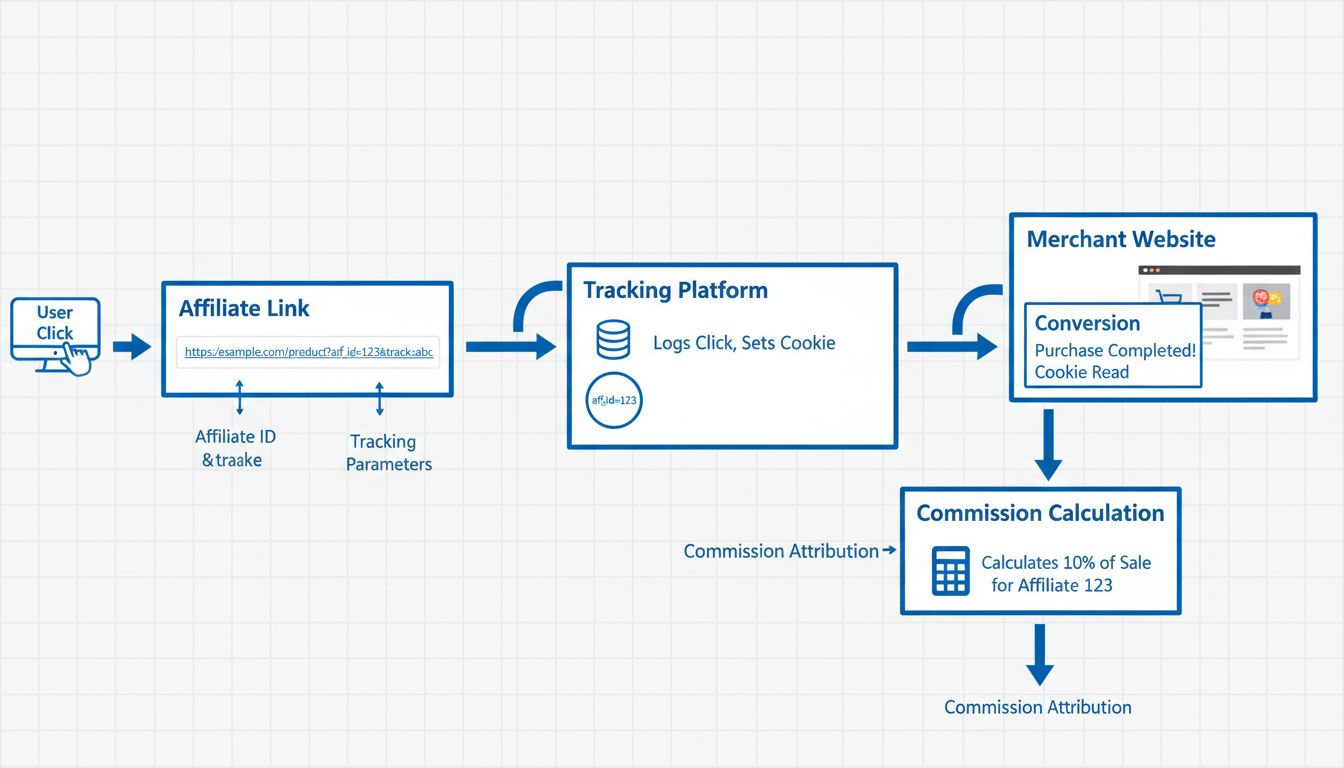
Affiliate tracking links typically use redirect-based tracking. The affiliate’s unique ID is embedded in the link — either as a visible parameter or encoded in a shortened URL. When a visitor clicks and later converts, the affiliate network or software records the transaction and attributes the commission. Unlike standard UTM links, affiliate tracking URLs must persist through the entire customer journey, often relying on first-party cookies set during the redirect.
Printed materials, event signage, and product packaging increasingly carry QR codes that resolve to tracking URLs. A QR code scan generates the same click data as a digital tap — referrer, device type, location, and time. Use a dedicated utm_medium=qr or utm_medium=print to separate offline-originated traffic in your reports.
You can build a tracking URL in under a minute using a structured approach:
utm_source, utm_medium, and utm_campaign. Add utm_content if you are testing multiple creatives, and utm_term for paid search keywords.Inconsistent parameter naming is the most common source of broken campaign data. utm_source=Facebook, utm_source=facebook, and utm_source=fb appear as three separate traffic sources in reports. Decide on a convention — lowercase, no spaces, hyphens for separators — document it, and enforce it across your team.
Before sending a tracking URL into a live campaign:
A well-instrumented tracking URL captures more than just a click count. Typical data points include:
| Data point | What it tells you |
|---|---|
| Source and medium | Which platform and channel drove the visit |
| Campaign name | Which specific campaign or promotion the click belongs to |
| Referrer URL | The exact page the visitor was on before clicking |
| Device type | Mobile, desktop, or tablet |
| Geographic location | Country, region, and city (derived from IP) |
| Time of click | Date, hour, and minute |
| Conversion event | Whether the visit led to a purchase, sign-up, or other goal |
Ad platforms add their own identifiers. Google Ads appends gclid, Meta appends fbclid, and TikTok appends ttclid. These feed each platform’s own attribution reporting and are generally not readable by external analytics tools the way UTM parameters are.
Tracking URLs have real limits. Understanding them prevents misreading your data:
Advertisers use tracking URLs to measure which channels, campaigns, and creatives drive the highest return on ad spend. Without them, a brand running simultaneous campaigns on Google Ads, Meta, email, and display has no way to separate performance by source. The workflow: assign a unique tracking URL to each ad variant and each placement, then compare conversion rates and cost per acquisition in the analytics dashboard.
Publishers — bloggers, influencers, coupon sites, review platforms — use tracking URLs to prove the traffic and conversions they deliver. Each affiliate receives a unique tracking link with their partner ID embedded. When a visitor clicks that link and completes a purchase, the affiliate network records the transaction and calculates the commission. Publishers should test their links regularly and monitor their dashboard for any discrepancies between their own analytics and the network’s reported numbers.
Program managers sit between advertisers and publishers. They configure tracking parameters, set cookie windows, define commission rules, and audit tracking data for accuracy. Their workflow includes: reviewing which affiliates drive the most conversions, identifying suspicious click patterns that may indicate fraud, and ensuring that tracking infrastructure works correctly across all partners. A program manager’s daily dashboard typically includes click volume, conversion rate, and commission totals broken down by affiliate and by campaign.
Web tracking is not inherently illegal, but how you collect, store, and use tracking data is regulated. Other jurisdictions have their own frameworks.
For tracking URLs specifically, the key distinction is whether the parameters collect personally identifiable information (PII). Standard UTM parameters — source, medium, campaign — do not identify individuals. However, when combined with IP addresses, browser fingerprints, or logged-in user IDs, the resulting dataset may fall under privacy regulations.
Tracking parameters are visible in the URL itself. Look for:
?utm_source=...gclid=, fbclid=, ttclid=, msclkid=ref=, aff=, partner_id=You can manually strip everything from the question mark onward before sharing a link. Browser extensions like ClearURLs automate this. Some messaging apps and email clients strip parameters automatically when you paste a link — which is one reason dark social traffic is hard to attribute.
Affiliate tracking URLs differ from standard marketing tracking URLs in one critical way: they must connect a click to a conversion that may happen days or weeks later. Here is how the flow works:
Cookie duration — also called the cookie window or lookback period — determines how long after the initial click a conversion still credits the affiliate. A 30-day cookie means that if the visitor buys within 30 days of clicking, the affiliate earns the commission. After that, the click expires.
Attribution models determine which affiliate gets credit when multiple affiliates influence the same sale. Last-click attribution — still the most common in affiliate marketing — awards the commission to the last affiliate whose link was clicked before purchase. First-click and multi-touch models exist but are less common in affiliate programs due to the complexity of splitting commissions.
A long URL full of visible parameters looks untrustworthy. Users are less likely to click a link that appears to be a tracking mechanism. Branded short links solve this: go.yourbrand.com/spring-sale carries the same tracking data as a 200-character parameter string but looks clean and credible.
Beyond aesthetics, branded short links improve deliverability. Some email clients and social platforms flag long, parameter-heavy URLs as suspicious. A short link on your own domain passes through filters more reliably. And because the redirect server sits between the click and the destination, you can update the destination URL without changing the short link — useful when a landing page changes after a campaign has already launched.
No. You can track links using UTM parameters alone, with no shortener involved. The parameters sit in the URL and are read by your analytics platform when the page loads.
A link shortener adds convenience — cleaner appearance, click-level data independent of the destination page’s analytics, and the ability to change the destination later. But it is not required for basic tracking. Many marketers use both: UTM parameters for analytics attribution, plus a shortener for usability and the additional click metadata the shortener’s dashboard provides.
A QR code that resolves to a tracking URL generates the same data as any other click on that URL. When someone scans the code with their phone camera, the phone opens the URL in a browser, and the analytics platform records the visit.
The key difference is the referrer data. A QR code scan typically shows no referrer or a blank referrer, because there is no referring web page. For this reason, include a distinct utm_medium=qr or utm_source=print parameter in the URL encoded in the QR code. This lets you separate QR-driven traffic from digital clicks in your reports.
Enhance your campaign performance and attribution with reliable tracking URL solutions from Post Affiliate Pro.
Learn what tracking links are in affiliate marketing, how they work, and why they're essential for accurate commission tracking and performance measurement. Com...
Learn how to create tracking URLs manually or with URL generators. Master UTM parameters, best practices, and integrate with PostAffiliatePro for advanced affil...
An affiliate link is a unique tracking URL that credits a partner for traffic or sales they refer. Learn how they work, with examples and best practices.
Join our community of happy clients and provide excellent customer support with Post Affiliate Pro.




Cookie Consent
We use cookies to enhance your browsing experience and analyze our traffic. See our privacy policy.