


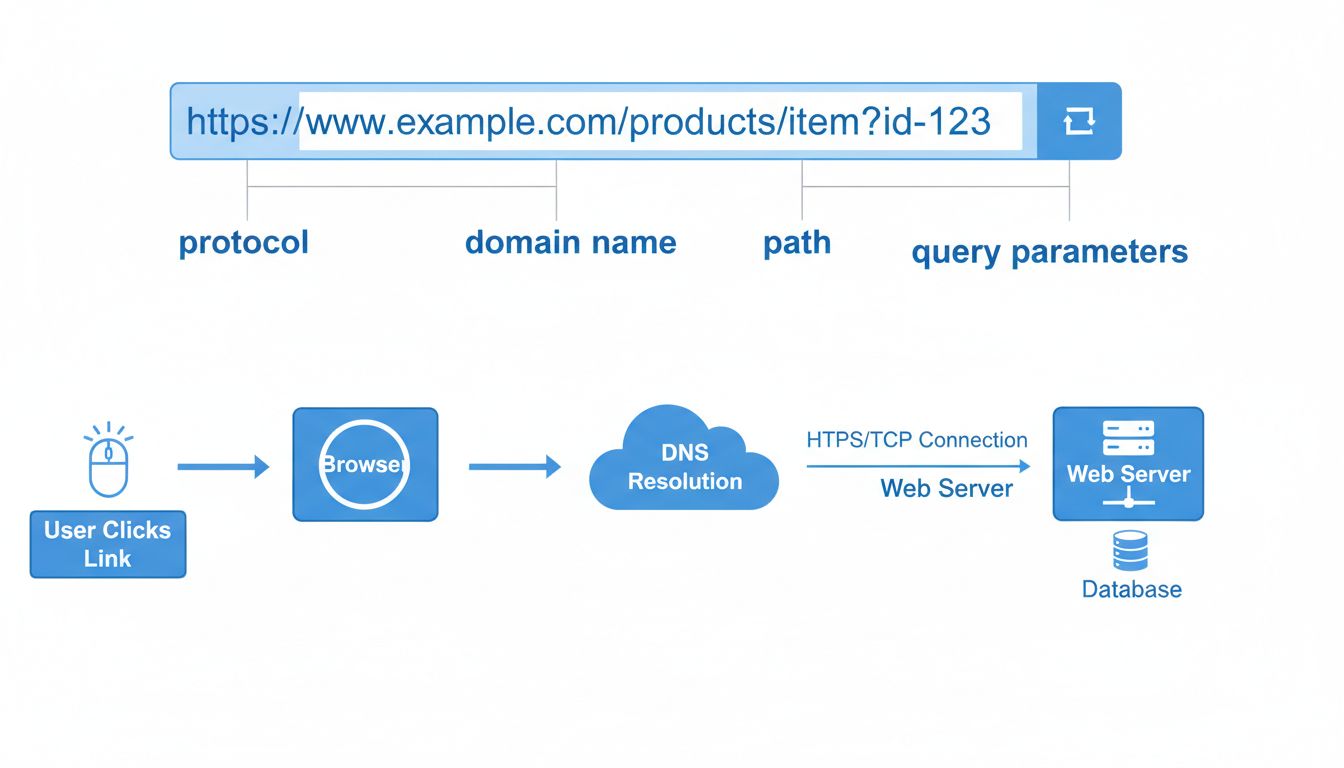
How Do Website Links Work? Complete Guide to URLs & Web Navigation
Learn how website links work, understand URL structure, DNS resolution, and the technical process behind web navigation. Expert guide for 2025.
15 min read
A URL — short for Uniform Resource Locator — is the unique address of a resource on the internet.
The WHATWG URL Standard defines URL parsing and serialization. When building tracking URLs, use a URL parser to handle paths and query parameters rather than concatenating unescaped strings.
A URL — short for Uniform Resource Locator — is the unique address of a resource on the internet. When you type one into a browser’s address bar or click a hyperlink, the browser uses that address to find and fetch the resource: a web page, an image, a video, a downloadable file, or any other piece of content stored on a server.
The key word is uniform. Every URL follows the same syntax rules, no matter what kind of resource it points to or where in the world that resource lives. That uniformity is what lets any browser on any device locate the same resource using the same string of text.
Confusion between related terms is common. Here is how to tell them apart:
example.com) is one part of a URL — the human-readable label that identifies a website. A URL is the full address that includes the protocol, domain, path, and everything else needed to reach a specific resource. example.com is a domain; https://example.com/about is a URL.192.0.2.1) is a numeric label that identifies a device on a network. A URL uses a domain name that the DNS translates into an IP address behind the scenes. You can sometimes use an IP address directly in place of a domain, but URLs exist partly so humans do not have to memorize strings of numbers.
Set up advanced tracking in minutes. No credit card required.
Every URL is built from a set of components, some mandatory and some optional. Reading a URL from left to right, each part adds more precision about what resource to fetch and how to fetch it.
Take this example URL:
https://www.example.com:443/blog/what-is-a-url?utm_source=google&utm_medium=organic#structure
The scheme — https in the example — tells the browser which protocol to use when connecting to the server. It is always followed by a colon and two forward slashes (://).
| Protocol | Purpose |
|---|---|
http | Hypertext Transfer Protocol — standard web communication, unencrypted |
https | HTTP Secure — the same communication encrypted with TLS/SSL |
ftp | File Transfer Protocol — for downloading or uploading files |
mailto | Opens the default email client to compose a message (e.g., mailto:name@domain.com) |
Modern browsers mark HTTP pages as “Not Secure.” For any site handling user data, logins, or payments, HTTPS is the minimum standard.
The authority section identifies where the resource lives. It includes:
www.example.com): The human-readable name of the server. It consists of a subdomain (www), a second-level domain (example), and a top-level domain (.com). The Domain Name System (DNS) translates this into an IP address.:443): An optional number that specifies which network port to use. HTTP defaults to port 80, HTTPS to 443. Most URLs omit the port because browsers assume the default.The path (/blog/what-is-a-url) tells the server which specific file or resource to return. It mirrors a file-system directory structure, though modern web servers often rewrite paths dynamically rather than serving literal files from folders. A URL with only a domain and no path (like https://example.com) typically returns the site’s homepage — the server fills in a default path such as /index.html.
Everything after a question mark (?) is the query string. It sends additional data to the server in key-value pairs separated by ampersands:
?utm_source=google&utm_medium=organic
The fragment (#structure) points to a specific section within the loaded page. It is never sent to the server — the browser handles it entirely on the client side, scrolling to the element whose id attribute matches the fragment value. Fragments are useful for table-of-contents navigation and for linking directly to a subheading.
| Component | Required? | Example | What It Does |
|---|---|---|---|
| Scheme | Yes | https:// | Chooses the communication protocol |
| Subdomain | No | www. | Specifies a subdivision of the domain |
| Domain name | Yes | example.com | Identifies the server |
| Port | No | :443 | Selects the network port |
| Path | No | /blog/post | Points to the specific resource |
| Query string | No | ?id=123&ref=abc | Passes data to the server |
| Fragment | No | #section-2 | Scrolls to an in-page anchor |
Typing a URL and pressing Enter feels instant, but several steps happen between the keystroke and the fully loaded page.
The browser cannot connect to a domain name directly — it needs an IP address. The Domain Name System (DNS) is the distributed directory that maps domain names to IP addresses. When you enter a URL, the browser checks its local cache, then queries a DNS resolver, which may contact root servers, TLD nameservers, and authoritative nameservers until it finds the matching IP address. This process normally takes milliseconds.
Be the first to know about new features and product updates.
The most direct method: click the address bar at the top of your browser, type or paste the full URL, and press Enter. Modern browsers auto-complete URLs from your history and bookmarks, and most no longer require you to type http:// or https:// — they add the scheme automatically.
Any underlined or highlighted text on a web page, button, or image can contain an embedded URL. Hover over a link (without clicking) to preview the destination URL in the bottom-left corner of most browsers — a simple safety check before you follow it.
The URL of the current page is always visible in the address bar at the top of the browser window. On mobile devices, tap the address bar to see the full URL. You can copy it by selecting the entire string and pressing Ctrl+C (Windows) or Cmd+C (Mac).
The process is the same across desktops, laptops, tablets, and phones: type or paste the URL into the browser’s address bar. On mobile, the address bar may be at the top (Safari, Chrome) or bottom (some Android browsers). Apps can also open URLs — tapping a link in an email, messaging app, or social media post hands the URL to the device’s default browser.
For advertisers, publishers, and affiliate program managers, a URL is not just an address — it is the backbone of tracking, attribution, and revenue.
An affiliate link is a URL that carries a unique identifier for the affiliate who shared it. When a visitor clicks that link, the tracking parameters in the URL tell the affiliate platform which affiliate sent the traffic. If the visitor completes a purchase or sign-up, the platform attributes the conversion to that affiliate and calculates the commission.
A typical affiliate URL looks like this:
https://www.merchant.com/product?aff_id=12345&campaign=summer_sale
aff_id parameter identifies the affiliate; campaign lets the affiliate and the merchant see which promotion drove the sale.Advertisers use URLs with UTM parameters to measure campaign performance across channels. A well-tagged URL answers questions like: Which email subject line generated more clicks? Which social platform delivers the highest conversion rate? Which paid keyword is profitable?
A UTM-tagged URL might look like:
https://www.store.com/landing-page?utm_source=newsletter&utm_medium=email&utm_campaign=spring_launch
utm_source identifies the traffic origin, utm_medium the channel, and utm_campaign the specific promotion. Consistent tagging across all campaigns makes analytics data reliable.Affiliates (publishers) receive unique links from each merchant or affiliate network they work with. Best practices include:
Affiliate software platforms automate link generation, tracking, and reporting. Key capabilities include:
Not every URL is harmless. Phishing attacks, malware distribution, and scam sites often start with a deceptive link. Before clicking:
paypaI.com (with a capital I instead of an l) or amaz0n.com. Read the domain from right to left to spot substitutions.URLs can only contain characters from the ASCII character set. Spaces, non-Latin characters, and certain symbols (like # or % outside their defined roles) must be percent-encoded. For example, a space becomes %20, and the € symbol becomes %E2%82%AC.
This is why you sometimes see URLs full of % codes — the browser decodes them for display, but the raw URL must be ASCII-clean. When creating URLs programmatically, always encode dynamic values to avoid broken links or security vulnerabilities.
Search engines use URLs as a ranking signal, and well-structured URLs improve click-through rates from search results:
example.com/what-is-a-url is better than example.com/?p=472.Page and page as different URLs, splitting ranking signals.Learn how URLs power tracking, analytics, and performance in affiliate marketing. Discover best practices and solutions for effective link management.
Learn how website links work, understand URL structure, DNS resolution, and the technical process behind web navigation. Expert guide for 2025.
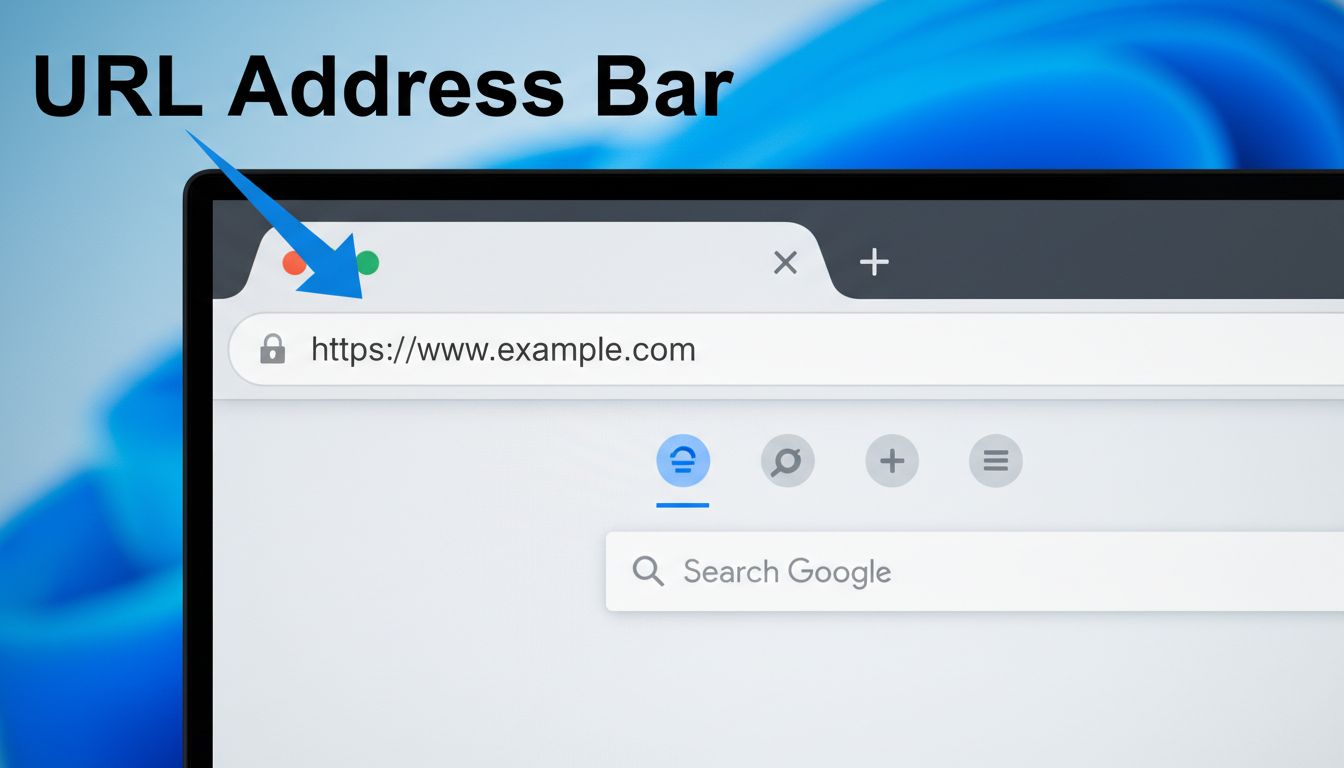
Learn exactly where URLs are located in web browsers. Discover the address bar, its functions, security features, and how to use it effectively for safe web nav...
A tracking URL is a web address with parameters that records where clicks come from and which campaign drove them. Learn how they work.
Join our community of happy clients and provide excellent customer support with Post Affiliate Pro.




Cookie Consent
We use cookies to enhance your browsing experience and analyze our traffic. See our privacy policy.