


What Does a Web Host Do? Complete Guide to Web Hosting Services
Learn what web hosts do, how they work, and why they're essential for your online presence. Discover hosting types, features, and how PostAffiliatePro can help ...
7 min read
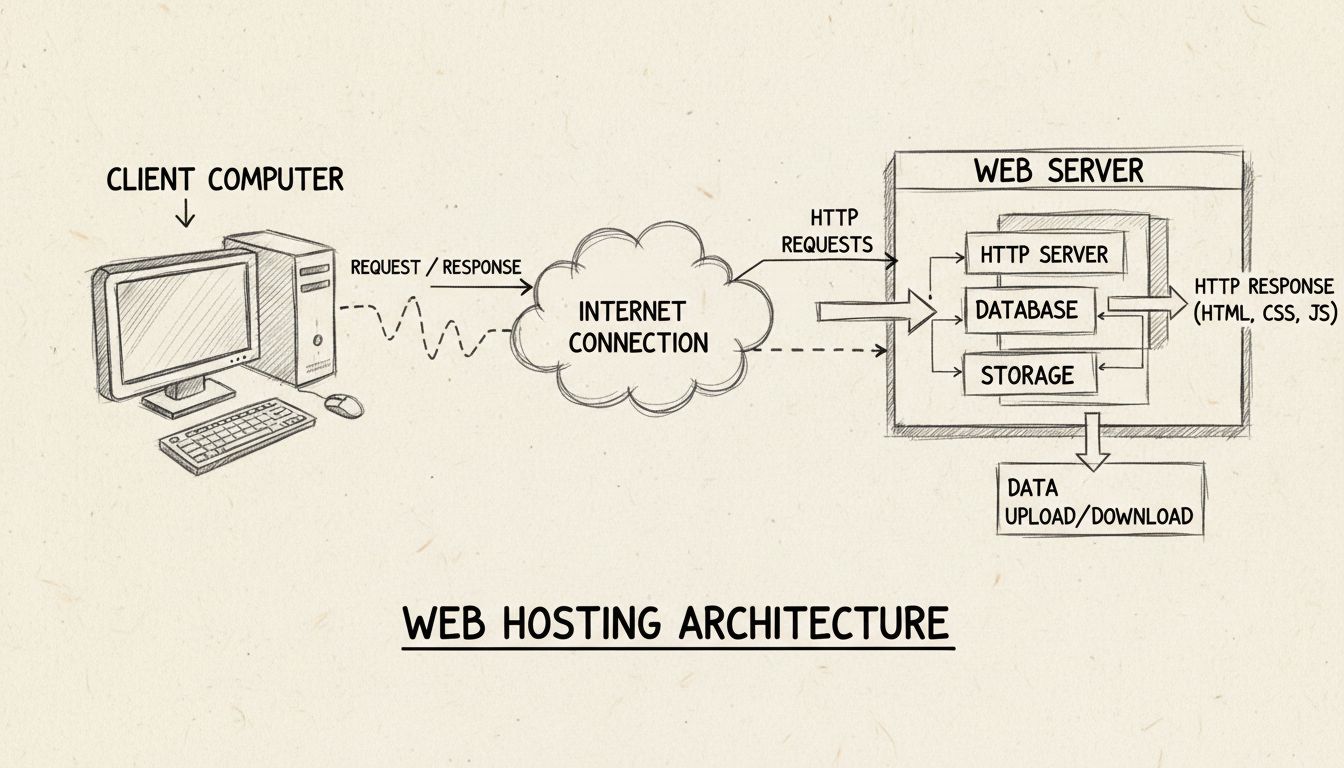
A web host is a service provider that owns and operates servers — powerful computers designed to store website files, databases, images, and code — and rents space on those servers to individuals and businesses.
A web host is a service provider that owns and operates servers — powerful computers designed to store website files, databases, images, and code — and rents space on those servers to individuals and businesses. When someone enters your domain name into a browser, the web host’s server retrieves your files and sends them to the visitor’s device, making your website visible on the internet.
The term “web host” can refer to the company (such as GoDaddy, Bluehost, or Hostinger) or to the server infrastructure that company provides. In practice, when someone says “I need to find a web host,” they mean they need to sign up with a hosting provider that will store their site and keep it online.
These two terms are often used interchangeably, but they describe different things:
Think of it this way: the server is the engine; the web host is the garage that houses it, maintains it, and gives you the keys.
A domain name is your website’s address — for example, yourstore.com. A web host provides the land where your website is built. The two are separate services, though many hosting providers sell both.
| Concept | What It Is | Analogy |
|---|---|---|
| Domain name | Your website’s address on the internet | Street address |
| Web host | Service that stores and serves your files | The plot of land |
| Website | The files, images, and code that make up your site | The house itself |
You can buy a domain from one company and host your site with another. The connection happens through the Domain Name System (DNS) — you point your domain’s nameservers to your web host, and the DNS routes visitors to the correct server when they type your address.

Set up advanced tracking in minutes. No credit card required.
When a visitor wants to see your website, a four-step process unfolds in under a second:
This cycle repeats for every page view, every image load, and every form submission on your site.
The server runs several layers of software to make this possible. The web server software (Apache, Nginx, or LiteSpeed) handles incoming HTTP requests. For dynamic sites — like those built on WordPress or custom content management systems — a scripting language (PHP, Python, Node.js) processes logic and pulls data from a database (MySQL, PostgreSQL). A caching layer may store pre-built versions of pages to reduce load and speed up delivery.
When you sign up for a hosting plan, you typically get access to a control panel — such as cPanel, Plesk, or a custom dashboard — where you can upload files via FTP, manage databases, set up email accounts, install SSL certificates, and configure DNS records.
DNS is the internet’s phonebook. When you point your domain to your web host, you update the domain’s nameserver records to the values your host provides (for example, ns1.hostingcompany.com). Once propagated — which can take anywhere from a few minutes to 48 hours — anyone typing your domain name is routed to your host’s server. Without this configuration step, your domain and your hosting remain disconnected, and your site won’t load.
Your web host directly determines how fast your pages load. A host that allocates sufficient CPU, RAM, and bandwidth — and uses fast storage like NVMe SSDs — delivers files to visitors quickly. A slow or overcrowded server adds latency to every request.
Page speed matters for two reasons. First, visitors abandon slow sites: research consistently shows that conversion rates drop sharply as load times climb past two to three seconds. Second, Google uses page speed as a ranking factor. For affiliate publishers, this means a slow host can reduce both organic traffic and the commissions earned from the visitors who do arrive.
A web host is your first line of defense against attacks. Reputable hosts provide firewalls, malware scanning, DDoS protection, and automatic security patches at the server level. Many also offer automated backups — daily or weekly snapshots of your entire site that can be restored if something goes wrong.
That said, server-level security does not replace website-level security. If you run a CMS like WordPress, you are still responsible for keeping plugins and themes updated and using strong credentials. The host protects the infrastructure; you protect the application.
A web host is a service provider that owns and operates servers — powerful computers designed to store website files, databases, images, and code — and rents space on those servers to individuals and businesses. When someone enters your domain name into a browser, the web host’s server retrieves your files and sends them to the visitor’s device, making your website visible on the internet.
The term “web host” can refer to the company (such as GoDaddy, Bluehost, or Hostinger) or to the server infrastructure that company provides. In practice, when someone says “I need to find a web host,” they mean they need to sign up with a hosting provider that will store their site and keep it online.
These two terms are often used interchangeably, but they describe different things:
Think of it this way: the server is the engine; the web host is the garage that houses it, maintains it, and gives you the keys.
A domain name is your website’s address — for example, yourstore.com. A web host provides the land where your website is built. The two are separate services, though many hosting providers sell both.
| Concept | What It Is | Analogy |
|---|---|---|
| Domain name | Your website’s address on the internet | Street address |
| Web host | Service that stores and serves your files | The plot of land |
| Website | The files, images, and code that make up your site | The house itself |
You can buy a domain from one company and host your site with another. The connection happens through the Domain Name System (DNS) — you point your domain’s nameservers to your web host, and the DNS routes visitors to the correct server when they type your address.
When a visitor wants to see your website, a four-step process unfolds in under a second:
This cycle repeats for every page view, every image load, and every form submission on your site.
The server runs several layers of software to make this possible. The web server software (Apache, Nginx, or LiteSpeed) handles incoming HTTP requests. For dynamic sites — like those built on WordPress or custom content management systems — a scripting language (PHP, Python, Node.js) processes logic and pulls data from a database (MySQL, PostgreSQL). A caching layer may store pre-built versions of pages to reduce load and speed up delivery.
When you sign up for a hosting plan, you typically get access to a control panel — such as cPanel, Plesk, or a custom dashboard — where you can upload files via FTP, manage databases, set up email accounts, install SSL certificates, and configure DNS records.
DNS is the internet’s phonebook. When you point your domain to your web host, you update the domain’s nameserver records to the values your host provides (for example, ns1.hostingcompany.com). Once propagated — which can take anywhere from a few minutes to 48 hours — anyone typing your domain name is routed to your host’s server. Without this configuration step, your domain and your hosting remain disconnected, and your site won’t load.
Your web host directly determines how fast your pages load. A host that allocates sufficient CPU, RAM, and bandwidth — and uses fast storage like NVMe SSDs — delivers files to visitors quickly. A slow or overcrowded server adds latency to every request.
Page speed matters for two reasons. First, visitors abandon slow sites: research consistently shows that conversion rates drop sharply as load times climb past two to three seconds. Second, Google uses page speed as a ranking factor. For affiliate publishers, this means a slow host can reduce both organic traffic and the commissions earned from the visitors who do arrive.
That sounds impressive, but the math reveals what it actually means:
| Uptime Guarantee | Maximum Downtime Per Year | Maximum Downtime Per Month |
|---|---|---|
| — | 8 hours, 45 minutes | ~43 minutes |
| — | 52 minutes | ~4 minutes |
| — | 5 minutes | ~26 seconds |
A web host is your first line of defense against attacks. Reputable hosts provide firewalls, malware scanning, DDoS protection, and automatic security patches at the server level. Many also offer automated backups — daily or weekly snapshots of your entire site that can be restored if something goes wrong.
That said, server-level security does not replace website-level security. If you run a CMS like WordPress, you are still responsible for keeping plugins and themes updated and using strong credentials. The host protects the infrastructure; you protect the application.
Be the first to know about new features and product updates.
Web hosting is not one-size-fits-all. The right type depends on your site’s traffic, technical requirements, and budget.
In a shared hosting setup, your website occupies space on a server alongside hundreds or thousands of other sites. All accounts share the server’s CPU, RAM, and bandwidth. This makes shared hosting the most affordable option — plans start as low as $2 to $5 per month — but also the most limited. If another site on the same server experiences a traffic spike or a security breach, your site’s performance can suffer.
Best for: Personal blogs, small portfolio sites, and brand-new websites with low traffic.
A Virtual Private Server (VPS) still shares a physical server with other accounts, but virtualization technology partitions the server into isolated environments. This provides more consistent performance and greater control: you typically get root access and can install custom software.
Best for: Growing sites that have outgrown shared hosting, mid-traffic affiliate sites, and developers who need server-level control.
Dedicated hosting gives you an entire physical server — every CPU core, every gigabyte of RAM, every terabyte of storage — exclusively for your website or application. No resource sharing with other accounts. This delivers maximum performance, full configuration control, and the highest level of security isolation.
You also need more technical expertise unless you pay extra for a managed dedicated plan.
Best for: High-traffic e-commerce sites, large affiliate content platforms, and applications with strict compliance or performance requirements.
Cloud hosting distributes your website across a network of interconnected servers rather than relying on a single physical machine. If one server fails, another picks up the load. Resources scale dynamically — you can add CPU or RAM during a traffic spike and reduce them afterward.
Pricing is typically usage-based: you pay for the resources you consume rather than a fixed monthly fee. This can range from a few dollars per month for a low-traffic site to thousands for enterprise applications. Major cloud providers include AWS, Google Cloud, and Microsoft Azure, though many traditional hosting companies now offer cloud plans as well.
Best for: Sites with variable or unpredictable traffic, SaaS applications, and businesses that need high availability and geographic distribution.
| Type | Monthly Cost (2026) | Resources | Control Level | Best For |
|---|---|---|---|---|
| Shared | — | Shared CPU/RAM | Low — control panel only | Beginners, small blogs |
| VPS | — | — | Medium to high — root access | Growing sites, affiliate publishers |
| Dedicated | — | Full physical server | Full — complete server control | High-traffic sites, enterprise |
| Cloud | — | Scalable, usage-based | Varies by provider | Variable traffic, SaaS, high availability |
Hosting costs vary widely based on the type of hosting, the resources included, and whether management is bundled.
Several factors influence the price beyond the base plan:
If you run an affiliate website, your hosting choice directly affects your revenue. Here’s how:
Page speed and conversion rates. Affiliate sites depend on visitors clicking through to merchant sites via tracking links. A slow-loading page frustrates users before they reach your affiliate links. Google’s page experience signals also influence rankings — a slow site may rank lower, reducing the organic traffic that feeds your affiliate funnel.
Downtime equals lost commissions. Every hour your site is offline is an hour when affiliate links cannot be clicked. A spike in downtime during a peak shopping period can be far more costly.
Server location and latency. If your audience is primarily in the United States but your host’s data center is in Europe, every page load incurs additional network latency. Many hosts let you choose your data center region — pick the one closest to your audience.
If the advertiser’s landing page is hosted on a slow or unreliable server, tracking scripts may load slowly or fail entirely, causing missed attributions and publisher disputes.
Tracking reliability. Server-side tracking — where the affiliate platform records conversions via postback URLs or API calls — depends on both the advertiser’s server and the tracking platform’s server being reachable. A hosting outage on either side can result in untracked conversions.
Geographic compliance. If you run an affiliate program serving multiple regions, your hosting setup should account for data residency requirements. Choosing a host with data centers in compliant regions simplifies compliance.
When evaluating a web host for an affiliate website, verify these points before signing up:
Beyond the basics of storage and bandwidth, evaluate these features when comparing hosting providers:
A self-managed (or unmanaged) plan gives you full control over the server but requires you to handle operating system updates, security patches, software installation, and troubleshooting. This is viable if you or someone on your team has Linux system administration experience.
A managed plan includes server administration as part of the service. The host handles updates, security, monitoring, and often performance optimization. Managed plans cost more but free you to focus on your website content and business rather than server maintenance.
For most affiliate publishers and small-to-medium businesses, a managed VPS or managed cloud plan offers the best balance of performance, control, and convenience.
Discover top web hosting solutions and boost your affiliate marketing success with reliable, secure hosting.
Learn what web hosts do, how they work, and why they're essential for your online presence. Discover hosting types, features, and how PostAffiliatePro can help ...

if shared hosting suits your business website. Compare shared vs VPS hosting for performance, security, cost, and scalability. Make the right choice for growth.

Learn how to host your own website with our comprehensive guide covering self-hosting options, technical requirements, costs, and best practices for 2025. Disco...
Join our community of happy clients and provide excellent customer support with Post Affiliate Pro.




Cookie Consent
We use cookies to enhance your browsing experience and analyze our traffic. See our privacy policy.